YouTube RAG Chatbot is an AI-powered web application that lets you have a conversation with any YouTube video. Instead of watching a 1-hour video to find one answer, you paste the URL, and the chatbot answers your questions instantly — using only the content from that video.
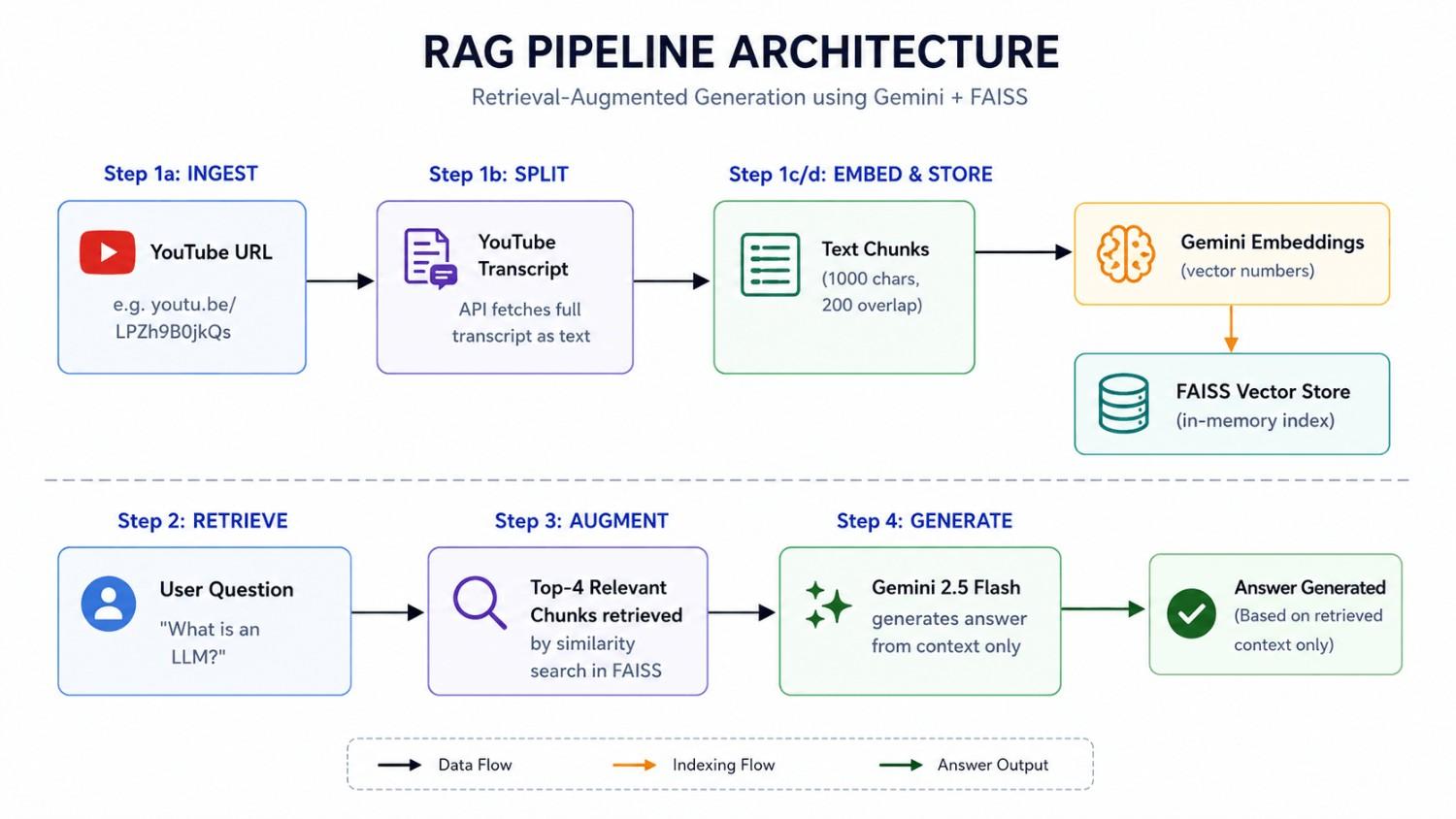
It uses a technique called Retrieval-Augmented Generation (RAG), which combines:
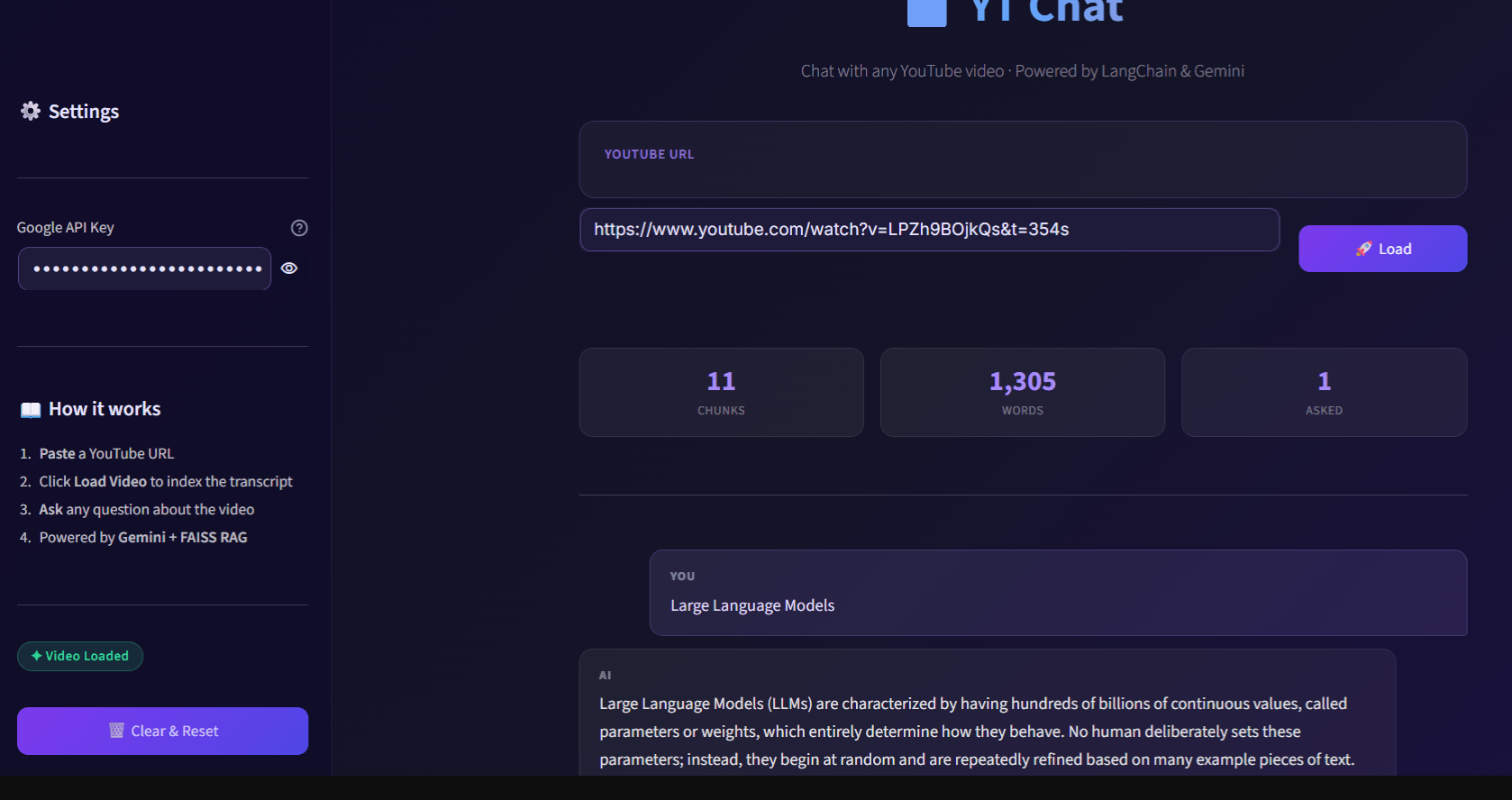
- Document retrieval — finding the most relevant parts of the transcript
- LLM generation — using Gemini AI to generate accurate, context-aware answers
Problem It Solves #
| Problem | Solution |
|---|---|
| Videos are long and hard to search | Instantly answer specific questions from any video |
| No way to “ctrl+F” a YouTube video | Semantic search over the full transcript |
| AI might hallucinate facts | RAG anchors answers only to the video transcript |
| Requires watching the whole video | Chat interface extracts what you need in seconds |
Real-world use cases:
- 📚 Students summarizing lecture videos
- 🔬 Researchers extracting key findings from conference talks
- 💼 Professionals reviewing long webinars or podcasts
- 🎓 Quick revision before exams from educational YouTube content
Tech Stack #
| Layer | Technology | Purpose |
|---|---|---|
| UI | Streamlit | Web interface with dark theme |
| Orchestration | LangChain | RAG pipeline & chain management |
| LLM | Google Gemini 2.5 Flash | Answer generation |
| Embeddings | Google Gemini Embedding | Convert text to vectors |
| Vector Store | FAISS | Fast similarity search |
| Transcript | youtube-transcript-api | Fetch YouTube subtitles |
| Text Splitting | LangChain RecursiveCharacterTextSplitter | Chunk transcript into pieces |
| Environment | python-dotenv | Secure API key management |
Setup Guide (For Students) #
Prerequisites #
- Python 3.10 or higher installed
- A Google AI Studio API key (free at aistudio.google.com)
- Git installed
Step 1 — Clone the Repository #
git clone https://github.com/sanjit507/Youtube-RAG-Chatbot.git
cd Youtube-RAG-Chatbot
Step 2 — Create a Virtual Environment #
Windows:
python -m venv venv
venv\Scripts\activate
macOS / Linux:
python3 -m venv venv
source venv/bin/activate
You should see (venv) appear at the start of your terminal line.
Step 3 — Install Dependencies #
pip install -r requirements.txt
⚠️ This may take 2–3 minutes. FAISS and LangChain have several sub-dependencies.
Step 4 — Set Up Your API Key #
Create a file called .env in the project root:
# Windows
echo GOOGLE_API_KEY=your_api_key_here > .env

# macOS/Linux
echo "GOOGLE_API_KEY=your_api_key_here" > .env
Or create it manually — create a new file named .env and add:
GOOGLE_API_KEY=AIzaSy...your_key_here
🔑 Get your free API key at aistudio.google.com/app/apikey
Step 5 — Run the App #
streamlit run app.py
The app will open at http://localhost:8501 in your browser.
Step 6 — Use the App #
- Paste any YouTube URL in the input box
e.g.https://www.youtube.com/watch?v=LPZh9BOjkQs - Click 🚀 Load and wait ~10-30 seconds for indexing
- Type your question and click 💬 Ask
- Get AI-powered answers based only on the video content!
Example Questions to Try #
Use this video: https://www.youtube.com/watch?v=LPZh9BOjkQs (3Blue1Brown — How LLMs work)
| Question | Expected Answer Type |
|---|---|
| What is a large language model? | Definition from the video |
| How does training work? | Step-by-step explanation |
| What is backpropagation? | Concept from the video |
| Summarize this video | Full summary |
| What is the transformer architecture? | Technical explanation |


