In traditional applications, we use relational databases (like MySQL or Oracle) to store data. However, these systems are built for keyword matching—they look for exact words. In AI, we need Semantic Search, which understands that “Taree Zameen Par” and “A Beautiful Mind” are similar because of their plots, even if they share no common keywords. This is where Vector Stores come in.
1. Why Vector Stores? #
The source identifies three primary challenges when working with Large Language Models and external data:
- Challenge 1: Generation: You must convert millions of documents into Embedding Vectors (numerical representations of meaning).
- Challenge 2: Storage: Traditional databases cannot efficiently store these vectors or calculate similarities between them.
- Challenge 3: Semantic Search: Searching through millions of vectors for the “most similar” one is computationally expensive. You need a system that can perform this search intelligently and fast.
Vector Stores solve all three by providing a specialized system to store, retrieve, and index numerical vectors
2. Working Diagram of a Vector Store #
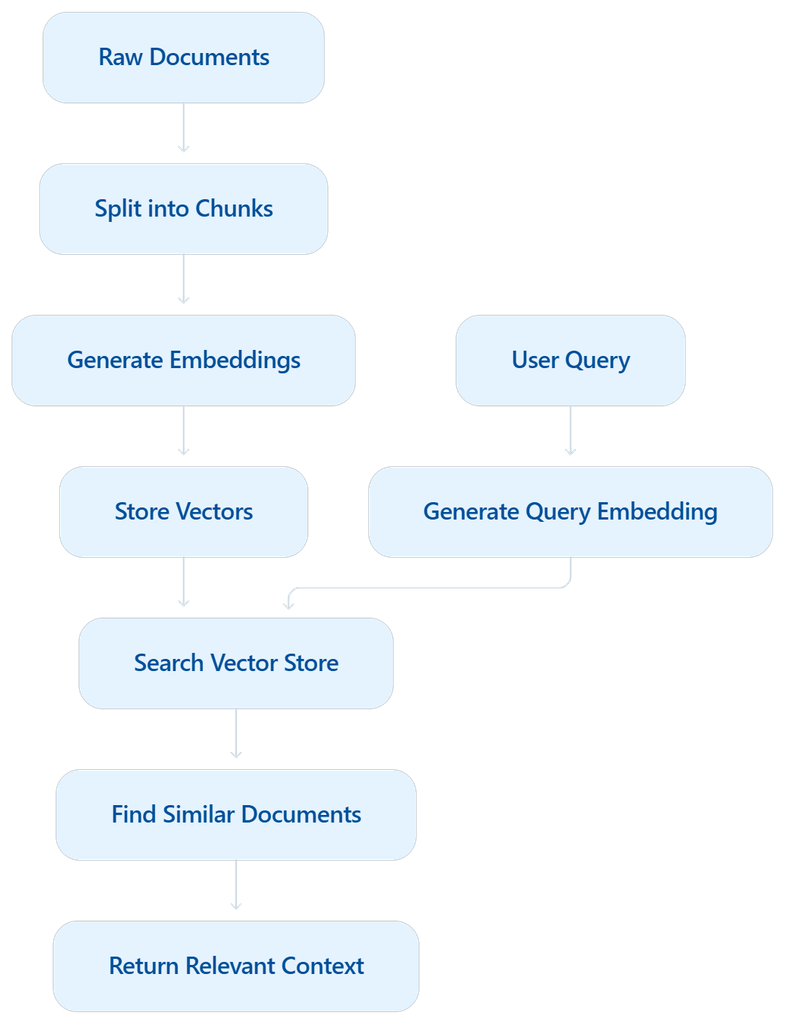
3. Key Features of Vector Stores #
- Storage: You can store vectors In-Memory (fast, but lost if the app closes) or On-Disk (persistent storage like a hard drive).
- Similarity Search: The ability to compare a “query vector” against millions of stored vectors to find the closest matches using techniques like Cosine Similarity.
- Indexing: A smart method (like clustering) that allows the system to find similar vectors without comparing the query to every single record, making the search significantly faster.
- CRUD Operations: Just like a standard database, you can Create, Read, Update, and Delete vectors.
4. Vector Store vs. Vector Database #
While often used interchangeably, there is a technical difference:
- Vector Store: A lightweight system or library (like FAISS) focused primarily on storage and similarity search. It is ideal for prototyping.
- Vector Database: A full-fledged system (like Pinecone, Milvus, or Qdrant) that adds enterprise features like distributed architecture, backups, security/authentication, and ACID transactions.
5. Implementing with Chroma DB (Code Example) #
LangChain provides a unified interface, meaning the code you write for one store (like Chroma) can easily be switched to another (like Pinecone) with minimal changes.
A step-by-step developer guide to embedding text, storing vector embeddings, querying with semantic search, and managing document lifecycles using LangChain and ChromaDB.
In modern AI applications and Retrieval-Augmented Generation (RAG) pipelines, Vector Databases (Vector Stores) are essential for storing and quickly retrieving high-dimensional semantic representations of text.
Setp Follow
- Set up Google Gemini Embeddings (
GoogleGenerativeAIEmbeddings). - Create and structure LangChain
Documentobjects with metadata. - Initialize and persist a Chroma Vector Store.
- Perform Semantic Similarity Search to fetch relevant context.
- Inspect and Update existing documents within the vector index.
Prerequisites & Installation
pip install -U langchain langchain-core langchain-community langchain-chroma langchain-google-genai chromadb

# Here I use Google Embedding Model you can use any model like open ai anthropic
API Key Configuration #
Ensure your Google API key is set in your environment:
import os

os.environ["GOOGLE_API_KEY"] = "YOUR_GOOGLE_API_KEY"
#💡 Best Practice: In production, avoid hardcoding keys. Use a .env file with python-dotenv or environment secret managers.
Step 1: Initializing the Embedding Model #
Embeddings convert textual tokens into dense numerical vectors capturing semantic meaning. We use Google’s gemini-embedding-001 model:
from langchain_google_genai import GoogleGenerativeAIEmbeddings

# Initialize the embedding model
embeddings = GoogleGenerativeAIEmbeddings(
    model="gemini-embedding-001"
)
step 2: Creating Structured LangChain Documents #
In LangChain, unstructured data is encapsulated inside Document objects. Each document contains:
page_content: The raw text content.metadata: A dictionary of structured key-value pairs (useful for metadata filtering and source tracking).
from langchain_core.documents import Document

# Sample dataset: Player profiles
doc1 = Document(
    page_content="Virat Kohli is one of the most successful and consistent batsmen in IPL history. Known for his aggressive batting style and fitness, he has led the Royal Challengers Bangalore in multiple seasons.",
    metadata={"team": "Royal Challengers Bangalore"}
)

doc2 = Document(
    page_content="Rohit Sharma is the most successful captain in IPL history, leading Mumbai Indians to five titles. He's known for his calm demeanor and ability to play big innings under pressure.",
    metadata={"team": "Mumbai Indians"}
)

doc3 = Document(
    page_content="MS Dhoni, famously known as Captain Cool, has led Chennai Super Kings to multiple IPL titles. His finishing skills, wicketkeeping, and leadership are legendary.",
    metadata={"team": "Chennai Super Kings"}
)

doc4 = Document(
    page_content="Jasprit Bumrah is considered one of the best fast bowlers in T20 cricket. Playing for Mumbai Indians, he is known for his yorkers and death-over expertise.",
    metadata={"team": "Mumbai Indians"}
)

doc5 = Document(
    page_content="Ravindra Jadeja is a dynamic all-rounder who contributes with both bat and ball. Representing Chennai Super Kings, his quick fielding and match-winning performances make him a key player.",
    metadata={"team": "Chennai Super Kings"}
)

docs = [doc1, doc2, doc3, doc4, doc5]
Step 3: Setting Up ChromaDB Vector Store #
Chroma is an open-source embedding database designed for speed and simplicity. We can configure it with on-disk persistence so our embeddings survive restarts.
from langchain_chroma import Chroma

# Initialize persistent Chroma store
vector_store = Chroma(
    embedding_function=embeddings,
    persist_directory="./my_chroma_db",
    collection_name="cricket_players"
)
Adding Documents to Vector Store
# Ingest and embed documents into the database
vector_store.add_documents(docs)
During this step:
embeddings.embed_documents()is called under the hood.- The generated vector embeddings, raw text, and metadata are saved to disk under
./my_chroma_db.
Step 4: Semantic Similarity Search #
Traditional keyword search fails when queries use synonyms or contextual descriptions. Vector search evaluates cosine similarity or Euclidean distance across vector representations.
# Query: Looking for bowlers without explicitly matching keyword 'bowler'
query = "Who among these are a bowler?"

results = vector_store.similarity_search(query=query, k=2)

for i, doc in enumerate(results, 1):
    print(f"\n--- Result {i} (Team: {doc.metadata.get('team')}) ---")
    print(doc.page_content)
Expected Output:
— Result 1 (Team: Mumbai Indians) —
Jasprit Bumrah is considered one of the best fast bowlers in T20 cricket. Playing for Mumbai Indians, he is known for his yorkers and death-over expertise.
— Result 2 (Team: Chennai Super Kings) —
Ravindra Jadeja is a dynamic all-rounder who contributes with both bat and ball. Representing Chennai Super Kings, his quick fielding and match-winning performances make him a key player.
Step 5: Inspecting Stored Vectors & Metadata #
You can inspect the contents stored inside a Chroma collection using .get():
# View documents, metadata, and embeddings stored in the collection
collection_data = vector_store.get(include=['embeddings', 'documents', 'metadatas'])

print("Total Documents Stored:", len(collection_data['ids']))
print("Sample Document ID:", collection_data['ids'][0])
Step 6: Updating Documents in the Vector Store #
When source data changes, vector stores support in-place document updates via unique document IDs:
# 1. Fetch a document ID to update
target_doc_id = collection_data['ids'][0]

# 2. Define the updated content
updated_doc = Document(
    page_content="Virat Kohli, the former captain of Royal Challengers Bangalore (RCB), is renowned for his aggressive leadership and consistent batting performances. He holds the record for the most runs in IPL history, including multiple centuries in a single season. Despite RCB not winning an IPL title under his captaincy, Kohli's passion and fitness set a benchmark for the league. His ability to chase targets and anchor innings has made him one of the most dependable players in T20 cricket.",
    metadata={"team": "Royal Challengers Bangalore"}
)

# 3. Update the document and re-calculate embedding
vector_store.update_document(
    document_id=target_doc_id,
    document=updated_doc
)
In-Memory Search with FAISS #
For lightweight or ephemeral workloads, FAISS (Facebook AI Similarity Search) is a strong alternative:
from langchain_community.vectorstores import FAISS

# Create FAISS vector store directly from documents
faiss_store = FAISS.from_documents(docs, embeddings)

# Run similarity search
faiss_results = faiss_store.similarity_search("Who is known as Captain Cool?", k=1)
print(faiss_results[0].page_content)
Chroma vs. FAISS Comparison #
| Feature | ChromaDB | FAISS |
|---|---|---|
| Primary Use Case | Persistent RAG collections & document store | High-speed in-memory vector index |
| Storage | Local disk / Client-Server | Memory / File export (save_local) |
| Metadata Filtering | Built-in rich filtering | Requires manual filtering / ID maps |
| CRUD Operations | Native add, update, delete | Index rebuild / ID management |
Vector Stores Quiz #
Q.1 In the context of movie recommendation systems, what is the primary limitation of using keyword matching to determine similarity between two films?
It requires a specialized high-dimensional coordinate system to function.
It fails to capture the underlying semantic meaning or plot similarity.
It can only compare movies released in the same decade.
It is computationally more expensive than generating vector embeddings.
Explanation
Keyword matching only compares exact words and misses semantic meaning. Two movies with similar themes or plots but different wording may appear unrelated, whereas embeddings capture their conceptual similarity.
Q.2 Which component is responsible for converting a piece of text into a numerical representation that captures its semantic meaning?
Embeddings
Relational Databases
Text Splitters
Document Loaders
Explanation
Embedding models transform text into dense numerical vectors that capture semantic meaning, enabling similarity searches based on concepts rather than exact keywords.
Q.3 When storing vectors in a system, what does the 'associated metadata' typically refer to?
The raw binary code of the embedding model.
The mathematical formula used to calculate cosine similarity.
Additional information about the vector, such as a movie's ID, title, or category.
The historical logs of all searches performed by users.
Explanation
Metadata stores descriptive information related to each embedding, such as document ID, title, source, category, author, or page number, making retrieved results easier to identify and filter.
Q.4 What is the primary purpose of 'Indexing' within a vector store?
To convert the dimensions of a vector from 784 to a smaller number.
To ensure that vectors are encrypted for security purposes.
To automatically delete outdated or irrelevant documents from the store.
To organize vectors into data structures that enable faster similarity searches.
Explanation
Indexing organizes vectors into efficient data structures so that nearest-neighbour searches can be performed quickly without comparing every stored vector.
Q.5 How does a 'Vector Database' differ from a basic 'Vector Store' according to the source?
A Vector Store cannot perform similarity searches, whereas a Vector Database can.
A Vector Database is only used for image data, while Vector Stores are for text.
A Vector Database includes enterprise features like ACID transactions, backups, and access control.
Vector Stores are stored on disk, while Vector Databases are always in-memory.
Explanation
A Vector Database provides enterprise capabilities such as persistence, ACID transactions, authentication, backups, scalability, and access control, while a Vector Store is typically a lightweight storage library.
Q.6 In LangChain, what is the advantage of using the standard method signatures provided for different vector store wrappers?
It allows the application to automatically choose the cheapest embedding model.
It automatically generates metadata for every document inserted into the system.
It enables developers to switch between different vector stores (e.g., from FAISS to Pinecone) with minimal code changes.
It ensures that the vectors are compatible with traditional SQL databases.
Explanation
LangChain standardizes vector store APIs so developers can replace one vector store with another, such as FAISS, Chroma, or Pinecone, without rewriting most of their application code.
Q.7 What does a lower score represent when using the similarity_search_with_score function in a vector store like Chroma?
A higher similarity, because the distance between the vectors is smaller.
The number of keywords that matched between the query and the document.
Lower accuracy in the embedding model.
A greater distance between the vectors, indicating less similarity.
Explanation
In many vector stores, the score represents distance. A lower distance means the query vector is closer to the stored vector, indicating greater semantic similarity.
Q.8 Which operation is most commonly performed by a Vector Store during a Retrieval-Augmented Generation (RAG) pipeline?
Sorting documents alphabetically before retrieval.
Performing similarity search to find the most semantically relevant documents.
Converting PDF files into text documents.
Training the embedding model using retrieved documents.
Explanation
After the user’s query is converted into an embedding vector, the Vector Store performs a similarity search (such as cosine similarity or Euclidean distance) to retrieve the most semantically relevant document chunks, which are then supplied to the LLM for generating an accurate response.
Q.9 In the indexing example provided in the source, how does using 'centroids' help speed up search?
It allows the system to compare a query vector against a few group averages first, narrowing down the search area.
It converts text directly into vectors without using a neural network.
It reduces the number of dimensions in every vector to a single point.
It encrypts the data so that only authorized users can perform similarity searches.
Explanation
Centroids represent clusters of similar vectors. The search first finds the closest centroid and then searches only within that cluster, greatly reducing the number of comparisons required.
Q.10 When building a RAG application, why would a developer choose 'On-disk' storage over 'In-memory' storage for a vector store?
On-disk storage is faster for real-time similarity searches.
On-disk storage ensures that vectors are persistent and remain available after the application is closed.
In-memory storage is limited to 512 dimensions, while on-disk supports 784 dimensions.
In-memory storage automatically updates metadata based on user feedback.
Explanation
On-disk storage persists embeddings on permanent storage, so they remain available even after the application or computer is restarted, unlike in-memory storage which is lost when the program exits.


