The Model Context Protocol (MCP) Lifecycle is the core sequence of steps that dictates how an AI host and a server establish, utilize, and terminate a connection during a single session. A session represents one continuous connection—for example, the time between opening an AI application like Claude Desktop and closing it while it is connected to a tool like GitHub.
The lifecycle is divided into three primary stages: Initialization, Normal Operation, and Shutdown
Stage 1: Initialization (The Handshake) #
The initialization phase must always be the first interaction between a client and a server. Its primary goals are to ensure version compatibility and to negotiate capabilities, acting much like a digital handshake.
The Initialization Steps:
- Initialize Request: The client calls the
initializemethod on the server,. It shares its protocol version, its capabilities (e.g., roots for directory access or sampling for AI assistance), and its implementation info (name and version). - Server Response: The server responds with its own protocol version, its available capabilities (such as tools or resources), and its own implementation details.
- Initialized Notification: Once the exchange is successful, the client sends a final notification to the server confirming the connection is established.
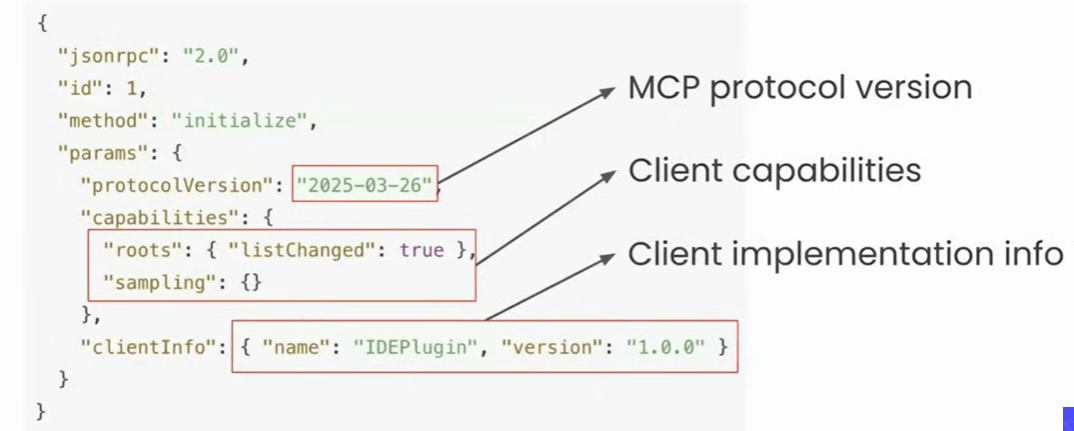
Crucial Rules: During this phase, neither party can send standard requests. The client cannot call tools or list resources until the server has responded to the initial request. Only pings and logging statements are permitted before the handshake is finalized.
Stage 2: Normal Operation #
Once initialized, the session moves into the operation phase, where actual work happens based on the negotiated capabilities. This stage is split into two functional parts:
A. Capability Discovery #
- Immediately after initialization, the client automatically performs Capability Discovery.
- It hits specific endpoints such as
tools/list,resources/list, orprompts/listTo find out exactly what tools or data the server offers. - The server then provides a detailed list of every function (tool) it can perform, including descriptions and required inputs.
B. Tool Calling #
This is the phase where the user interacts with the AI. When a user asks a question, the AI maps that request to the best available tool from the discovered list. The client then hits the tools/call endpoint, providing the necessary arguments to the server, which executes the task and returns the result.
Stage 3: Shutdown #
The shutdown phase terminates the session. Interestingly, this phase typically does not use JSON-RPC messages; instead, the responsibility falls on the Transport Layer.
- Local Servers (STDIO): The client initiates the shutdown by closing its input stream. If the server doesn’t exit, the client may use low-level operating system signals like SIGTERM (a polite request to close) or SIGKILL (a forced termination),.
- Remote Servers (HTTP): The client simply terminates the existing HTTP connection. If a server shuts down unexpectedly (server-initiated), the client must be prepared to handle the dropped connection gracefully.
Special Lifecycle Scenarios #
Beyond the standard flow, several special cases ensure the connection remains healthy and responsive:
- Pings: Lightweight “health checks” used to verify if the other side is still alive. These are vital for long-running tasks to prevent the connection from being silently dropped by firewalls or operating systems.
- Error Handling: MCP inherits standard JSON-RPC error objects. If something goes wrong—like a version mismatch or an invalid tool argument—the server returns a structured error containing a specific code and message.
- Timeouts: To prevent a request from hanging forever, clients can set a time limit (e.g., 30 seconds). If the server exceeds this, the client sends a cancellation notification to stop the server from wasting resources on that request.
- Progress Notifications: For long-running tasks (like scanning a massive code repository), the server can send periodic progress updates via a “progress token”. This provides real-time feedback to the user, such as “Scanning 60% complete”.
MCP Lifecycle Quiz #
Q.1 Which of the following best describes the Model Context Protocol (MCP) Lifecycle?
The physical hardware architecture required to run an MCP-based AI system.
A specific programming language used to develop MCP clients and servers.
A fixed set of rules for writing code in an MCP server environment.
The complete sequence of steps governing how a host and server establish, use, and end a connection.
Explanation
The MCP Lifecycle describes the complete process of establishing a connection, initializing communication, performing operations, and cleanly shutting down the session between a client and server.
Q.2 During the Initialization Phase, what is the very first step the client performs?
Sending an initialize request containing the protocol version and client capabilities.
Performing a ping before connecting.
Sending an initialized notification.
Requesting the list of tools and resources.
Explanation
The client begins the handshake by sending an initialize request containing its supported protocol version and capabilities so the server can negotiate compatibility.
Q.3 What happens if a client receives an unsupported protocol version from the server?
The client automatically downgrades its protocol.
The server restarts automatically.
The client disconnects and terminates the session.
The client disables advanced capabilities and continues.
Explanation
If the protocol versions are incompatible, the client terminates the connection because reliable communication cannot be guaranteed.
Q.4 Which MCP capability allows a server to request assistance from the client's AI model?
Roots.
Logging.
Sampling.
Elicitation.
Explanation
Sampling allows an MCP Server to ask the client’s AI model to perform tasks such as summarization, reasoning, or text generation using the client’s language model.
Q.5 When does Capability Discovery normally occur during the MCP Lifecycle?
Before initialization.
At the end of the session.
Only when the user explicitly requests it.
Automatically after successful initialization.
Explanation
Once initialization succeeds, the client automatically discovers available tools, prompts, and resources so it knows what capabilities the server provides.
Q.6 How are JSON-RPC messages used during the Shutdown Phase?
The server sends a goodbye notification.
A terminate request synchronizes database shutdown.
JSON-RPC is not involved; shutdown is handled by the transport layer.
The client waits for a shutdown_confirmed response.
Explanation
The MCP protocol does not define JSON-RPC shutdown messages. Closing the connection is handled by the underlying transport layer, such as STDIO or HTTP.
Q.7 What is the difference between SIGTERM and SIGKILL during a local STDIO shutdown?
SIGTERM is sent by the server while SIGKILL is sent by the client.
SIGTERM politely requests termination, whereas SIGKILL immediately forces the process to stop.
SIGTERM shuts down hardware while SIGKILL stops software.
They are identical commands.
Explanation
SIGTERM allows an application to gracefully release resources before shutting down, whereas SIGKILL immediately terminates the process without cleanup.
Q.8 Which JSON-RPC error code indicates that the requested method does not exist on the server?
-32602 (Invalid Params).
-32600 (Invalid Request).
-32000 (Internal Error).
-32601 (Method Not Found).
Explanation
The JSON-RPC error code -32601 (Method Not Found) indicates that the requested method, tool, resource, or prompt is not implemented by the server.
Q.9 How does a client notify a server that it no longer wants the result of a pending request?
By ignoring the response.
By sending a high-priority ping.
By sending a notifications/cancelled message containing the original request ID.
By sending SIGKILL immediately.
Explanation
The notifications/cancelled notification informs the server that the client is no longer interested in the response, allowing unnecessary work to be stopped.
Q.10 What mechanism enables a server to provide live progress updates during a long-running operation?
Repeatedly reopening the connection.
Using progress tokens with notifications/progress messages.
Sending periodic ping messages.
The client repeatedly calling tools/list.
Explanation
Progress tokens allow notifications/progress messages to be associated with a specific request, enabling clients to display real-time progress for long-running operations.


