In our previous documentation, we focused on making agents smarter through memory and persistence. However, an agent that can only talk is limited. This eleventh installment explores how to give your AI “hands and legs” by integrating Tools. By the end of this guide, you will understand how to transition from a purely conversational chatbot to an Action-Oriented Agent capable of searching the web, performing calculations, and fetching real-time data.
1. The Problem: Reactive vs. Active AI #
Standard LLMs are limited by their training data cutoff and their inability to interact with the physical or digital world.
- Without Tools: If you ask for the current stock price of Tesla or the product of two large numbers, the LLM might hallucinate or admit it doesn’t know.
- With Tools: The agent recognizes it lacks information, selects the appropriate tool (like a calculator or a search engine), executes it, and then uses the result to answer the user.
2. Core Architectural Components #
To enable tool usage, LangGraph introduces two specialized prebuilt components:
A. The Tool Node (ToolNode)
The Tool Node is a specialized, ready-made node that acts as a bridge between your graph and external functions. Its primary jobs are:
- Listening: It monitors the LLM for “tool calls”.
- Executing: Once it detects a call, it automatically routes the request to the correct tool (e.g., DuckDuckGo Search or a Stock API).
- Returning: it takes the tool’s raw output and passes it back into the graph’s state.
B. The Tools Condition (tools_condition)
This is a built-in conditional edge function. It analyzes the LLM’s output to decide the next step:
- If the LLM provided a normal text response → Route to END.
- If the LLM requested a tool call → Route to the Tool Node.
3. The “Looping” Architecture for Refinement #
A critical engineering insight from the sources is that the flow should never go directly from a Tool Node to the user. Instead, it must loop back to the Chat Node.
Why Loop Back?
- Polishing Output: Raw tool results (like JSON data from a Stock API) are often too technical for users. Sending the data back to the LLM allows the agent to draft a human-friendly response.
- Multi-Step Reasoning: Some tasks require multiple tools. For example, to find the stock price of YouTube’s owner, the agent must first search for the owner (Google/Alphabet) and then fetch the stock price for that specific entity.
Agentic Tool Workflow Diagram
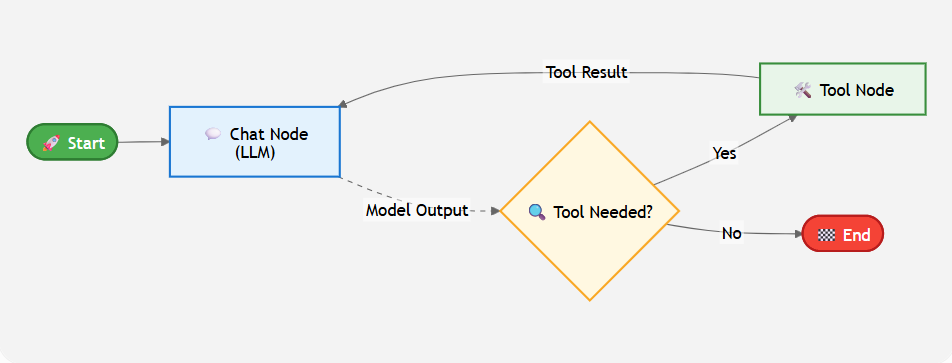
Note: The loop from Tool Node back to Chat Node allows for multi-step reasoning and refined output.
4. Implementation Framework #
Step 1: Define Your Tools #
Tools can be Prebuilt (provided by libraries like LangChain) or Custom (functions you write yourself using the @tool decorator).
- Prebuilt Example:
DuckDuckGoSearchRunfor internet access. - Custom Example: A
calculatororget_stock_pricefunction. Crucially, you must provide a docstring for every custom tool so the LLM understands when to use it.
Step 2: Bind Tools to the LLM #
You must inform the LLM about the available tools using the bind_tools function.
llm_with_tools = model.bind_tools(tools_list)
Step 3: Assemble the Graph #
Add the nodes and the specific conditional logic.
from langgraph.prebuilt import ToolNode, tools_condition

builder = StateGraph(State)

# Add Nodes
builder.add_node("chat_node", chat_node_function)
builder.add_node("tool_node", ToolNode(tools_list)) # Prebuilt tool handler

# Define Edges
builder.add_edge(START, "chat_node")
builder.add_conditional_edges("chat_node", tools_condition)
builder.add_edge("tool_node", "chat_node") # The essential loop back
Example
# backend.py

from langgraph.graph import StateGraph, START, END
from typing import TypedDict, Annotated
from langchain_core.messages import BaseMessage, HumanMessage
from langchain_openai import ChatOpenAI
from langgraph.checkpoint.sqlite import SqliteSaver
from langgraph.graph.message import add_messages
from langgraph.prebuilt import ToolNode, tools_condition
from langchain_community.tools import DuckDuckGoSearchRun
from langchain_core.tools import tool
from dotenv import load_dotenv
import sqlite3
import requests

load_dotenv()

# -------------------
# 1. LLM
# -------------------
llm = ChatOpenAI()

# -------------------
# 2. Tools
# -------------------
# Tools
search_tool = DuckDuckGoSearchRun(region="us-en")

@tool
def calculator(first_num: float, second_num: float, operation: str) -> dict:
    """
    Perform a basic arithmetic operation on two numbers.
    Supported operations: add, sub, mul, div
    """
    try:
        if operation == "add":
            result = first_num + second_num
        elif operation == "sub":
            result = first_num - second_num
        elif operation == "mul":
            result = first_num * second_num
        elif operation == "div":
            if second_num == 0:
                return {"error": "Division by zero is not allowed"}
            result = first_num / second_num
        else:
            return {"error": f"Unsupported operation '{operation}'"}

        return {"first_num": first_num, "second_num": second_num, "operation": operation, "result": result}
    except Exception as e:
        return {"error": str(e)}

@tool
def get_stock_price(symbol: str) -> dict:
    """
    Fetch latest stock price for a given symbol (e.g. 'AAPL', 'TSLA')
    using Alpha Vantage with API key in the URL.
    """
    url = f"https://www.alphavantage.co/query?function=GLOBAL_QUOTE&symbol={symbol}&apikey=C9PE94QUEW9VWGFM"
    r = requests.get(url)
    return r.json()

tools = [search_tool, get_stock_price, calculator]
llm_with_tools = llm.bind_tools(tools)

# -------------------
# 3. State
# -------------------
class ChatState(TypedDict):
    messages: Annotated[list[BaseMessage], add_messages]

# -------------------
# 4. Nodes
# -------------------
def chat_node(state: ChatState):
    """LLM node that may answer or request a tool call."""
    messages = state["messages"]
    response = llm_with_tools.invoke(messages)
    return {"messages": [response]}

tool_node = ToolNode(tools)

# -------------------
# 5. Checkpointer
# -------------------
conn = sqlite3.connect(database="chatbot.db", check_same_thread=False)
checkpointer = SqliteSaver(conn=conn)

# -------------------
# 6. Graph
# -------------------
graph = StateGraph(ChatState)
graph.add_node("chat_node", chat_node)
graph.add_node("tools", tool_node)

graph.add_edge(START, "chat_node")

graph.add_conditional_edges("chat_node",tools_condition)
graph.add_edge('tools', 'chat_node')

chatbot = graph.compile(checkpointer=checkpointer)

# -------------------
# 7. Helper
# -------------------
def retrieve_all_threads():
    all_threads = set()
    for checkpoint in checkpointer.list(None):
        all_threads.add(checkpoint.config["configurable"]["thread_id"])
    return list(all_threads)

# Fronted code
import streamlit as st
from langgraph_tool_backend import chatbot, retrieve_all_threads
from langchain_core.messages import HumanMessage, AIMessage, ToolMessage
import uuid

# =========================== Utilities ===========================
def generate_thread_id():
    return uuid.uuid4()

def reset_chat():
    thread_id = generate_thread_id()
    st.session_state["thread_id"] = thread_id
    add_thread(thread_id)
    st.session_state["message_history"] = []

def add_thread(thread_id):
    if thread_id not in st.session_state["chat_threads"]:
        st.session_state["chat_threads"].append(thread_id)

def load_conversation(thread_id):
    state = chatbot.get_state(config={"configurable": {"thread_id": thread_id}})
    # Check if messages key exists in state values, return empty list if not
    return state.values.get("messages", [])

# ======================= Session Initialization ===================
if "message_history" not in st.session_state:
    st.session_state["message_history"] = []

if "thread_id" not in st.session_state:
    st.session_state["thread_id"] = generate_thread_id()

if "chat_threads" not in st.session_state:
    st.session_state["chat_threads"] = retrieve_all_threads()

add_thread(st.session_state["thread_id"])

# ============================ Sidebar ============================
st.sidebar.title("LangGraph Chatbot")

if st.sidebar.button("New Chat"):
    reset_chat()

st.sidebar.header("My Conversations")
for thread_id in st.session_state["chat_threads"][::-1]:
    if st.sidebar.button(str(thread_id)):
        st.session_state["thread_id"] = thread_id
        messages = load_conversation(thread_id)

        temp_messages = []
        for msg in messages:
            role = "user" if isinstance(msg, HumanMessage) else "assistant"
            temp_messages.append({"role": role, "content": msg.content})
        st.session_state["message_history"] = temp_messages

# ============================ Main UI ============================

# Render history
for message in st.session_state["message_history"]:
    with st.chat_message(message["role"]):
        st.text(message["content"])

user_input = st.chat_input("Type here")

if user_input:
    # Show user's message
    st.session_state["message_history"].append({"role": "user", "content": user_input})
    with st.chat_message("user"):
        st.text(user_input)

    CONFIG = {
        "configurable": {"thread_id": st.session_state["thread_id"]},
        "metadata": {"thread_id": st.session_state["thread_id"]},
        "run_name": "chat_turn",
    }

    # Assistant streaming block
    with st.chat_message("assistant"):
        # Use a mutable holder so the generator can set/modify it
        status_holder = {"box": None}

        def ai_only_stream():
            for message_chunk, metadata in chatbot.stream(
                {"messages": [HumanMessage(content=user_input)]},
                config=CONFIG,
                stream_mode="messages",
            ):
                # Lazily create & update the SAME status container when any tool runs
                if isinstance(message_chunk, ToolMessage):
                    tool_name = getattr(message_chunk, "name", "tool")
                    if status_holder["box"] is None:
                        status_holder["box"] = st.status(
                            f"🔧 Using `{tool_name}` …", expanded=True
                        )
                    else:
                        status_holder["box"].update(
                            label=f"🔧 Using `{tool_name}` …",
                            state="running",
                            expanded=True,
                        )

                # Stream ONLY assistant tokens
                if isinstance(message_chunk, AIMessage):
                    yield message_chunk.content

        ai_message = st.write_stream(ai_only_stream())

        # Finalize only if a tool was actually used
        if status_holder["box"] is not None:
            status_holder["box"].update(
                label="✅ Tool finished", state="complete", expanded=False
            )
5. Enhancing the User Experience #
When building a frontend (like Streamlit) for tool-using agents, two adjustments are recommended for professional results:
- Streaming Filters: When an agent uses a tool, it generates a “Tool Message” (technical data) followed by an “AI Message” (the final answer). To avoid confusing the user, you should filter your stream to only display AI Messages.
- Status Indicators: Use a status container to show the user exactly which tool is being used in real-time (e.g., “Searching DuckDuckGo…”), providing transparency during longer processing tasks.
By integrating tools, you move beyond simple text generation into the realm of Autonomous Agents that can solve complex, real-world problems through multi-step action and reasoning
Q.1 In the context of LangGraph, what is the primary role of a Tool Node?
It stores the conversation history for long-term memory.
It is used exclusively for mathematical calculations.
It acts as a bridge that listens for tool calls and executes the appropriate external tool.
It is the central node where the LLM decides whether to chat or perform an action.
Explanation
A Tool Node receives tool calls generated by the LLM and executes the corresponding external tool, returning the results back to the workflow.
Q.2 Why is connecting a Tool Node directly to the END node generally considered a poor design?
It causes a recursion error.
The graph cannot compile.
Tools cannot execute before reaching END.
Tool outputs are often raw data that should be refined by the LLM before being shown to users.
Explanation
Tool outputs often contain raw JSON or technical data. Routing the output back to the Chat Node allows the LLM to interpret and present the information in a user-friendly conversational format.
Q.3 What is the purpose of the tools_condition function in a LangGraph workflow?
It limits the chatbot to using one tool at a time.
It converts user questions into mathematical expressions.
It decides whether execution should continue to a Tool Node or terminate the workflow.
It validates API keys for external services.
Explanation
tools_condition examines the LLM’s response to determine whether a tool call exists. If so, execution is routed to the Tool Node; otherwise, the workflow ends.
Q.4 Why is the docstring important when defining a custom tool with the @tool decorator?
It acts as the tool's API key.
Without it, the graph cannot compile.
The LLM reads the docstring to understand what the tool does and when to use it.
Python uses it to train the model.
Explanation
The docstring provides a natural-language description of the tool’s functionality, helping the LLM determine when that tool is appropriate for answering a user’s request.
Q.5 Which tool was demonstrated for retrieving real-time information from the web?
Alpha Vantage.
Wikipedia Run.
DuckDuckGo Search.
Google Search API.
Explanation
DuckDuckGo Search was used to retrieve current information from the web, allowing the chatbot to answer questions beyond its training data.
Q.6 A user asks, 'What is Apple's stock price and how much would 50 shares cost?' Which LangGraph capability makes this possible?
Direct frontend API access without an LLM.
Hard-coded stock market responses.
Parallel execution of all available tools.
Multi-step reasoning by looping between the Chat Node and Tool Node multiple times.
Explanation
The chatbot can repeatedly alternate between the Chat Node and Tool Node, calling multiple tools when needed before generating a final natural-language response.
Q.7 Which message type should typically be filtered out during streaming to avoid displaying raw tool outputs?
HumanMessage.
SystemMessage.
ToolMessage.
AIMessage.
Explanation
ToolMessage often contains technical outputs such as JSON responses. Filtering it allows users to see only the polished explanation generated by the AI.
Q.8 Which function informs the LLM about the available tools and their schemas?
set_entry_point().
add_node().
compile().
bind_tools().
Explanation
The bind_tools() method registers available tools with the LLM, enabling it to generate structured tool calls whenever appropriate.
Q.9 In the Streamlit chatbot interface, what is the purpose of the Status Container?
To display which tool is currently being executed.
To show the remaining API credits.
To act as a backup database.
To store user login credentials.
Explanation
The Status Container provides real-time feedback by informing users which tool the agent is currently executing, improving transparency and user experience.
Q.10 Why does the LangGraph workflow usually route back from the Tool Node to the Chat Node after tool execution?
To save memory.
To allow the LLM to interpret the tool results and generate a natural-language response.
Because Tool Nodes cannot terminate a workflow.
To automatically execute every tool again.
Explanation
After receiving raw tool outputs, the Chat Node allows the LLM to reason over the results and produce a clear, user-friendly answer instead of exposing technical data directly.


