A step-by-step developer tutorial on creating a production-ready conversational AI web app featuring persistent state management, dynamic thread titles, and real-time streaming using LangGraph, Google Gemini, and Streamlit.
1. Introduction #
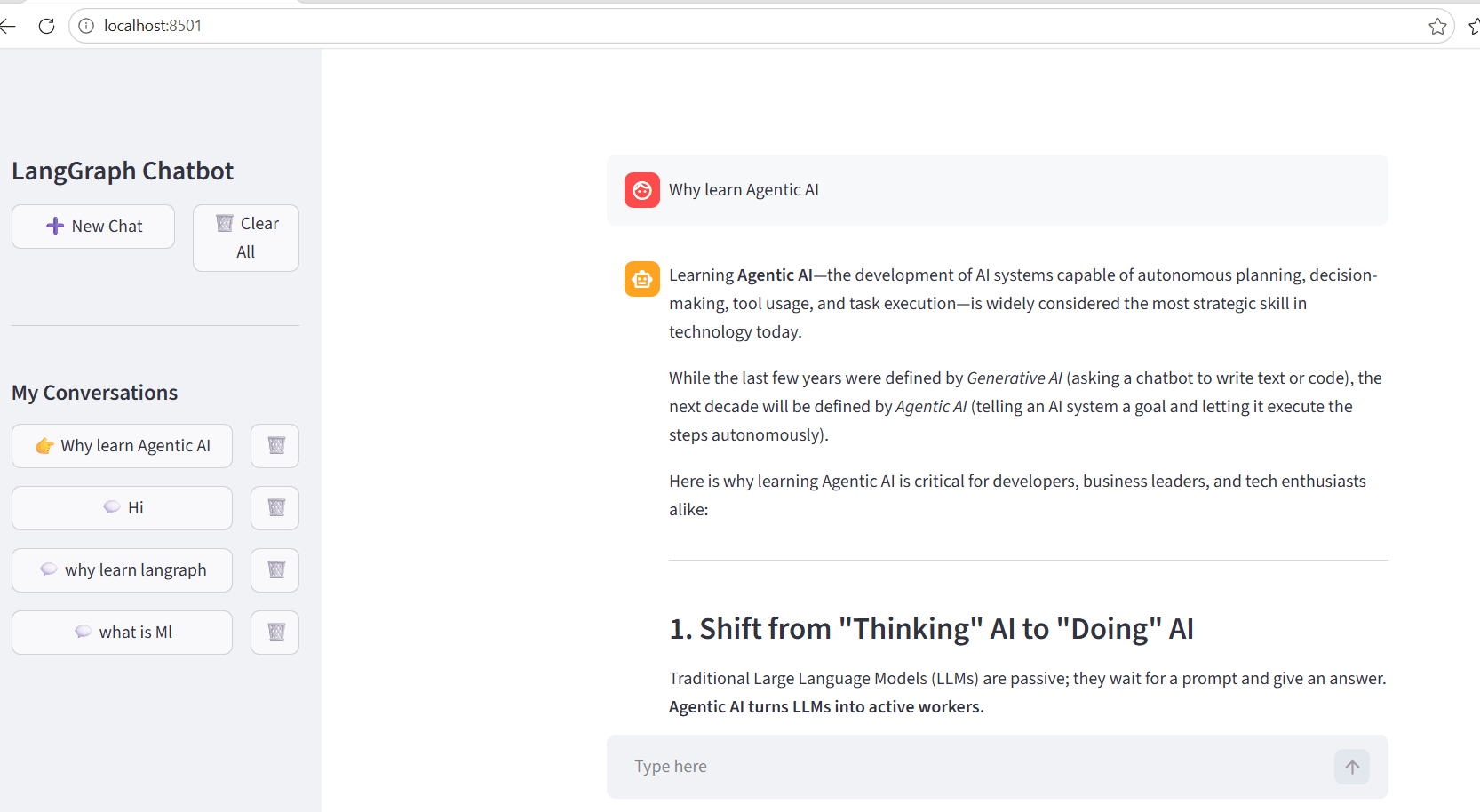
When building modern AI chatbots, two major challenges developers face are managing conversational state across sessions and delivering a seamless user experience.
Standard LLM calls are stateless by default. To create a ChatGPT-like experience where users can revisit old threads, continue past conversations, or start new ones, we need an agentic framework capable of saving checkpoints automatically.
In this tutorial, we will build a full-stack chatbot using LangGraph for workflow control, SQLite (SqliteSaver) for persistence, Google Gemini 3.6 Flash for reasoning, and Streamlit for a reactive web interface.
2. What is Persistence in LangGraph? #
In LangGraph, Persistence allows an AI agent to remember previous interactions across multiple turns or user sessions.
Rather than maintaining an in-memory list that resets whenever the server restarts, LangGraph uses Checkpointers. A Checkpointer saves a snapshot of the graph’s state after every node execution into a storage backend (such as SQLite, PostgreSQL, or Redis).
Key Benefits of Persistence: #
- Short-Term & Long-Term Memory: The chatbot retains context within a thread and restores history across app reloads.
- Multi-Session Isolation: Different conversations are isolated using unique
thread_ididentifiers. - Fault Tolerance: If a process crashes, the conversation state is safely preserved in the database.
3. System Architecture Overview #
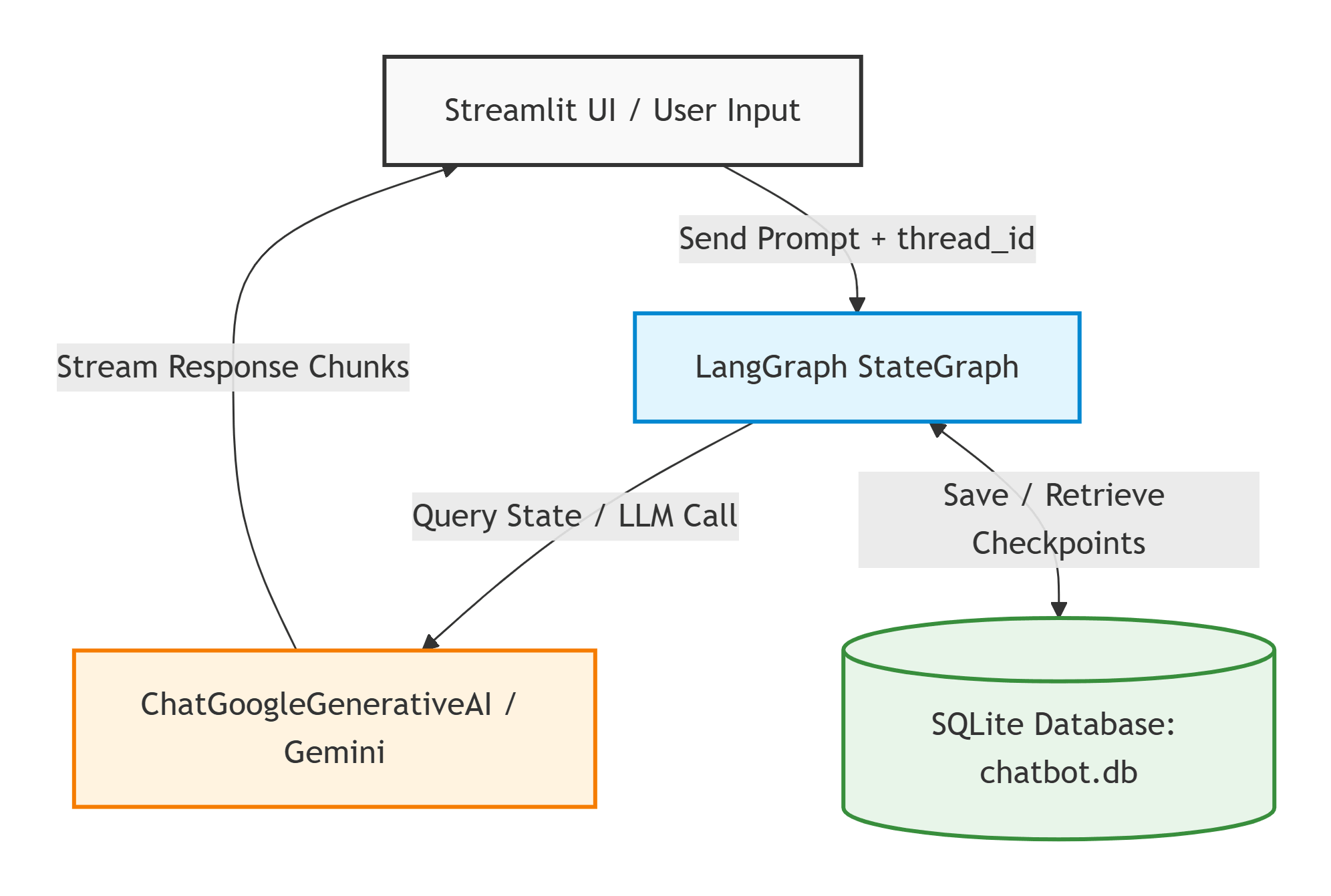
The application is modularized into two primary files:
langgraph_backend.py: Defines theStateGraph, initializesChatGoogleGenerativeAI, compiles the graph withSqliteSaver, and handles raw database CRUD operations.streamlit_frontend.py: Handles state management (st.session_state), sidebar dynamic thread titles, typewriter streaming (st.write_stream), and chat history deletion.
4. Step 1: Define the Graph & SQLite Checkpointer #
First, we set up our backend state graph and attach SqliteSaver.
# langgraph_backend.py
from langgraph.graph import StateGraph, START, END
from langgraph.graph.message import add_messages
from langgraph.checkpoint.sqlite import SqliteSaver
from langchain_google_genai import ChatGoogleGenerativeAI
from typing import TypedDict, Annotated
from langchain_core.messages import BaseMessage
import sqlite3

# Define Chat State schema
class ChatState(TypedDict):
    messages: Annotated[list[BaseMessage], add_messages]

# Initialize LLM
llm = ChatGoogleGenerativeAI(model="gemini-3.6-flash")

# Define Chat Node
def chat_node(state: ChatState):
    messages = state['messages']
    response = llm.invoke(messages)
    return {"messages": [response]}

# Set up SQLite Connection & Checkpointer
conn = sqlite3.connect(database='chatbot.db', check_same_thread=False)
checkpointer = SqliteSaver(conn=conn)

# Build Graph
graph = StateGraph(ChatState)
graph.add_node("chat_node", chat_node)
graph.add_edge(START, "chat_node")
graph.add_edge("chat_node", END)

# Compile Graph with Persistence
chatbot = graph.compile(checkpointer=checkpointer)
5. Step 2: ChatGPT-Style Dynamic Sidebar Titles #
Instead of displaying raw database UUIDs (e.g., 4a92ddd1-bc5b-43e9-ad50-b445abd7df0) in the sidebar, we dynamically inspect each thread’s checkpoint state to extract the first user question and display it as the title (e.g., 💬 What is Python...).
# streamlit_frontend.py

def load_conversation(thread_id):
    """Fetch stored messages for a specific thread from LangGraph checkpoint."""
    state = chatbot.get_state(config={'configurable': {'thread_id': thread_id}})
    return state.values.get('messages', [])

def get_thread_title(thread_id):
    """Inspect state and return the first user question as thread title."""
    messages = load_conversation(thread_id)
    for msg in messages:
        if isinstance(msg, HumanMessage):
            text = extract_text_content(msg.content).strip()
            if text:
                return text[:22] + "..." if len(text) > 22 else text
    return f"Chat {str(thread_id)[:6]}"
6. Step 3: Real-Time Token Streaming & Content Sanitization #
Modern generative models like Gemini sometimes stream message content as a structured list of dictionaries [{'type': 'text', 'text': '...'}]. If passed directly to Streamlit, it would render unwanted raw JSON widgets.
We write a defensive normalizer function extract_text_content() and pass a generator to Streamlit’s native st.write_stream:
def extract_text_content(content):
    """Normalize plain string or structured content block list into clean text."""
    if isinstance(content, str):
        return content
    elif isinstance(content, list):
        text_parts = []
        for part in content:
            if isinstance(part, str):
                text_parts.append(part)
            elif isinstance(part, dict) and 'text' in part:
                text_parts.append(part['text'])
        return "".join(text_parts)
    return str(content)

# Streaming Response in Streamlit UI
with st.chat_message('assistant'):
    def stream_generator():
        for message_chunk, metadata in chatbot.stream(
            {'messages': [HumanMessage(content=user_input)]},
            config={"configurable": {"thread_id": st.session_state["thread_id"]}},
            stream_mode='messages'
        ):
            chunk_text = extract_text_content(message_chunk.content)
            if chunk_text:
                yield chunk_text

    ai_message = st.write_stream(stream_generator())
Step 4: Implementing Full Chat Thread Deletion (CRUD) #
To give users full control, we allow deleting individual chat threads or purging all chat history with one click.
# langgraph_backend.py

def delete_thread(thread_id):
    """Delete all database rows associated with thread_id across all tables."""
    cursor = conn.cursor()
    cursor.execute("SELECT name FROM sqlite_master WHERE type='table';")
    tables = cursor.fetchall()
    for (table_name,) in tables:
        cursor.execute(f"PRAGMA table_info('{table_name}');")
        columns = [col[1] for col in cursor.fetchall()]
        if 'thread_id' in columns:
            cursor.execute(f"DELETE FROM '{table_name}' WHERE thread_id = ?", (str(thread_id),))
    conn.commit()
requirements.txt #
streamlit>=1.30.0
langgraph>=0.2.0
langchain-core>=0.3.0
langchain-google-genai>=2.0.0
python-dotenv>=1.0.0
8. Conclusion & Key Takeaways #
By combining LangGraph with SQLite persistence and Streamlit, we built a fully featured, stateful ChatGPT clone in under 200 lines of clean Python code!
Key Takeaways for Developers: #
- Checkpointers make state persistence trivial in LangGraph without writing manual SQL query handlers for every turn.
- Dynamic State Inspection allows creating rich ChatGPT-style UI features (like thread title previews) directly from checkpoint data.
- Defensive parsing ensures structured LLM streaming responses render seamlessly as clean markdown.
| Github Link | Click Here |
| Follow Me on LinkedIn | Click Here |
Join For More Updates #
| 1. Official Telegram | Click Here |
| 2. Download App | Click Here |
| 3. Download Study Routine App | Click Here |
| 4. CS/IT Job Alert | Click Here |
| 5. Join For Engineering Exam Job Alerts | Click Here |
| 6. DRDO & ISRO Job Alert | Click Here |
| 7. EXAM PYQ PDF | Click Here |
| 8. Placement CS\IT | Click Here |


