If you have already mastered building local tools, you are actually 90% of the way to building remote ones. The FastMCP library makes the transition nearly seamless, requiring only a few lines of code changes to take your AI tools from your machine to the cloud.
Why Go Remote? #
While local servers are fast because they run on the same machine as your client, they are limited to that single device. Remote MCP Servers offer several advantages:
- Multi-Client Support: Multiple users can connect to the same server simultaneously.
- Enhanced Compute: They typically run on powerful internet servers, allowing you to perform more “compute-intensive” tasks than a standard laptop might handle.
- Global Accessibility: Once deployed, anyone in the world with the URL can use your MCP server in their own AI client.
The Key Difference: Transport
In a local setup, the communication happens via STDIO (Standard Input/Output). For a remote server, we switch the transport to HTTP (specifically using Server-Sent Events or SSE).
The coding logic for your tools and resources remains exactly the same. The only major change is the final line of your script:
Local Version: mcp.run() Remote Version: mcp.run(transport="http", host="0.0.0.0", port=8000)
This tells FastMCP to listen for incoming web requests rather than waiting for local system commands.
Deploying to the Cloud (FastMCP Cloud) #
The easiest way to put your server online is using FastMCP Cloud, a free service designed specifically for this protocol.
- Host on GitHub: Push your code (including your
main.pyandpyproject.toml) to a GitHub repository. - Connect to FastMCP Cloud: Login to
fastmcp.cloudand link your GitHub account.
from fastmcp import FastMCP
import random

# Create the FastMCP server
mcp = FastMCP("Demo Server")


@mcp.tool()
def roll_dice(n_dice: int) -> list[int]:
    """
    Roll one or more six-sided dice.

    Args:
        n_dice: Number of dice to roll.

    Returns:
        A list of random dice values.
    """
    return [random.randint(1, 6) for _ in range(n_dice)]


@mcp.tool()
def add_numbers(a: float, b: float) -> float:
    """
    Add two numbers.

    Args:
        a: First number.
        b: Second number.

    Returns:
        Sum of a and b.
    """
    return a + b


if __name__ == "__main__":
    mcp.run()
GitHub LInk Full Code
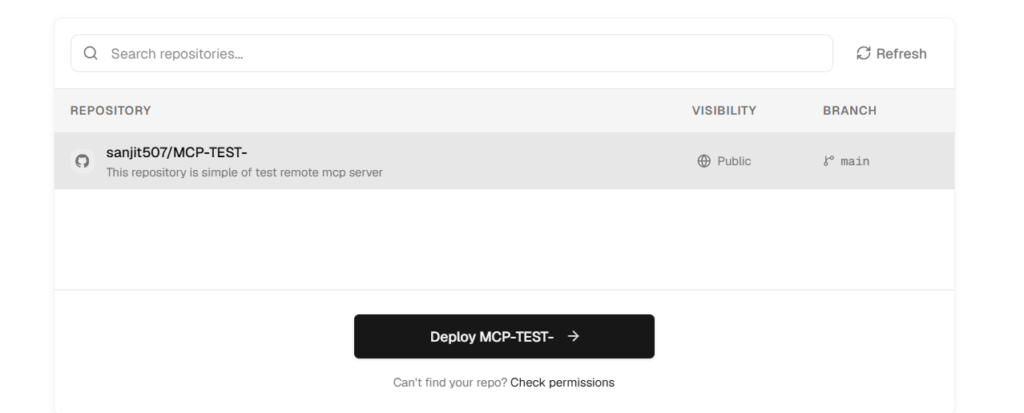
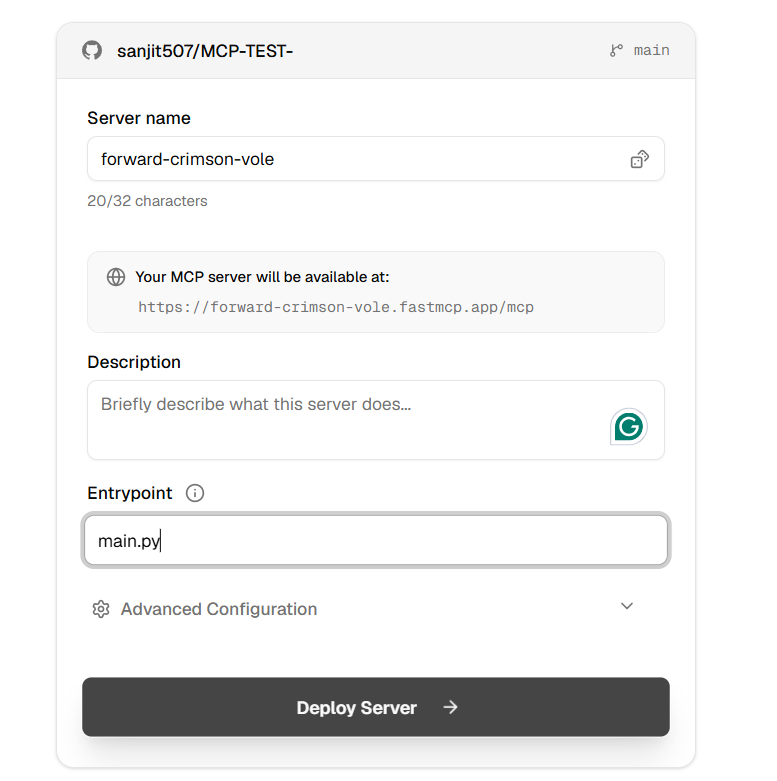
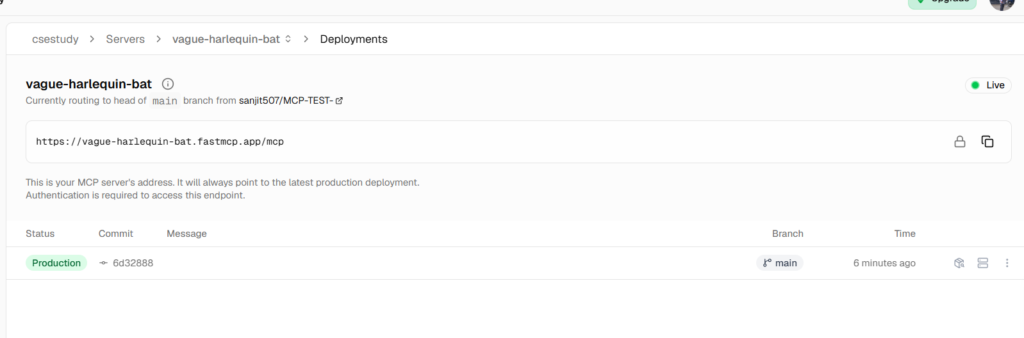
- Deploy: Select your repository and click “Deploy.” The platform will automatically build your environment and provide you with a public URL.
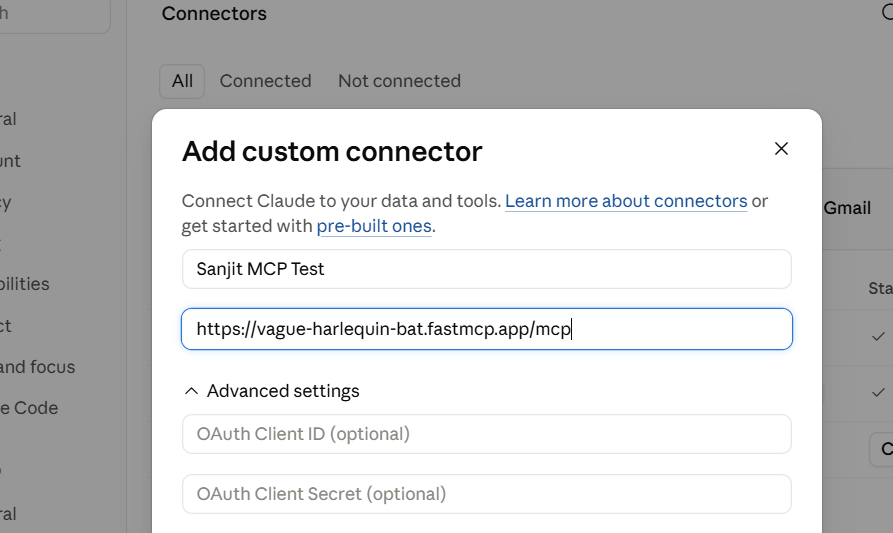
Connecting Claude Desktop to Remote Servers
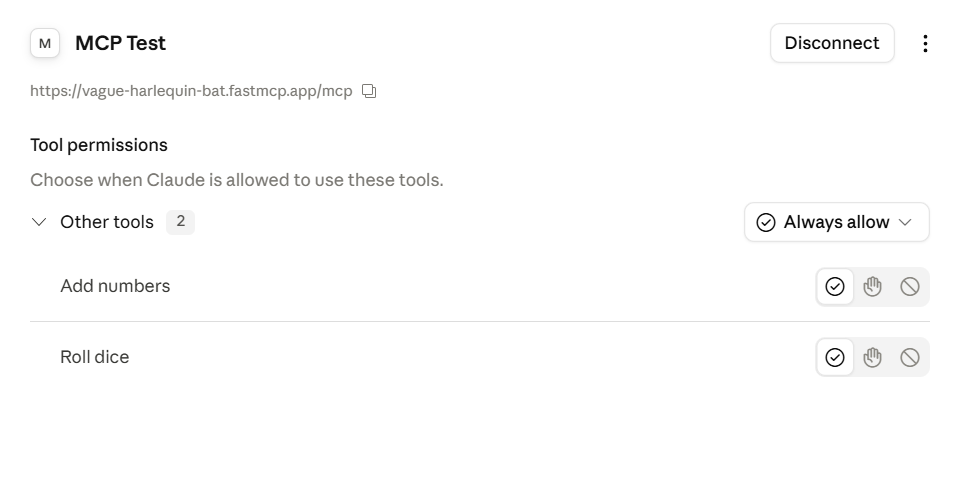
Once your server is live, you can integrate it into Claude Desktop.
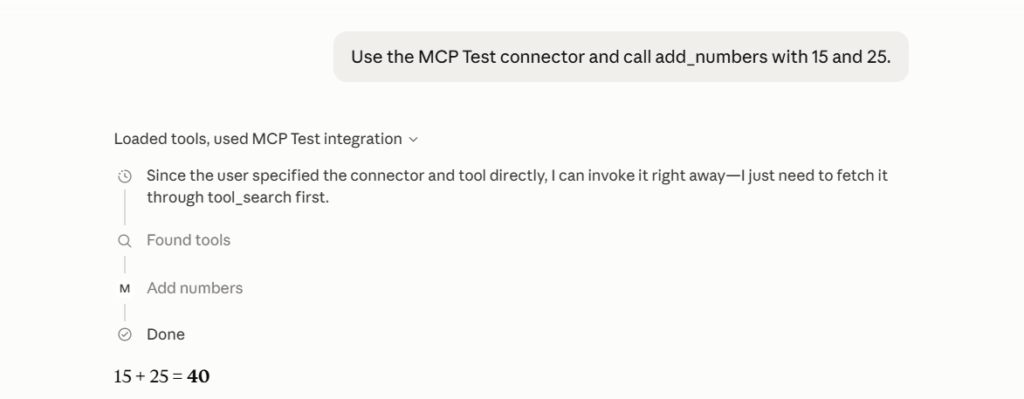
- For Claude Free Users: Claude has a built-in “Add Custom Connector” feature in the settings. You simply paste your remote server’s URL, and the tools appear instantly.
Remote MCP servers represent the future of “Enterprise MCP,” where companies will host specialized AI tools that their entire workforce can access from any device
Remote MCP Servers Quiz #
Q.1 What is the primary advantage of a Remote MCP server over a Local MCP server?
Higher communication speed due to local execution.
Ability to serve multiple clients simultaneously and utilize powerful compute resources.
Native access to the host machine's local file system.
Zero configuration requirement for transport protocols.
Explanation
Remote MCP servers run on cloud infrastructure, allowing multiple clients to connect simultaneously while leveraging scalable compute resources that are not limited by a user’s personal machine.
Q.2 When configuring a Remote MCP server in FastMCP, which transport protocol must be specified for internet communication?
SSE (Server-Sent Events).
WebSockets.
HTTP.
STDIO.
Explanation
Remote MCP servers typically use the HTTP transport, allowing clients to communicate with servers over the internet using standard web protocols.
Q.3 What is the significance of setting the host to 0.0.0.0 in a FastMCP server?
It blocks unauthorized users.
It allows the server to listen on all available network interfaces.
It automatically assigns a public IP address.
It restricts access to localhost only.
Explanation
Using host=’0.0.0.0′ instructs the server to listen on every available network interface so it can accept connections from external devices or cloud services.
Q.4 Why did the initial cloud deployment of the Expense Tracker server fail to add new expenses?
SQLite is unsupported in cloud environments.
The SQLite database was opened in read-only mode.
The database became corrupted after pushing to GitHub.
The deployment ran out of storage space.
Explanation
The deployed SQLite database was operating in read-only mode, preventing INSERT operations and causing expense additions to fail until the configuration was corrected.
Q.5 What is the primary advantage of converting a synchronous MCP server to an asynchronous one using aiosqlite?
It automatically encrypts the database.
It reduces the database size.
It enables the server to process multiple concurrent requests without blocking.
It removes the need for HTTP transport.
Explanation
Using aiosqlite allows database operations to execute asynchronously, enabling the server to handle multiple client requests concurrently without blocking other operations.
Q.6 How does a Proxy Server help Claude Desktop users without a Pro subscription?
It upgrades their account automatically.
It acts as a local bridge that connects the local client to a remote MCP server.
It removes the need for internet access.
It speeds up remote servers through caching.
Explanation
A Proxy Server runs locally and forwards requests between Claude Desktop and a remote MCP server, allowing users without direct remote MCP support to access cloud-hosted services.
Q.7 What major logical flaw exists in the multi-user remote Expense Tracker server?
It cannot store more than 100 expenses.
It only functions during weekdays.
It was written in Python.
There is no user isolation, so all users share the same expense data.
Explanation
Without authentication or user-specific data separation, every connected user accesses the same shared database, creating serious privacy and security issues.
Q.8 Which tool provides a browser-based interface for inspecting and debugging MCP servers?
GitHub Desktop.
Claude Desktop.
MCP Inspector using 'fastmcp dev'.
Postman.
Explanation
The MCP Inspector, launched with ‘fastmcp dev’, provides a web interface for testing tools, resources, prompts, and other MCP capabilities during development.
Q.9 Which tool was used to initialize the remote deployment project and manage its dependencies?
UV.
Conda.
Npm.
Pip.
Explanation
UV is a modern Python package manager used to initialize projects, create virtual environments, install dependencies, and simplify deployment workflows.
Q.10 Which file should be modified in Claude Desktop if the automatic installation does not include the full executable path?
config.json (Claude Desktop configuration).
requirements.txt.
categories.json.
main.py.
Explanation
If automatic installation fails, users should manually edit Claude Desktop’s configuration file (config.json or claude_desktop_config.json depending on the platform) to specify the correct executable path.


