Welcome to the ninth installment of our Agentic AI with LangGraph series! In this deep dive, we explore Persistence a foundational concept that transforms simple stateless pipelines into production-grade AI agents capable of remembering interactions across sessions, recovering gracefully from crashes, pausing for human review, and even “traveling through time” to debug and fork workflows.
1. What is Persistence? #
In standard execution, when a workflow or chain is triggered via .invoke(), its entire state exists solely in volatile memory (RAM). Once the execution finishes (or if the server crashes midway), the state is permanently erased.
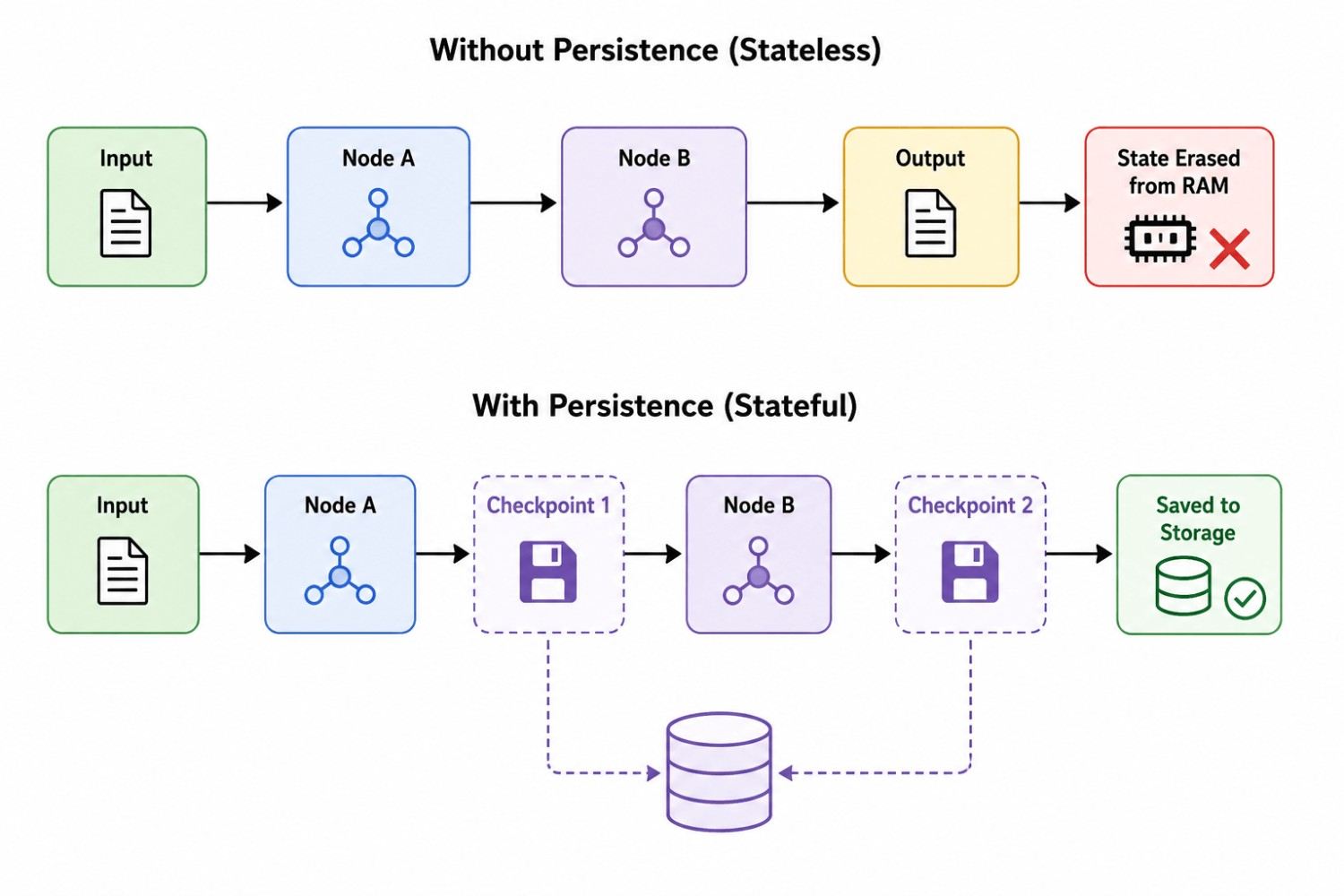
Persistence enables LangGraph to automatically serialize and persist the state of your graph at discrete milestones, allowing you to reload, inspect, resume, or fork the state at any point in time.
2. Core Concepts: Checkpointers, Supersteps, and Threads #
To master persistence, you need to understand three core building blocks:
A. Supersteps & Checkpoints #
LangGraph executes in rounds called Supersteps. In each superstep, one or more active nodes execute and produce updates to the state:
- At the end of every Superstep, the current state snapshot is saved as a Checkpoint.
- Every checkpoint receives a globally unique identifier (
checkpoint_id) and references itsparent_configcheckpoint, creating an immutable history tree.
B. Checkpointers #
A Checkpointer is the persistence backend configured during graph compilation:
InMemorySaver: Stores checkpoints in an in-memory dictionary. Ideal for unit testing, rapid prototyping, and notebook exploration.PostgresSaver/AsyncPostgresSaver: Production-grade checkpointers storing serialized state snapshots in PostgreSQL tables.SqliteSaver/MongoDBSaver/RedisSaver: Persistent storage options tailored for local desktop apps, document stores, or caching layers.
C. Threads #
To manage multiple independent conversations and concurrent users, LangGraph uses Threads:
- Every execution config requires a
thread_id(e.g.{"configurable": {"thread_id": "session_42"}}). - Checkpoints are isolated per thread, preventing state collisions between users.
Real Life Example: Imagine you are writing a 3-hour exam #
You are solving questions in an exam hall.
1. Persistence = your saved exam progress #
Suppose after 1 hour, you have solved 20 questions.
You save your work somewhere.
Then your laptop/system crashes.
When you restart, you can recover the saved information.
So:
Persistence = keeping state/data so it survives beyond the current execution.
In an AI/agent system, persistence could store things like:
- previous conversation state
- user preferences
- completed steps
- database records
- uploaded documents
- long-term memory
Think: “Where is my information stored permanently?”
2. Checkpoint = a snapshot during the exam #
Now imagine your exam system automatically takes a snapshot:
10:00 → Checkpoint 1
       Questions 1–10 completed

11:00 → Checkpoint 2
       Questions 1–20 completed

12:00 → Checkpoint 3
       Questions 1–30 completed
At 12:30 your computer crashes.
You don’t necessarily start from Question 1.
You can restore the latest checkpoint and continue from Question 30.
So:
Checkpoint = a saved snapshot of the current state at a particular point in time.
Think:
“What was the state at this particular moment?”
3. Thread = your particular exam session #
Suppose you have:
Student A
 └── Exam Session 101

Student B
 └── Exam Session 102
Each exam session has its own questions, answers, and progress.
That exam session is like a thread.
So:
Thread = a separate conversation/workflow/session with its own state.
For example:
Thread 1
User: Explain RAG
Assistant: ...

Thread 2
User: Explain fine-tuning
Assistant: ...
The two threads should not accidentally mix their states.
3. Four Superpowers Enabled by Persistence #
| Superpower | How Persistence Makes It Possible |
|---|---|
| Short-Term Memory | Store conversation messages across turns. Re-invoke with the same thread_id to pick up context seamlessly. |
| Fault Tolerance | If a third-party API fails or a worker node dies mid-graph, resume from the last successful checkpoint instead of restarting from scratch. |
| Human-in-the-Loop (HITL) | Pause execution before high-risk actions (e.g., sending emails, making financial transactions), store state, wait for human review, and resume upon approval. |
| Time Travel & Branching | Inspect every intermediate state, rewind execution to any historical checkpoint, edit variables, and spawn alternate execution branches. |
4. End-to-End Hands-On Implementation #
Step 1: Define the State and Nodes #
from typing import TypedDict
from dotenv import load_dotenv
from langchain_openai import ChatOpenAI
from langgraph.graph import StateGraph, START, END
from langgraph.checkpoint.memory import InMemorySaver

load_dotenv()
llm = ChatOpenAI(model="gpt-4o-mini")

# 1. Define graph state schema
class JokeState(TypedDict):
    topic: str
    joke: str
    explanation: str

# 2. Define node logic
def generate_joke(state: JokeState):
    prompt = f"Generate a funny short joke on the topic: {state['topic']}"
    response = llm.invoke(prompt).content
    return {"joke": response}

def generate_explanation(state: JokeState):
    prompt = f"Write a short, fun explanation for the joke: {state['joke']}"
    response = llm.invoke(prompt).content
    return {"explanation": response}
Step 2: Assemble and Compile with a Checkpointer #
Pass the initialized checkpointer instance into graph.compile():
# Build graph topology
builder = StateGraph(JokeState)
builder.add_node("generate_joke", generate_joke)
builder.add_node("generate_explanation", generate_explanation)

builder.add_edge(START, "generate_joke")
builder.add_edge("generate_joke", "generate_explanation")
builder.add_edge("generate_explanation", END)

# Attach the Checkpointer
checkpointer = InMemorySaver()
app = builder.compile(checkpointer=checkpointer)
Step 3: Run Workflows with Isolated Threads #
Execute the workflow by passing a thread_id inside the configuration:
# Session 1: Topic = Pizza
config1 = {"configurable": {"thread_id": "thread-1"}}
result1 = app.invoke({"topic": "pizza"}, config=config1)

print("Result for Thread 1:")
print(f"Joke: {result1['joke']}")
print(f"Explanation: {result1['explanation']}\n")

# Session 2: Topic = Pasta (completely independent state)
config2 = {"configurable": {"thread_id": "thread-2"}}
result2 = app.invoke({"topic": "pasta"}, config=config2)

print("Result for Thread 2:")
print(f"Joke: {result2['joke']}")
Step 4: Inspecting State and State Snapshots #
You can inspect the latest state of any thread using app.get_state(config):
latest_state = app.get_state(config1)
print(latest_state)
Understanding the StateSnapshot Object #
When you call get_state(), LangGraph returns a StateSnapshot object containing rich metadata:
StateSnapshot(
    values={'topic': 'pizza', 'joke': '...', 'explanation': '...'},  # Current state data
    next=(),                                                         # Next node(s) to execute (empty if finished)
    config={'configurable': {'thread_id': '1', 'checkpoint_id': '1f06cc6e-93a2-...'}},  # Current Checkpoint ID
    parent_config={'configurable': {'thread_id': '1', 'checkpoint_id': '1f06cc6e-7a2f-...'}}, # Previous Checkpoint
    metadata={'source': 'loop', 'step': 2, 'thread_id': '1'},       # Execution metadata
    created_at='2025-07-29T21:56:42.071296+00:00',
    tasks=()                                                         # Tasks executed in this superstep
)
Step 5: Exploring History and Time Travel #
LangGraph allows you to retrieve the entire chain of checkpoints for a thread using app.get_state_history():
# Retrieve checkpoints in reverse chronological order (newest first)
history = list(app.get_state_history(config1))

for snapshot in reversed(history):
    step_source = snapshot.metadata.get("source", "unknown")
    step_num = snapshot.metadata.get("step", 0)
    cp_id = snapshot.config["configurable"]["checkpoint_id"]
    next_node = snapshot.next
    print(f"Step {step_num} [{step_source}] | Checkpoint: {cp_id[:8]}... | Next Node: {next_node}")
Replaying from a Past Checkpoint #
To re-run execution starting from a historical checkpoint without redoing previous steps, provide the specific checkpoint_id:
# Target checkpoint after 'generate_joke' was created, but before 'generate_explanation'
target_checkpoint_id = history[1].config["configurable"]["checkpoint_id"]

replay_config = {
    "configurable": {
        "thread_id": "thread-1",
        "checkpoint_id": target_checkpoint_id
    }
}

# Pass None as input to tell LangGraph to resume from saved state
replayed_result = app.invoke(None, config=replay_config)
print("Replayed Result:", replayed_result)
Step 6: State Forking and Mutations (update_state) #
What if you want to travel back in time, modify a variable, and see what happens? LangGraph provides app.update_state():
gitGraph
   commit id: "START (topic: pizza)"
   commit id: "generate_joke (pizza joke)"
   branch samosa_branch
   checkout samosa_branch
   commit id: "update_state (topic: samosa)"
   commit id: "generate_joke (samosa joke)"
   commit id: "generate_explanation"
   checkout main
   commit id: "generate_explanation (pizza joke)"
# 1. Select the initial checkpoint (Step 0)
initial_cp = history[-2].config["configurable"]["checkpoint_id"]

# 2. Fork the state by updating 'topic' to 'samosa'
update_config = {
    "configurable": {
        "thread_id": "thread-1",
        "checkpoint_id": initial_cp,
        "checkpoint_ns": ""
    }
}
fork_info = app.update_state(update_config, {"topic": "samosa"})
new_checkpoint_id = fork_info["configurable"]["checkpoint_id"]

# 3. Resume execution from the newly forked checkpoint
fork_result = app.invoke(
    None,
    config={"configurable": {"thread_id": "thread-1", "checkpoint_id": new_checkpoint_id}}
)

print("Forked Execution Output:")
print("Joke:", fork_result["joke"])
print("Explanation:", fork_result["explanation"])
Step 7: Fault Tolerance & Crash Recovery #
Consider a workflow that crashes midway due to network loss or API rate limits. Persistence ensures that completed work is never lost:
import time

class CrashState(TypedDict):
    input: str
    step1: str
    step2: str

def step_1(state: CrashState):
    print("✅ Step 1 completed successfully.")
    return {"step1": "done"}

def step_2(state: CrashState):
    print("⏳ Step 2 running... (simulating network error / crash)")
    raise ConnectionResetError("Third-party API failed unexpectedly!")
    return {"step2": "done"}

def step_3(state: CrashState):
    print("✅ Step 3 completed successfully.")
    return {"step2": "finalized"}

# Build and compile
crash_builder = StateGraph(CrashState)
crash_builder.add_node("step_1", step_1)
crash_builder.add_node("step_2", step_2)
crash_builder.add_node("step_3", step_3)

crash_builder.set_entry_point("step_1")
crash_builder.add_edge("step_1", "step_2")
crash_builder.add_edge("step_2", "step_3")
crash_builder.add_edge("step_3", END)

crash_app = crash_builder.compile(checkpointer=InMemorySaver())
fail_config = {"configurable": {"thread_id": "resilience-demo"}}

# 1. Run until failure
try:
    crash_app.invoke({"input": "test_run"}, config=fail_config)
except ConnectionResetError as e:
    print(f"❌ Execution interrupted by error: {e}")

# 2. Check saved state
state_after_crash = crash_app.get_state(fail_config)
print("\nState saved at checkpoint:", state_after_crash.values)
print("Next node pending execution:", state_after_crash.next) # ('step_2',)

# 3. Once the issue is resolved, resume with None input
# (Step 1 will NOT be executed again!)
When you resume with crash_app.invoke(None, config=fail_config), LangGraph reads the pending node directly from the last successful checkpoint and continues execution seamlessly.
5. Persistence in Production: Transitioning from Memory to Postgres #
While InMemorySaver is perfect for development, production systems require durable storage like PostgreSQL:
pip install langgraph-checkpoint-postgres
from langgraph.checkpoint.postgres import PostgresSaver
# or from langgraph.checkpoint.postgres.aio import AsyncPostgresSaver

DB_URI = "postgresql://user:password@localhost:5432/agent_db"

with PostgresSaver.from_conn_string(DB_URI) as checkpointer:
    # Creates necessary checkpoint tables on first run
    checkpointer.setup()

    # Compile graph with Postgres checkpointer
    app = builder.compile(checkpointer=checkpointer)

    # Run graph as usual
    config = {"configurable": {"thread_id": "user_session_1001"}}
    app.invoke({"topic": "Quantum Computing"}, config=config)
Summary & Quick Reference #
| Method / Property | Purpose | Example |
|---|---|---|
compile(checkpointer=...) | Attaches a persistence engine to the graph. | app = builder.compile(checkpointer=memory) |
app.invoke(data, config=...) | Runs or initiates a thread with a thread_id. | app.invoke({'topic': 'AI'}, config={'configurable': {'thread_id': '1'}}) |
app.get_state(config) | Returns current StateSnapshot for a thread. | snapshot = app.get_state(config) |
app.get_state_history(config) | Returns iterator of historical state snapshots. | history = list(app.get_state_history(config)) |
app.invoke(None, config=...) | Resumes execution from the current or specified checkpoint. | app.invoke(None, config={'configurable': {'thread_id': '1', 'checkpoint_id': '...'}}) |
app.update_state(config, values) | Manually updates state at a checkpoint and forks history. | app.update_state(config, {'topic': 'samosa'}) |
Simple Example #
from typing import Annotated
from typing_extensions import TypedDict

from langgraph.graph import StateGraph, START, END
from langgraph.graph.message import add_messages
from langgraph.checkpoint.memory import InMemorySaver
from langchain_google_genai import ChatGoogleGenerativeAI


class State(TypedDict):
    messages: Annotated[list, add_messages]


# Create LLM
llm = ChatGoogleGenerativeAI(
    model="gemini-2.5-flash",
    temperature=0
)


# Chatbot node
def chatbot(state: State):
    res = llm.invoke(state["messages"])

    return {
        "messages": [res]
    }


# Build graph
builder = StateGraph(State)

builder.add_node("chatbot", chatbot)

builder.add_edge(START, "chatbot")


# Persistence
memory = InMemorySaver()

graph = builder.compile(
    checkpointer=memory
)


# Create a thread
config = {
    "configurable": {
        "thread_id": "user_123"
    }
}


# First message
res = graph.invoke(
    {
        "messages": [
            ("user", "My name is Sanjit.")
        ]
    },
    config=config
)

print(res["messages"][-1].content)


# Second message
res = graph.invoke(
    {
        "messages": [
            ("user", "What is my name?")
        ]
    },
    config=config
)

print(res["messages"][-1].content)
Summary Diagram: The Persistent Workflow
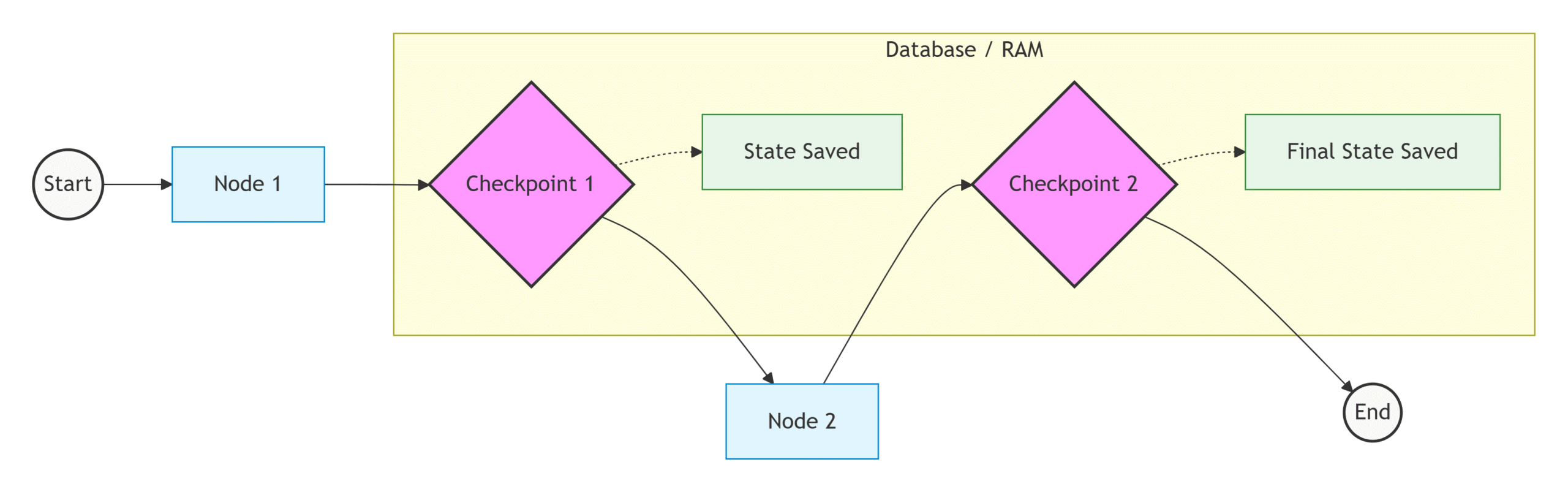
At every Checkpoint, the state is saved to a database, allowing for fault tolerance and session resumption.
Persistence Quiz #
Q.1 What does 'persistence' specifically refer to within the context of LangGraph?
The speed at which nodes in the graph can read and write data to the state.
Ensuring that an LLM agent never makes the same mistake twice.
The ability to save and restore the state of a workflow over time.
The permanent storage of the graph's architecture and node functions.
Explanation
Persistence allows LangGraph to save the workflow’s state so it can later be restored, resumed, or inspected, even after the application has stopped running.
Q.2 By default, what happens to the state of a LangGraph workflow once execution is complete without persistence?
The final state is sent back to the LLM for summarization.
It is automatically saved to a local cache file.
All values in the state are erased from memory.
The state remains accessible for the next 24 hours.
Explanation
Without persistence, the workflow state exists only in memory. Once execution finishes or the application stops, the state is lost completely.
Q.3 Which component in LangGraph is responsible for dividing graph execution into stages and saving the workflow state?
The Checkpointer.
The Node Handler.
The State Reducer.
The Edge Controller.
Explanation
The Checkpointer automatically saves the workflow state at checkpoints, enabling recovery, debugging, resumability, and human-in-the-loop interactions.
Q.4 In LangGraph, when are checkpoints typically created?
Only after reaching the END node.
Every fixed number of seconds.
After every line of Python code.
At every superstep of graph execution.
Explanation
LangGraph creates checkpoints at every superstep, ensuring the latest state is safely stored throughout workflow execution.
Q.5 Why must a thread_id be provided when using persistence?
To improve execution speed.
To distinguish different user sessions or workflow executions.
To limit the number of graph nodes.
To specify which LLM to use.
Explanation
The thread_id uniquely identifies each workflow execution or user session so LangGraph knows which saved state should be loaded or updated.
Q.6 How does persistence provide fault tolerance in LangGraph?
By running duplicate graphs on multiple servers.
By automatically fixing programming errors.
By preventing servers from crashing.
By allowing the workflow to resume from the last saved checkpoint after a failure.
Explanation
Persistence enables fault tolerance by restoring the workflow from the most recent checkpoint instead of restarting from the beginning after failures or interruptions.
Q.7 Which checkpointer is commonly used for demonstrations and tutorials, even though its data is temporary?
PostgresSaver.
RedisSaver.
CloudCheckpointManager.
InMemorySaver.
Explanation
InMemorySaver stores checkpoints in memory, making it simple for learning and testing. However, the data disappears when the application stops.
Q.8 What is the primary purpose of LangGraph's Time Travel feature?
To predict future LLM outputs.
To change the server's system clock.
To skip directly to the final node.
To inspect previous checkpoints and replay execution from an earlier state.
Explanation
Time Travel allows developers to inspect historical workflow states and replay execution from any saved checkpoint, making debugging and experimentation much easier.
Q.9 Why is persistence essential for Human-in-the-Loop (HITL) workflows?
It allows the workflow to pause, wait for human input, and later resume from the saved state.
It translates human language into machine code.
It prevents humans from modifying the workflow.
It keeps the server continuously running for days.
Explanation
Persistence stores the workflow state while waiting for human approval or input, allowing execution to continue later without losing progress.
Q.10 When using workflow.invoke() to resume an interrupted or failed workflow, what should be passed as the initial state input?
The string 'RESTART'.
The complete previous state dictionary.
The timestamp of the failure.
A value of None.
Explanation
When resuming a persisted workflow, you typically pass None as the input state while supplying the same thread_id. LangGraph automatically loads the most recent saved checkpoint associated with that thread.


