In the journey of building robust AI models, the way you handle data is just as critical as the architecture of the neural network itself. While earlier discussions focused on model building, this blog explores the fundamental tools PyTorch provides to handle data efficiently: the Dataset and DataLoader classes. These classes are designed to solve significant flaws in basic training pipelines and provide a scalable framework for real-world applications.
The Motivation: Moving Beyond “Batch” Flaws #
Many beginners start by loading their entire dataset into a single tensor and performing Batch Gradient Descent. However, the sources highlight two major problems with this approach:
- Memory Inefficiency: Loading a massive dataset (like gigabytes of images) directly into RAM can crash your system.
- Slow Convergence: In Batch Gradient Descent, parameters are only updated once after seeing the entire dataset, making the learning process extremely slow.
To solve this, we use Mini-Batch Gradient Descent, where the data is divided into smaller chunks (batches). This allows for more frequent parameter updates and keeps memory usage manageable.
1. The Dataset Class: Defining Your Data #
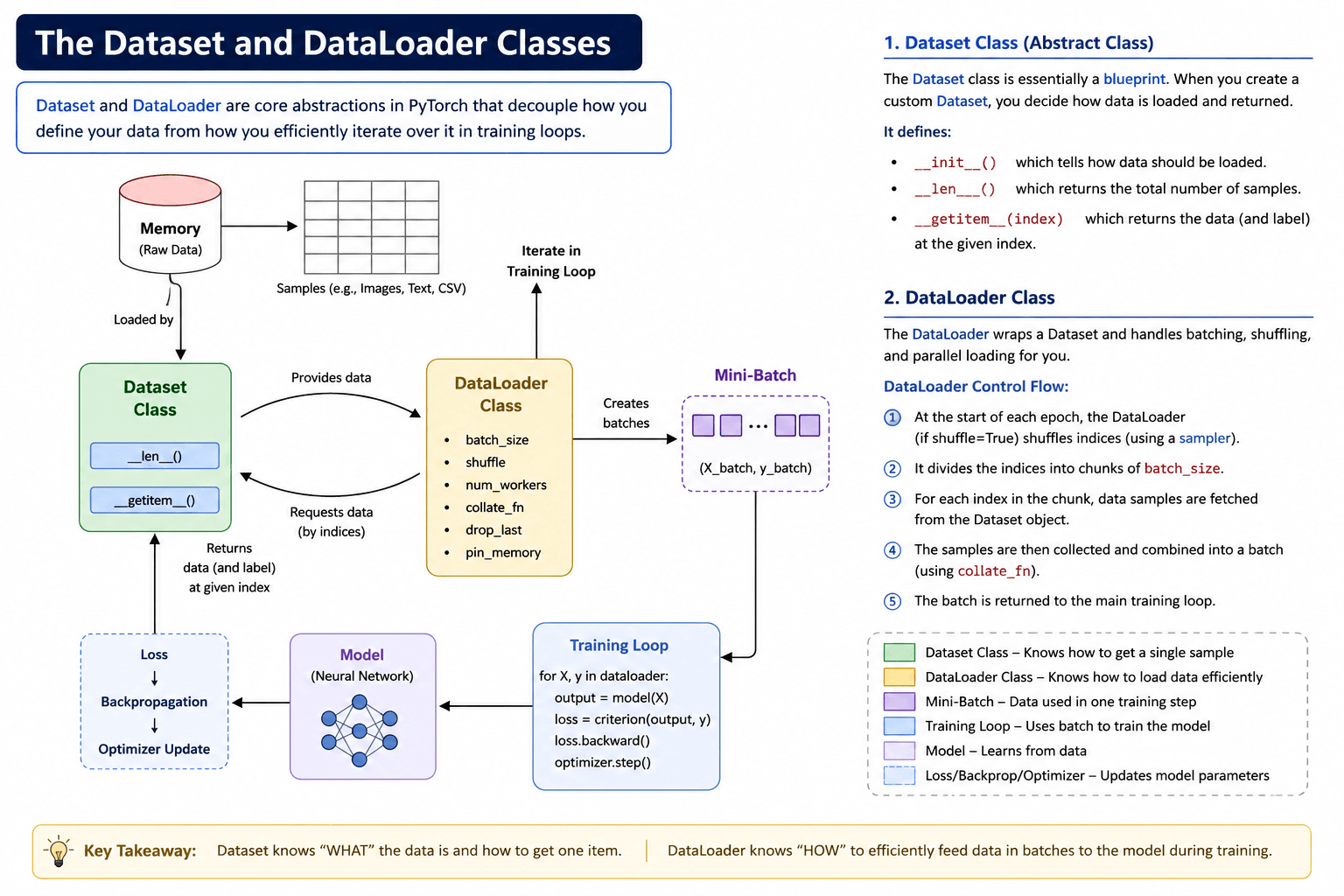
The Dataset class is an abstract blueprint that tells PyTorch what your data is and how to access it. When creating a custom dataset, you must implement three essential methods:
- __init__: Where you define how data is loaded (e.g., reading a CSV or locating image folders).
- __len__: Returns the total number of samples.
- __getitem__: Takes an index and returns the specific row/sample at that position. This is also the ideal place to apply transformations like resizing or normalization.
Code Example: Creating a Custom Dataset #
import torch
from torch.utils.data import Dataset, DataLoader

class CustomDataset(Dataset):
    def __init__(self, features, labels):
        # Store features and labels as attributes
        self.features = features
        self.labels = labels

    def __len__(self):
        # Return the total number of rows
        return len(self.features)

    def __getitem__(self, index):
        # Fetch a single row and its label based on the index
        sample_x = self.features[index]
        sample_y = self.labels[index]
        return sample_x, sample_y

# Creating the dataset object
# Assuming 'X' and 'y' are pre-defined PyTorch tensors
my_dataset = CustomDataset(X, y)
2. The DataLoader Class: Managing the Flow #
While the Dataset fetches individual items, the DataLoader is an iterable that manages the batching process. It automates complex tasks like:
- Batching: Grouping rows into sizes you define.
- Shuffling: Randomizing data order at the start of every epoch to improve learning.
- Parallelization: Using multiple CPU “workers” to load data while the GPU is busy training.
Code Example: Implementing the DataLoader
#  Create the DataLoader object
train_loader = DataLoader(
    dataset=my_dataset,
    batch_size=32,    # Size of each data chunk
    shuffle=True,     # Randomize data for better convergence
    num_workers=2     # Use parallel workers for speed
)

# Iterating through batches in the training loop
for batch_features, batch_labels in train_loader:
    # Perform forward pass, loss calculation, and backpropagation here
    pass
3. Under the Hood: How They Work Together #
The interaction between these two classes is a highly structured workflow:
- The Sampler: At the start of an epoch, the
DataLoaderuses a Sampler to shuffle the indices (e.g., 0 to 999).
What is the role of a Sampler in data loading? #
In PyTorch, a Sampler plays a critical role in determining the strategy for selecting samples from a dataset during the data loading process. It essentially controls how the indices of the dataset are drawn to form each batch.
According to the sources, its primary roles and types include:
- Shuffling and Indexing: At the start of an epoch, the
DataLoaderuses a Sampler to take all dataset indices (e.g., from 0 to 9) and shuffle them randomly. This randomized sequence is then divided into chunks to create batches. - Standard Sampler Types:
- Random Sampler: This is the default when
shuffle=Trueis set in theDataLoader. It creates a new, random sequence of indices for every epoch. - Sequential Sampler: This draws indices in order (0, 1, 2…) without any shuffling. This is particularly useful for time series data where the order of information must be preserved.
- Random Sampler: This is the default when
- Handling Imbalanced Data: One of the most important uses for a Custom Sampler is dealing with imbalanced datasets. For example, if a dataset contains 99% of one class and only 1% of another, a standard random sampler might produce batches that contain no samples of the minority class. A custom sampling strategy can be implemented to ensure that every batch has a fair representation of both classes.
- Workflow Integration: The Sampler works at the beginning of the data pipeline. Once it determines the indices for a batch, those indices are passed to the
Datasetclass’s__getitem__method to fetch the actual data.
By allowing for custom sampling logic, PyTorch ensures that developers can control the data distribution seen by the model during training, which is vital for achieving better convergence and accuracy.
- Chunking: These shuffled indices are divided into groups based on your
batch_size. - Fetching: The
DataLoadersends these indices to theDataset‘s__getitem__method to retrieve actual data tensors. - Collation: A collate_fn (Collate Function) takes the list of individual samples and merges them into a single, large “batch tensor”.
Insight from Sources: Custom collate_fn are particularly useful for text data, where sentences might have different lengths and need padding before being stacked into a batch.
4. Advanced Parameters for Production #
To truly optimize your pipeline, PyTorch offers several advanced parameters in the DataLoader:
- num_workers: Increasing this value allows you to load data across multiple CPU cores, preventing the CPU from becoming a bottleneck for the GPU.
- drop_last: If your dataset size isn’t perfectly divisible by the batch size, this allows you to drop the final incomplete batch, which is often necessary when using techniques like Batch Normalization.
- pin_memory: When set to
True, it speeds up the transfer of data from the CPU to the GPU.
5. The Final Training Pipeline #
When you put it all together, your training loop shifts from a single loop to a nested loop structure: the outer loop handles epochs, and the inner loop iterates through the batches provided by the DataLoader.
# A standard training loop with Mini-Batch Gradient Descent
for epoch in range(num_epochs):
    for batch_x, batch_y in train_loader:
        # 1. Forward Pass
        y_pred = model(batch_x)

        # 2. Loss Calculation
        loss = criterion(y_pred, batch_y)

        # 3. Backward Pass & Optimization
        optimizer.zero_grad()
        loss.backward()
        optimizer.step()
By decoupling how data is stored (Dataset) from how it is iterated (DataLoader), PyTorch provides a professional, “separation of concern” architecture that can handle everything from simple CSVs to massive real-world image and text datasets
| Google Colab Nootebook | Click Here |
Quiz #
Q.1 What is a primary disadvantage of using Batch Gradient Descent on a dataset with millions of high-resolution images?
It requires the dataset to be converted into a single one-dimensional tensor.
It results in noisy gradient updates that prevent the model from converging to a local minimum.
It is extremely memory inefficient because it requires loading the entire dataset into RAM simultaneously.
It prevents the use of the Autograd module for calculating derivatives.
Explanation
Batch Gradient Descent processes the entire dataset before updating model parameters. For very large datasets, loading all samples into memory at once is often impractical, making it highly memory inefficient.
Q.2 Which specific method in a custom PyTorch Dataset class is responsible for returning a single sample and its corresponding label when provided with an index?
init
len
iter
getitem
Explanation
The getitem() method retrieves an individual sample and its corresponding label using an index. It is called repeatedly by the DataLoader to construct batches.
Q.3 If you have a dataset with 1,000 rows and you set the batch_size to 32 in your DataLoader, approximately how many batches will be generated per epoch?
31 batches
32 batches
1,000 batches
10 batches
Explanation
The number of batches is calculated as ceil(1000 ÷ 32) = 32. The final batch contains the remaining samples unless drop_last=True is specified.
Q.4 What is the role of the Sampler component within the PyTorch DataLoader?
It converts raw data into tensors for model training.
It defines the sequence or strategy for selecting indices from the dataset.
It parallelizes the data loading process across multiple CPU cores.
It calculates the loss for each mini-batch during the training loop.
Explanation
A Sampler determines the order in which dataset indices are selected. It enables sequential, random, weighted, or custom sampling strategies before batches are formed.
Q.5 In what scenario would a custom collate_fn be necessary when defining a DataLoader?
When you need to shuffle the data before every epoch.
When the dataset is stored in a format other than a CSV file.
When you want to use a GPU for model training.
When individual samples in a batch have different shapes and cannot be automatically stacked.
Explanation
A custom collate_fn is used when samples have varying sizes or structures, such as variable-length text sequences or images of different dimensions, requiring custom batching logic like padding.
Q.6 How does the num_workers parameter in DataLoader improve the efficiency of the training pipeline?
It reduces the number of epochs required for the model to reach convergence.
It automatically increases the batch size to utilize more RAM.
It enables fetching and preparing multiple batches in parallel using multiple CPU processes.
It allows the GPU to perform forward and backward passes more quickly.
Explanation
The num_workers parameter launches multiple worker processes that load and preprocess data in parallel, reducing data-loading bottlenecks and keeping the GPU busy.
Q.7 True or False: According to the source material, data transformations like image resizing or text normalization should ideally be implemented inside the Dataset class's getitem method.
False
True
Explanation
True. Sample-level preprocessing, such as resizing images, tokenizing text, or normalizing data, is typically performed inside the Dataset’s getitem() method before the sample is returned.
Q.8 What is the effect of setting the drop_last parameter to True in the DataLoader?
It removes any outliers from the dataset before training starts.
It ignores the labels and only provides the features during training.
It deletes the entire dataset from memory after one epoch.
It discards the final batch of an epoch if it is smaller than the specified batch_size.
Explanation
When drop_last=True, the final incomplete batch is discarded if its size is smaller than the specified batch_size. This is useful when consistent batch sizes are required.
Q.9 Why is the len method essential for the DataLoader to function correctly?
It ensures that all tensors have the same data type.
It determines the number of features in each input tensor.
It is used by the DataLoader to calculate the total number of batches available in an epoch.
It tells the optimizer how many layers are in the neural network.
Explanation
The len() method returns the total number of samples in the dataset. DataLoader uses this value to determine the number of iterations (batches) in each training epoch.
Q.10 Which parameter in DataLoader is particularly useful for Time Series data where the order of observations is critical?
num_workers=0
shuffle=True
shuffle=False
pin_memory=True
Explanation
For time series data, shuffle=False preserves the chronological order of observations. Randomly shuffling the data could destroy temporal dependencies and negatively affect model performance.


