Introduction #
What if you could hand an AI agent a single topic — say, “RAG in 2026” or “Self-Attention for developers” — and receive, minutes later, a fully-structured, research-backed Markdown blog post complete with AI-generated images? That is exactly what the Blog Writing Agent (BWA) project does.
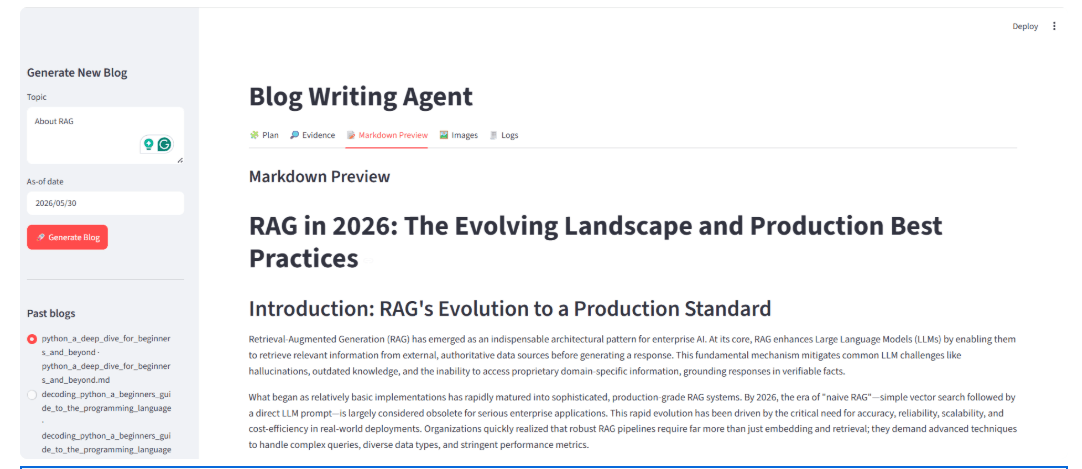
Built on LangGraph, LangChain, Groq (LLaMA 3.3-70B), Tavily Search, Pollinations.ai, and a Streamlit UI, the BWA project is a masterclass in modern agentic system design.
High-Level Architecture #
1.1 Pydantic Data Schemas — The Contract Layer #
The backend starts by defining all its schemas with Pydantic, which provides type safety and structured output parsing for LLM calls.
class Task(BaseModel):
    id: int
    title: str
    goal: str  # "One sentence describing what the reader should do/understand."
    bullets: List[str]          # 3–6 bullets per section
    target_words: int           # 120–550
    tags: List[str]
    requires_research: bool
    requires_citations: bool
    requires_code: bool
A Task represents a single section of the blog. The requires_* flags tell downstream worker agents exactly what kind of content is expected — no ambiguity.
class Plan(BaseModel):
    blog_title: str
    audience: str
    tone: str
    blog_kind: Literal["explainer", "tutorial", "news_roundup", "comparison", "system_design"]
    constraints: List[str]
    tasks: List[Task]
The Plan is the orchestrator’s output — a structured blueprint for the entire blog. blog_kind is a discriminated union that will later influence how worker agents frame their writing.
class EvidenceItem(BaseModel):
    title: str
    url: str
    published_at: Optional[str]  # ISO YYYY-MM-DD
    snippet: Optional[str]
    source: Optional[str]
EvidenceItem wraps a search result. The strict schema forces the LLM to normalize dates and strip noise.
class RouterDecision(BaseModel):
    needs_research: bool
    mode: Literal["closed_book", "hybrid", "open_book"]
    reason: str
    queries: List[str]
    max_results_per_query: int
The RouterDecision is the first LLM call’s output. The three-mode taxonomy is elegant:
closed_book— evergreen concepts (e.g., “explain recursion”)hybrid— stable concept + current tools (e.g., “LangGraph best practices”)open_book— real-time news (e.g., “AI news this week”)
class ImageSpec(BaseModel):
    placeholder: str   # "[[IMAGE_1]]"
    filename: str      # "rag_overview.png"
    alt: str
    caption: str
    prompt: str        # Text-to-image prompt
    size: Literal["1024x1024", "1024x1536", "1536x1024"]
    quality: Literal["low", "medium", "high"]
ImageSpec is the bridge between the LLM’s editorial judgment and the image generation API. The LLM decides where an image should go and what it should depict; Pollinations.ai does the actual generation.
1.2 Shared State — The Backbone of the Graph #
class State(TypedDict):
    topic: str
    mode: str
    needs_research: bool
    queries: List[str]
    evidence: List[EvidenceItem]
    plan: Optional[Plan]
    as_of: str
    recency_days: int
    sections: Annotated[List[tuple[int, str]], operator.add]  # fan-in reducer!
    merged_md: str
    md_with_placeholders: str
    image_specs: List[dict]
    final: str
The State TypedDict is shared across all nodes. The most interesting field is sections:
sections: Annotated[List[tuple[int, str]], operator.add]The Annotated + operator.add tells LangGraph to append (not overwrite) results from parallel worker nodes.
This is how fan-out/fan-in is handled without a custom reducer function — each worker returns {"sections": [(task_id, section_md)]} and LangGraph automatically concatenates them.
1.3 The LLM — Groq’s LLaMA 3.3 70B #
llm = ChatGroq(
    api_key=os.getenv("GROQ_API_KEY"),
    model="llama-3.3-70b-versatile",
)
The choice of Groq is deliberate. Groq’s hardware-level inference (LPU chips) makes LLaMA 3.3-70B extremely fast — crucial for an agentic pipeline that calls the LLM 5+ times per blog. Structured outputs (.with_structured_output(SchemaClass)) are used for every call that needs a schema, falling back to .invoke() for free-form text generation in the worker node.
1.4 Node 1: The Router #
ROUTER_SYSTEM = """You are a routing module for a technical blog planner.
Decide whether web research is needed BEFORE planning.

Modes:
- closed_book (needs_research=false): evergreen concepts.
- hybrid (needs_research=true): evergreen + needs up-to-date examples/tools/models.
- open_book (needs_research=true): volatile weekly/news/"latest"/pricing/policy.
..."""

def router_node(state: State) -> dict:
    decider = llm.with_structured_output(RouterDecision)
    decision = decider.invoke([...])
    recency_days = {
        "open_book": 7,
        "hybrid": 45,
        "closed_book": 3650,
    }[decision.mode]
    return {
        "needs_research": decision.needs_research,
        "mode": decision.mode,
        "queries": decision.queries,
        "recency_days": recency_days,
    }
The router is the intelligence layer that saves cost and latency. If the topic is evergreen (e.g., “explain binary trees”), no search happens. If it’s “Latest AI news”, the router sets needs_research=True and generates 3–10 targeted search queries.
The recency_days field is a clever downstream filter: open_book articles older than 7 days are discarded; hybrid allows up to 45 days.
The conditional edge:
def route_next(state: State) -> str:
    return "research" if state["needs_research"] else "orchestrator"
1.5 Node 2: Research via Tavily
def research_node(state: State) -> dict:
    queries = (state.get("queries") or [])[:6]
    raw: List[dict] = []
    for q in queries:
        raw.extend(_tavily_search(q, max_results=3))
    ...
    # Deduplicate by URL
    dedup: dict[str, EvidenceItem] = {}
    for r in trimmed:
        url = (r.get("url") or "").strip()
        if not url: continue
        item = EvidenceItem(...)
        dedup[url] = item

    # Filter for recency in open_book mode
    if state.get("mode") == "open_book":
        cutoff = as_of - timedelta(days=int(state["recency_days"]))
        evidence = [e for e in evidence if (d := _iso_to_date(e.published_at)) and d >= cutoff]

    return {"evidence": evidence}
Key design decisions:
- URL deduplication — If multiple queries return the same article, it’s stored once.
- Date filtering for
open_book— A news roundup strictly filters for fresh content. Older articles are silently dropped. - Evidence built without an LLM — The comment says “Build evidence without an LLM to avoid tool-call failures on Groq.” This is a pragmatic choice: Groq’s structured output had issues with certain Pydantic models at the time of writing, so the
EvidenceItemlist is built directly in Python. - Graceful degradation —
_tavily_searchreturns[]if noTAVILY_API_KEYis set. The system still runs inclosed_bookmode.
1.6 Node 3: The Orchestrator (Planner) #
def orchestrator_node(state: State) -> dict:
    planner = llm.with_structured_output(Plan)
    plan = planner.invoke([
        SystemMessage(content=ORCH_SYSTEM),
        HumanMessage(content=(
            f"Topic: {state['topic']}\n"
            f"Mode: {mode}\n"
            f"Evidence:\n{[e.model_dump() for e in evidence][:16]}"
        )),
    ])
    return {"plan": plan}
The orchestrator prompt is a detailed editorial spec. It tells the LLM to produce 5–9 tasks, each with a precise goal, 3–6 bullets, a word count target, and metadata flags (requires_research, requires_citations, requires_code). The evidence (up to 16 items) is passed as context so the planner knows what sources are available for citation.
For open_book mode, blog_kind is forcefully set to "news_roundup" in Python after the LLM call — a good example of output validation overriding LLM decisions when deterministic business logic applies.
1.7 Node 4: Fan-Out to Workers #
def fanout(state: State):
assert state[“plan”] is not None
return [
Send(
“worker”,
{
“task”: task.model_dump(),
“topic”: state[“topic”],
“mode”: state[“mode”],
“evidence”: [e.model_dump() for e in state.get(“evidence”, [])],
…
},
)
for task in state[“plan”].tasks
]
This is LangGraph’s Send API — it dynamically spawns one worker node instance per task. If the plan has 7 sections, 7 workers run in parallel. Each worker receives the full evidence list and its specific task instructions.
g.add_conditional_edges("orchestrator", fanout, ["worker"])The graph edge is conditional because the number of Send messages varies per run (5–9, depending on the plan).
1.8 Node 5: Worker (Section Writer) #
def worker_node(payload: dict) -> dict:
    task = Task(**payload["task"])
    plan = Plan(**payload["plan"])
    evidence = [EvidenceItem(**e) for e in payload.get("evidence", [])]

    section_md = llm.invoke([
        SystemMessage(content=WORKER_SYSTEM),
        HumanMessage(content=(
            f"Blog title: {plan.blog_title}\n"
            f"Audience: {plan.audience}\n"
            f"Tone: {plan.tone}\n"
            f"Blog kind: {plan.blog_kind}\n"
            ...
            f"Evidence (ONLY cite these URLs):\n{evidence_text}\n"
        )),
    ]).content.strip()

    return {"sections": [(task.id, section_md)]}
The worker prompt has strong grounding rules:
- In
open_bookmode: “Do not introduce any specific event/company/model/funding/policy claim unless supported by provided Evidence URLs.” - For
requires_citations=True: cite Evidence URLs for external claims. - For
requires_code=True: include at least one code snippet.
The result is a tuple (task_id, section_md) — the task_id is critical for ordering the sections correctly after parallel execution.
1.9 The Reducer Subgraph (Merge → Images → Generate) #
The reducer is itself a compiled LangGraph subgraph — a graph inside a graph:
reducer_graph = StateGraph(State)
reducer_graph.add_node("merge_content", merge_content)
reducer_graph.add_node("decide_images", decide_images)
reducer_graph.add_node("generate_and_place_images", generate_and_place_images)
reducer_graph.add_edge(START, "merge_content")
reducer_graph.add_edge("merge_content", "decide_images")
reducer_graph.add_edge("decide_images", "generate_and_place_images")
reducer_graph.add_edge("generate_and_place_images", END)
reducer_subgraph = reducer_graph.compile()
Step A: merge_content
def merge_content(state: State) -> dict:
    ordered_sections = [md for _, md in sorted(state["sections"], key=lambda x: x[0])]
    body = "\n\n".join(ordered_sections).strip()
    merged_md = f"# {plan.blog_title}\n\n{body}\n"
    return {"merged_md": merged_md}
Sorts sections by task_id (fixing the out-of-order parallel fan-in), joins them, and prepends the blog title as a # heading.
Step B: decide_images
def decide_images(state: State) -> dict:
    try:
        planner = llm.with_structured_output(GlobalImagePlan)
        image_plan = planner.invoke([...])
    except Exception:
        image_plan = None

    if image_plan and image_plan.images:
        return {
            "md_with_placeholders": image_plan.md_with_placeholders,
            "image_specs": [img.model_dump() for img in image_plan.images],
        }

    # Graceful fallback
    image_specs = _default_image_specs(state.get("topic"))
    ...
The LLM reads the entire merged blog and decides: where should images go, and what should they depict? It inserts [[IMAGE_1]] placeholders directly into the Markdown. If the LLM fails (timeout, schema error), _default_image_specs() creates a sensible fallback with an overview and workflow diagram.
Step C: generate_and_place_images
def _pollinations_generate_image_bytes(prompt: str, size: str) -> bytes:
    width, height = _parse_image_size(size)
    encoded = urllib.parse.quote(prompt)
    url = (
        f"https://image.pollinations.ai/prompt/{encoded}"
        f"?width={width}&height={height}&nologo=true"
    )
    with urllib.request.urlopen(url, timeout=90) as resp:
        return resp.read()
The image generation is zero-cost — Pollinations.ai is a free public API. Images are generated only if the file doesn’t already exist (if not out_path.exists():), avoiding redundant regeneration on reruns.
1.10 Main Graph Assembly #
g = StateGraph(State)
g.add_node("router", router_node)
g.add_node("research", research_node)
g.add_node("orchestrator", orchestrator_node)
g.add_node("worker", worker_node)
g.add_node("reducer", reducer_subgraph)  # subgraph as a node!

g.add_edge(START, "router")
g.add_conditional_edges("router", route_next, {"research": "research", "orchestrator": "orchestrator"})
g.add_edge("research", "orchestrator")
g.add_conditional_edges("orchestrator", fanout, ["worker"])
g.add_edge("worker", "reducer")
g.add_edge("reducer", END)

app = g.compile()
he use of reducer_subgraph as a node (g.add_node("reducer", reducer_subgraph)) is an advanced LangGraph pattern — it keeps the main graph clean and the reducer logic fully encapsulated.
Part 2: The Frontend (frontend.py) Deep Dive #
The frontend is a Streamlit application that drives the backend graph, displays live progress, and provides rich post-generation UI.
2.1 Streaming Graph Progress
def try_stream(graph_app, inputs: Dict[str, Any]) -> Iterator[Tuple[str, Any]]:
    try:
        for step in graph_app.stream(inputs, stream_mode="updates"):
            yield ("updates", step)
        out = graph_app.invoke(inputs)
        yield ("final", out)
        return
    except Exception:
        pass

    try:
        for step in graph_app.stream(inputs, stream_mode="values"):
            yield ("values", step)
        out = graph_app.invoke(inputs)
        yield ("final", out)
        return
    except Exception:
        pass

    out = graph_app.invoke(inputs)
    yield ("final", out)
try_stream is a defensive streaming wrapper with three fallback levels:
- Try streaming with
stream_mode="updates"(best — shows node-by-node deltas) - Try streaming with
stream_mode="values"(shows full state snapshots) - Fall back to blocking
.invoke()(no streaming, but always works)
This makes the UI resilient to version differences in LangGraph’s streaming API.
for kind, payload in try_stream(app, inputs):
if kind in (“updates”, “values”):
node_name = next(iter(payload.keys()))
if node_name != last_node:
status.write(f”➡️ Node: {node_name}“)
last_node = node_name
    summary = {
        "mode": current_state.get("mode"),
        "evidence_count": len(current_state.get("evidence", [])),
        "tasks": ...,
        "images": ...,
        "sections_done": ...,
    }
    progress_area.json(summary)
Each streaming update triggers a live progress panel — the user sees mode, evidence count, tasks planned, images scheduled, and sections written, all updating in real time.
2.2 The Five-Tab Layout
tab_plan, tab_evidence, tab_preview, tab_images, tab_logs = st.tabs(
    ["🧩 Plan", "🔎 Evidence", "📝 Markdown Preview", "🖼️ Images", "🧾 Logs"]
)- 🧩 Plan tab — Shows the structured plan as a Pandas DataFrame (
id,title,target_words,requires_*,tags) with an expandable raw JSON view. - 🔎 Evidence tab — Tabular view of all search results (
title,published_at,source,url). - 📝 Markdown Preview tab — Renders the final blog with local image support. Includes download buttons for raw Markdown and a bundled ZIP (Markdown + images).
- 🖼️ Images tab — Shows the image plan JSON, then displays each generated image from the
images/folder with a ZIP download button. - 🧾 Logs tab — A rolling event log of all streaming updates, useful for debugging node execution order and payloads.
2.3 Local Image Rendering #
Streamlit’s st.markdown() cannot render local file paths as images. The render_markdown_with_local_images function solves this:
_MD_IMG_RE = re.compile(r"!\[(?P<alt>[^\]]*)\]\((?P<src>[^)]+)\)")
_CAPTION_LINE_RE = re.compile(r"^\*(?P<cap>.+)\*$")

def render_markdown_with_local_images(md: str):
    # Split md into ("md", text) and ("img", alt|||src) parts
    # For each "img" part, call st.image() with resolved path
    # For each "md" part, call st.markdown()
    ...
The function:
- Splits the Markdown string into alternating text blocks and image references.
- For
http://orhttps://URLs: callsst.image()directly. - For local paths: resolves them relative to
BASE_DIRand callsst.image(str(img_path)). - Handles captions — if the line immediately after an image is
*caption text*, it’s extracted and passed as thecaption=argument tost.image().
2.4 Past Blogs Sidebar #
def list_past_blogs() -> List[Path]:
    files = []
    for root in {BASE_DIR, Path(".").resolve()}:
        files.extend([p for p in root.glob("*.md") if p.is_file()])
    # Deduplicate by resolved path
    dedup: dict[str, Path] = {}
    for p in files:
        dedup[str(p.resolve())] = p
    ordered = list(dedup.values())
    ordered.sort(key=lambda p: p.stat().st_mtime, reverse=True)
    return ordered
The sidebar automatically lists all .md files in the working directory, sorted by modification time. Titles are extracted from the first # heading. Clicking “📂 Load selected blog” populates st.session_state["last_out"] with the file’s content — the exact same structure as a live generation result:
st.session_state["last_out"] = {
    "plan": None,
    "evidence": [],
    "image_specs": [],
    "final": md_text,   # the loaded markdown
}
This means all five tabs (Plan, Evidence, Preview, Images, Logs) work identically whether the blog was just generated or loaded from disk.
2.5 Download System #
Two download options are offered after generation:
# 1. Raw Markdown
st.download_button(
    "⬇️ Download Markdown",
    data=final_md.encode("utf-8"),
    file_name=f"{safe_slug(blog_title)}.md",
    mime="text/markdown",
)

# 2. Bundle: Markdown + all images
def bundle_zip(md_text: str, md_filename: str, images_dir: Path) -> bytes:
    buf = BytesIO()
    with zipfile.ZipFile(buf, "w", compression=zipfile.ZIP_DEFLATED) as z:
        z.writestr(md_filename, md_text.encode("utf-8"))
        for p in images_dir.rglob("*"):
            if p.is_file():
                z.write(p, arcname=str(p))
    return buf.getvalue()

st.download_button(
    "📦 Download Bundle (MD + images)",
    data=bundle,
    file_name=f"{safe_slug(blog_title)}_bundle.zip",
    mime="application/zip",
)
The ZIP bundle uses BytesIO to avoid writing temporary files to disk.
2.6 Input Schema to the Graph #
inputs: Dict[str, Any] = {
    "topic": topic.strip(),
    "mode": "",
    "needs_research": False,
    "queries": [],
    "evidence": [],
    "plan": None,
    "as_of": as_of.isoformat(),
    "recency_days": 7,
    "sections": [],
    "merged_md": "",
    "md_with_placeholders": "",
    "image_specs": [],
    "final": "",
}
All fields in State must be provided at invocation time (LangGraph’s TypedDict requirement). The frontend supplies sensible defaults for all non-topic fields; the graph nodes overwrite them as they execute.
The as_of date (defaulting to today) lets users generate dated content (“as of January 2026”) for reproducibility.
Using reducer_subgraph = reducer_graph.compile() and then g.add_node("reducer", reducer_subgraph) demonstrates how large graphs can be modularized into reusable subgraphs.
5. State is the Single Source of Truth #
Every node reads from and writes to State. No hidden global variables. No direct function calls between nodes. This makes each node independently testable and the graph trivially inspectable.
6. Date-Aware Research Modes #
The recency_days filter is applied after research. This is intentional — the search API doesn’t always filter by date reliably, so a Python-level filter is the safest approach.
Technology Stack Summary #
| Component | Technology | Purpose |
|---|---|---|
| Agent framework | LangGraph | Graph execution, fan-out, subgraphs |
| LLM | Groq / LLaMA 3.3-70B | Routing, planning, writing |
| Web search | Tavily Search | Real-time research |
| Image generation | Pollinations.ai | Free text-to-image |
| UI | Streamlit | Interactive web frontend |
| Schema validation | Pydantic v2 | Structured LLM outputs |
| Env management | python-dotenv | API key loading |
| Data display | Pandas | Plan & evidence tables |
Conclusion #
The Blog Writing Agent is a textbook example of production-grade agentic design: modular nodes, typed contracts, graceful fallbacks, parallel fan-out, and a clean UI that exposes every layer of the pipeline to the user.
The key insight is that writing a blog post is a DAG problem, not a monolithic prompt problem. By decomposing the task into routing, research, planning, parallel section writing, and image generation — each driven by a focused LLM call with a strict schema — the system produces output that is more accurate, better structured, and more controllable than any single-prompt approach could achieve.
Whether you’re building a content automation tool, a research assistant, or any multi-step AI pipeline, the patterns demonstrated here — especially structured outputs, LangGraph subgraphs, and the operator.add reducer — are directly applicable to your next project.
| GitHub Full Code | Click Here |
| Follow Me linkedin | Click Here |
Join For More Updates #
| 1. Official Telegram | Click Here |
| 2. Download App | Click Here |
| 3. Download Study Routine App | Click Here |
| 4. CS/IT Job Alert | Click Here |
| 5. Join For Engineering Exam Job Alerts | Click Here |
| 6. DRDO & ISRO Job Alert | Click Here |
| 7. EXAM PYQ PDF | Click Here |
| 8. Placement CS\IT | Click Here |


