LangGraph Subgraphs Explain #
As AI applications grow larger, managing everything inside a single graph quickly becomes difficult. Imagine building an AI assistant that performs multiple independent tasks such as:
- Researching information
- Summarizing documents
- Translating text
- Reviewing code
- Asking for human approval
Putting all these workflows into one giant graph makes the application difficult to understand, debug, and maintain.
This is where Subgraphs become extremely useful.
A subgraph is simply a LangGraph workflow that runs inside another LangGraph workflow. From the parent graph’s perspective, the entire subgraph behaves like a single node.
Instead of creating one massive workflow, you divide your application into smaller reusable graphs.
What is a Subgraph? #
A Subgraph is a complete LangGraph that is embedded inside another graph.
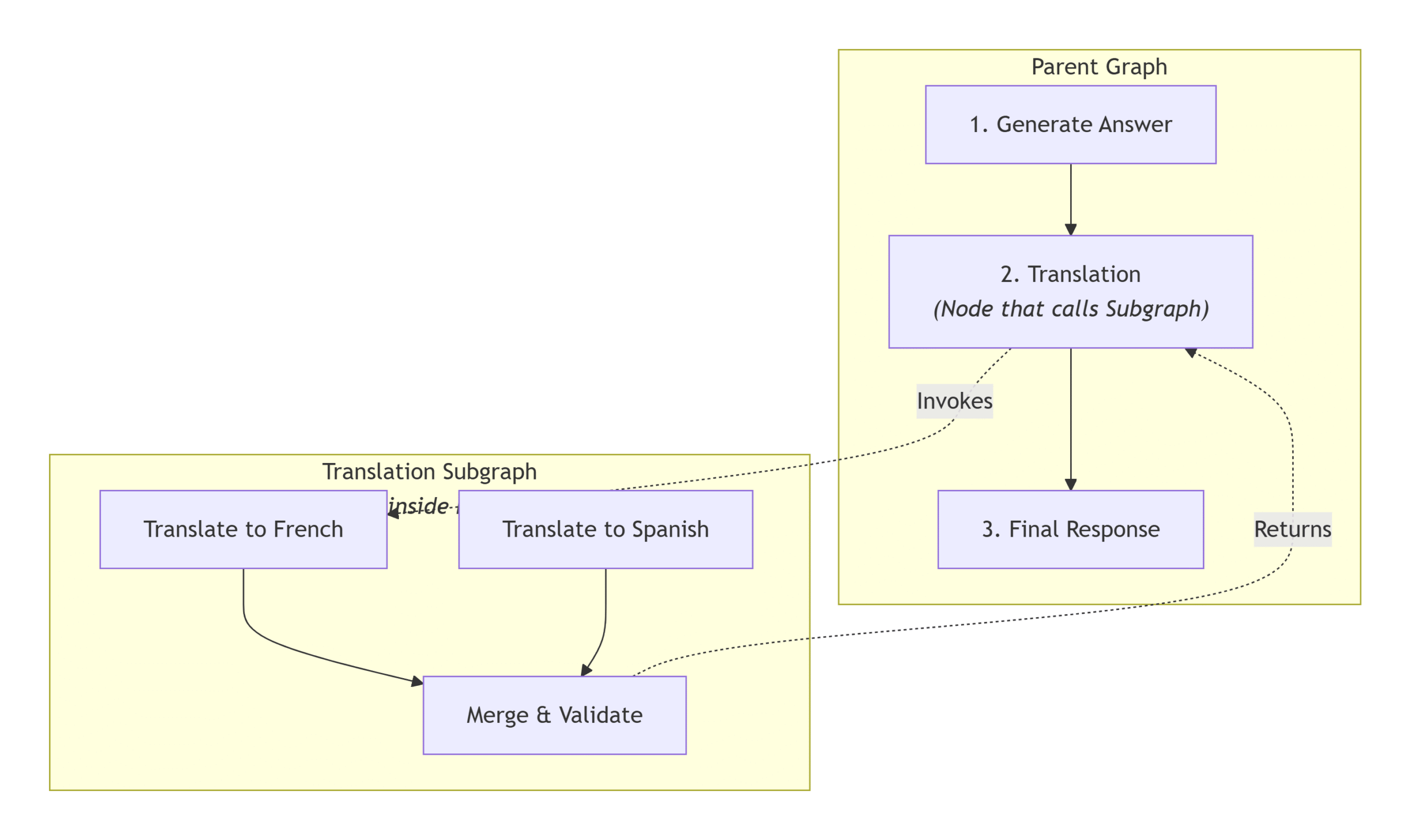
The parent graph only knows that it is calling another graph.
Everything happening inside that graph is isolated from the parent unless explicitly shared.
Why Use Subgraphs? #
Subgraphs provide several important advantages.
Modular Design #
Each workflow performs one specific responsibility.
For example:
- Research Agent
- Translation Agent
- Code Review Agent
- SQL Agent
- Document QA Agent
Each can be developed independently.
Reusability #
A translation workflow can be reused across multiple AI applications without rewriting the logic.
Easier Maintenance #
Instead of editing one graph with hundreds of nodes, developers can update only the affected subgraph.
Better Multi-Agent Architecture #
Every AI agent can have its own graph while the parent graph coordinates them.
This is the recommended design for complex AI systems.
Two Ways to Create Subgraphs in LangGraph #
LangGraph provides two mechanisms for using subgraphs.
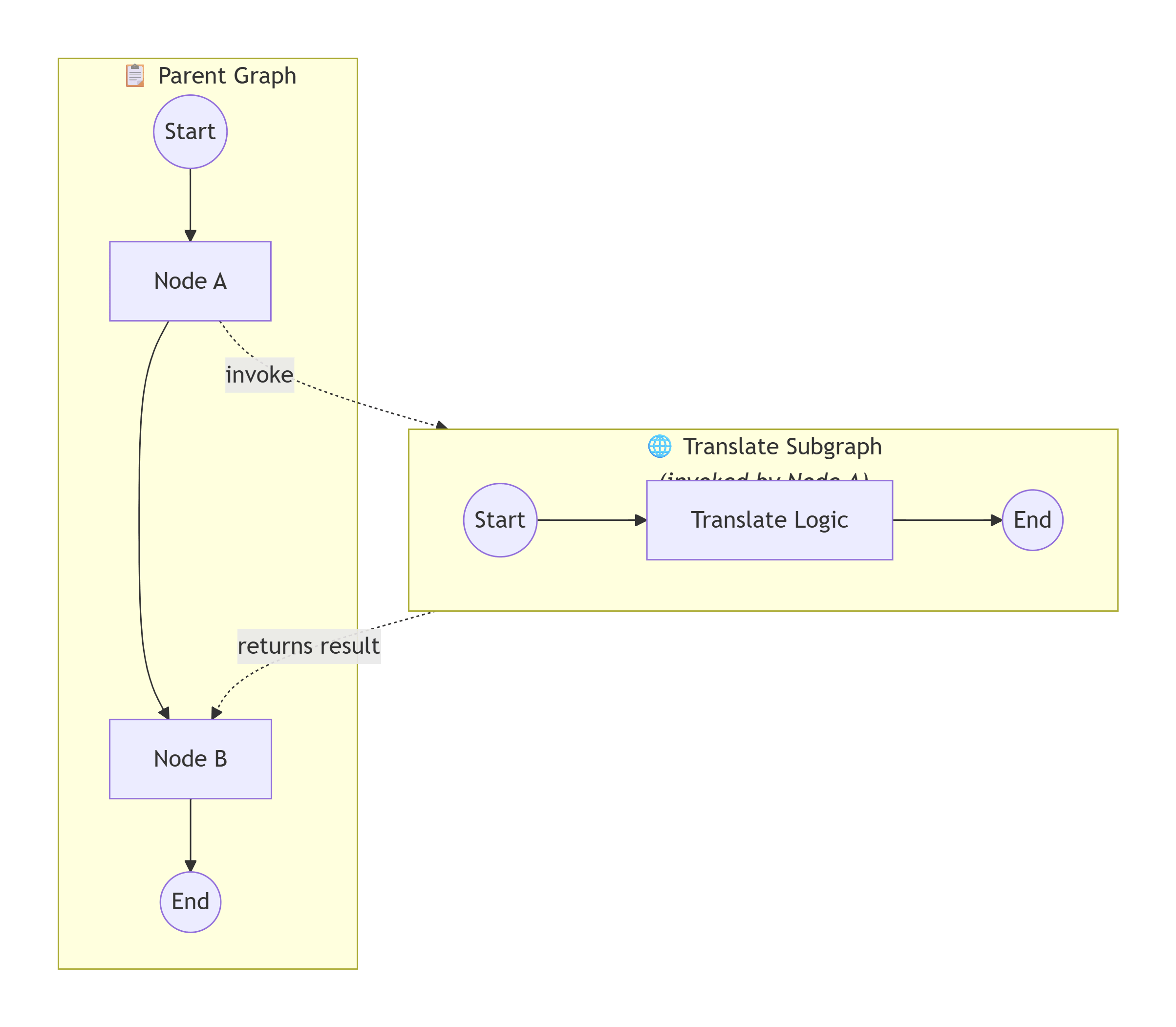
Method 1: Invoke a Graph from a Node #
In this approach:
- Parent graph and subgraph have separate states.
- The parent explicitly calls the subgraph using
.invoke(). - Data is manually passed between the graphs.
Step 1: Define the Subgraph State #
The subgraph contains only the data it needs.
class SubState(TypedDict):
    input_text: str
    translated_text: str
Step 2: Build the Subgraph #
def translate_node(state):
    return {
        "translated_text": "नमस्ते"
    }
Compile the graph normally.
subgraph = workflow.compile()
Step 3: Invoke the Subgraph #
Inside the parent graph:
def parent_translate_node(state):

    result = subgraph.invoke(
        {
            "input_text": state["english_answer"]
        }
    )

    return {
        "hindi_answer": result["translated_text"]
    }
The parent passes only the required data.
The subgraph processes it independently and returns the output.
# Full code You can Test
from typing_extensions import TypedDict
from dotenv import load_dotenv

from langgraph.graph import StateGraph, START, END
from langchain_openai import ChatOpenAI

load_dotenv()

# ----------------------------
# Subgraph State
# ----------------------------
class SubState(TypedDict):
    input_text: str
    translated_text: str


subgraph_llm = ChatOpenAI(model="gpt-4o")


def translate_text(state: SubState):
    prompt = f"""
Translate the following text to Hindi.
Keep it natural and clear. Do not add extra content.

Text:
{state["input_text"]}
""".strip()

    translated = subgraph_llm.invoke(prompt).content

    return {
        "translated_text": translated
    }


subgraph_builder = StateGraph(SubState)

subgraph_builder.add_node("translate_text", translate_text)

subgraph_builder.add_edge(START, "translate_text")
subgraph_builder.add_edge("translate_text", END)

subgraph = subgraph_builder.compile()

# ----------------------------
# Parent State
# ----------------------------
class ParentState(TypedDict):
    question: str
    answer_eng: str
    answer_hin: str


parent_llm = ChatOpenAI(model="gpt-4o-mini")


def generate_answer(state: ParentState):
    answer = parent_llm.invoke(
        f"You are a helpful assistant.\n\nQuestion: {state['question']}"
    ).content

    return {
        "answer_eng": answer
    }


def translate_answer(state: ParentState):
    # Invoke the compiled subgraph
    result = subgraph.invoke({
        "input_text": state["answer_eng"]
    })

    return {
        "answer_hin": result["translated_text"]
    }


parent_builder = StateGraph(ParentState)

parent_builder.add_node("answer", generate_answer)
parent_builder.add_node("translate", translate_answer)

parent_builder.add_edge(START, "answer")
parent_builder.add_edge("answer", "translate")
parent_builder.add_edge("translate", END)

graph = parent_builder.compile()

# Execute
result = graph.invoke({
    "question": "What is quantum physics?"
})

print(result)
Advantages of Method 1 #
- Complete state isolation
- Prevents state pollution
- Better modularity
- Easy debugging
- Independent testing
This approach is recommended when different AI agents should maintain separate memory.
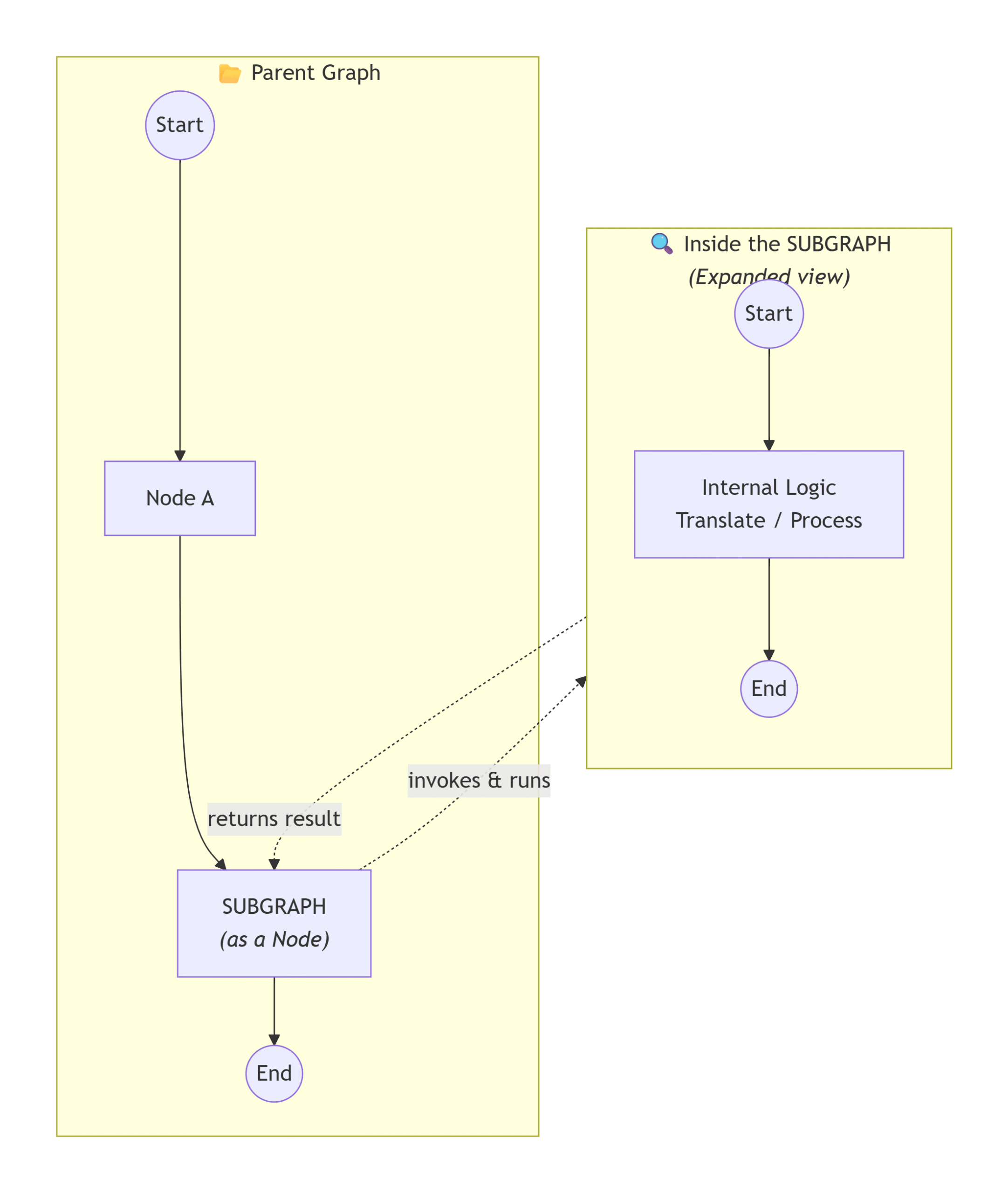
Method 2: Add a Graph as a Node #
Instead of invoking the graph manually, the compiled graph itself becomes a node inside the parent graph.
Both graphs share the same state.
Shared State #
Both graphs use the same state object.
class ParentState(TypedDict):
    question: str
    answer: str
    translated_answer: str
Build the Subgraph #
Create the workflow normally.
subgraph = workflow.compile()
Add Subgraph as a Node #
Instead of passing a function:
workflow.add_node(
    "generate",
    generate_answer
)
Pass the compiled graph.
workflow.add_node(
    "translate",
    compiled_subgraph
)
Then connect it.
workflow.add_edge(
    "generate",
    "translate"
)
The parent graph treats the entire subgraph as one node.
# Full Code
from typing_extensions import TypedDict
from dotenv import load_dotenv

from langgraph.graph import StateGraph, START, END
from langchain_openai import ChatOpenAI

load_dotenv()

# =====================================================
# Shared State
# =====================================================

class State(TypedDict):
    question: str
    answer_eng: str
    answer_hin: str

# =====================================================
# LLMs
# =====================================================

answer_llm = ChatOpenAI(model="gpt-4o-mini")
translator_llm = ChatOpenAI(model="gpt-4o")

# =====================================================
# Build Subgraph
# =====================================================

def translate_text(state: State):

    prompt = f"""
Translate the following text into Hindi.

Text:
{state['answer_eng']}
"""

    translated = translator_llm.invoke(prompt).content

    return {
        "answer_hin": translated
    }


subgraph_builder = StateGraph(State)

subgraph_builder.add_node("translate_text", translate_text)

subgraph_builder.add_edge(START, "translate_text")
subgraph_builder.add_edge("translate_text", END)

subgraph = subgraph_builder.compile()

# =====================================================
# Parent Graph
# =====================================================

def generate_answer(state: State):

    answer = answer_llm.invoke(
        f"Answer the following question:\n\n{state['question']}"
    ).content

    return {
        "answer_eng": answer
    }


parent_builder = StateGraph(State)

parent_builder.add_node("answer", generate_answer)

# Add the entire subgraph as a node
parent_builder.add_node("translator", subgraph)

parent_builder.add_edge(START, "answer")
parent_builder.add_edge("answer", "translator")
parent_builder.add_edge("translator", END)

graph = parent_builder.compile()

# =====================================================
# Execute
# =====================================================

result = graph.invoke(
    {
        "question": "What is Artificial Intelligence?"
    }
)

print(result)
Notice that every node—including those inside the subgraph—works on the same shared state.
Advantages of Method 2 #
- Less code
- Automatic state sharing
- Easier data flow
- Suitable for sequential workflows
This is useful when every node should read and update the same state.
Method 1 vs Method 2 #
| Feature | Invoke Graph | Graph as Node |
|---|---|---|
| State | Separate | Shared |
| Data Transfer | Manual | Automatic |
| Isolation | High | Low |
| Reusability | Excellent | Good |
| Complexity | Slightly Higher | Simple |
| Best For | Multi-Agent Systems | Sequential Pipelines |
Real-World Example #
Suppose you’re building a multilingual AI chatbot.
The parent graph:
- Receives the question
- Generates the answer
- Sends the answer to a Translation Subgraph
- Returns both English and Hindi responses
User Question
      │
      ▼
Generate Answer
      │
      ▼
Translation Subgraph
      │
      ▼
English + Hindi Response
The translation logic remains reusable across multiple applications.
Benefits of Using Subgraphs #
1. State Separation #
Different AI agents maintain independent memory.
No accidental overwriting of state variables.
2. Failure Isolation #
If one subgraph fails, it is less likely to crash the entire workflow.
This improves the reliability of large AI systems.
3. Better Observability #
LangGraph allows monitoring each subgraph independently.
You can analyze:
- Execution time
- Token usage
- LLM cost
- Errors
- Performance
This makes debugging much easier.
4. Human-in-the-Loop Support #
One of the biggest advantages is checkpoint management.
If the parent graph uses a checkpointer for persistence or Human-in-the-Loop (HITL), child subgraphs automatically participate in the checkpointing process.
There is usually no need to configure separate checkpointers for every subgraph.
When Should You Use Each Method? #
Use Method 1 (Invoke) #
Choose this approach when:
- Multiple AI agents work independently
- Different state objects are required
- Agents should remain isolated
- You want maximum modularity
Examples:
- Research Agent
- SQL Agent
- Coding Agent
- Planning Agent
Use Method 2 (Graph as Node) #
Choose this approach when:
- The workflow is sequential
- Every node shares the same state
- Simplicity is more important than isolation
- The graph behaves like a reusable module
Examples:
- Translation
- Summarization
- Formatting
- Validation
Best Practices #
- Keep each subgraph focused on one responsibility.
- Reuse subgraphs across multiple parent workflows.
- Use isolated state for independent AI agents.
- Use shared state for linear processing pipelines.
- Add Human-in-the-Loop at the parent graph level whenever possible.
- Test each subgraph independently before integrating it.
Conclusion #
Subgraphs are one of LangGraph’s most powerful features for building scalable AI applications.
Whether you’re designing a multi-agent system or simply organizing a complex workflow, subgraphs make your code easier to understand, reuse, test, and maintain.
Use Invoke Graph when you need isolated state and independent agents.
Use Graph as Node when you want a clean, shared-state workflow.
As your AI applications grow, adopting a modular architecture with subgraphs will help keep your LangGraph projects organized, scalable, and production-ready.
Key Takeaways #
- A subgraph is a graph inside another graph.
- LangGraph supports two approaches:
- Invoke a Graph (isolated state)
- Graph as a Node (shared state)
- Isolated state is ideal for multi-agent systems.
- Shared state is ideal for sequential workflows.
- Subgraphs improve modularity, reusability, observability, and maintainability.
- Human-in-the-Loop checkpointing is typically managed from the parent graph.
Quiz #
Q.1 What is the primary conceptual definition of a subgraph within the context of LangGraph?
A backup version of the main graph used only when the primary execution fails.
A graph that is embedded and executed as a node inside another parent graph.
A specialized node that only performs data retrieval from vector databases.
A linear sequence of nodes that cannot contain conditional routing.
Explanation
A subgraph is an independent LangGraph workflow that is embedded and executed as a node inside a larger parent graph, enabling modular and reusable agent architectures.
Q.2 How does using subgraphs improve the Failure Isolation of an Agentic AI system?
It prevents any errors from occurring by pre-validating all LLM calls.
It merges all error logs into a single state for easier debugging.
It allows other parts of the graph to continue execution even if a specific subgraph encounters an error.
It ensures that if one subgraph fails, the entire parent graph is automatically rebooted.
Explanation
Subgraphs isolate failures so that problems inside one workflow do not necessarily affect the execution of the remaining system.
Q.3 Which benefit describes the ability to use the same Coding Agent logic for both Front-end and Back-end teams in a software development workflow?
State Separation
Reusability
Failure Isolation
Observability
Explanation
Reusability allows a subgraph to be developed once and reused across multiple parent workflows without duplicating logic.
Q.4 In LangGraph, what is a significant disadvantage of building a massive, complex agent as a single graph without subgraphs?
The agent will be unable to access external tools or APIs.
All modules (coding, testing, etc.) must share a single, potentially cluttered state.
LangSmith will be unable to track any tokens consumed by the graph.
The graph will become too large to be compiled by the Python interpreter.
Explanation
Without subgraphs, all components typically share one large state, making the workflow difficult to maintain, debug, and extend.
Q.5 When implementing subgraphs via invoking a graph from a node, how is the state typically handled?
The subgraph state is deleted immediately after the node finishes execution.
The parent and subgraph have isolated states, and data must be explicitly passed between them.
The parent graph and subgraph share exactly the same state object and keys.
The subgraph is not allowed to have its own state in this mechanism.
Explanation
When a graph is invoked from a node, the parent and subgraph maintain separate states, so developers explicitly map inputs and outputs between them.
Q.6 What is a primary benefit of State Separation when using subgraphs for different agents like Coding and Testing?
It allows the agents to run on different physical servers automatically.
It prevents the Testing agent from accidentally overwriting internal data used by the Coding agent.
It removes the requirement for a checkpointer in the parent graph.
It reduces the total number of tokens used by the LLM.
Explanation
State Separation ensures each subgraph manages its own data independently, reducing unintended side effects between specialized agents.
Q.7 In the second mechanism of adding subgraphs (adding a graph as a node), how does the Shared State behave?
The subgraph automatically ignores any keys it doesn't recognize from the parent.
This mechanism requires the developer to manually sync states using a database.
The subgraph uses the parent's state keys, allowing for direct communication without explicit invocation code.
The subgraph can only read from the parent state but cannot write to it.
Explanation
When a graph is directly added as a node, it can share compatible state keys with the parent graph, simplifying communication.
Q.8 How does LangGraph facilitate Observability at a granular level when using subgraphs?
It automatically records a video of the agent's decision-making process.
It provides a single latency score for the entire parent graph only.
It allows developers to trace specific metrics like token consumption and latency for each individual subgraph.
It only allows tracing if the subgraph and parent graph share the same state.
Explanation
Each subgraph can be independently observed in LangSmith, making it easier to analyze latency, token usage, errors, and execution flow.
Q.9 True or False: When adding persistence to a multi-agent system, providing a checkpointer to the parent graph will automatically checkpoint the subgraphs as well.
True
False
Explanation
Subgraphs automatically inherit the parent’s checkpointer, so developers usually only configure persistence once at the parent graph level.
Q.10 Which approach should you choose when the parent graph and subgraph require completely different state schemas?
Add the subgraph directly as a node with shared state.
Use a single global state shared by every graph.
Invoke the subgraph from a node and explicitly pass input and output between the two graphs.
Avoid using subgraphs because different state schemas are not supported.
Explanation
Invoking a graph from a node is the preferred approach when the parent and subgraph use different state schemas because it provides complete state isolation and explicit data mapping.


