Introduction #
Traditional AI chatbots can answer general questions, but they struggle with private documents, recent information, and factual accuracy. Modern AI applications are moving toward Agentic AI, where an AI agent can reason, make decisions, and use external tools whenever required.
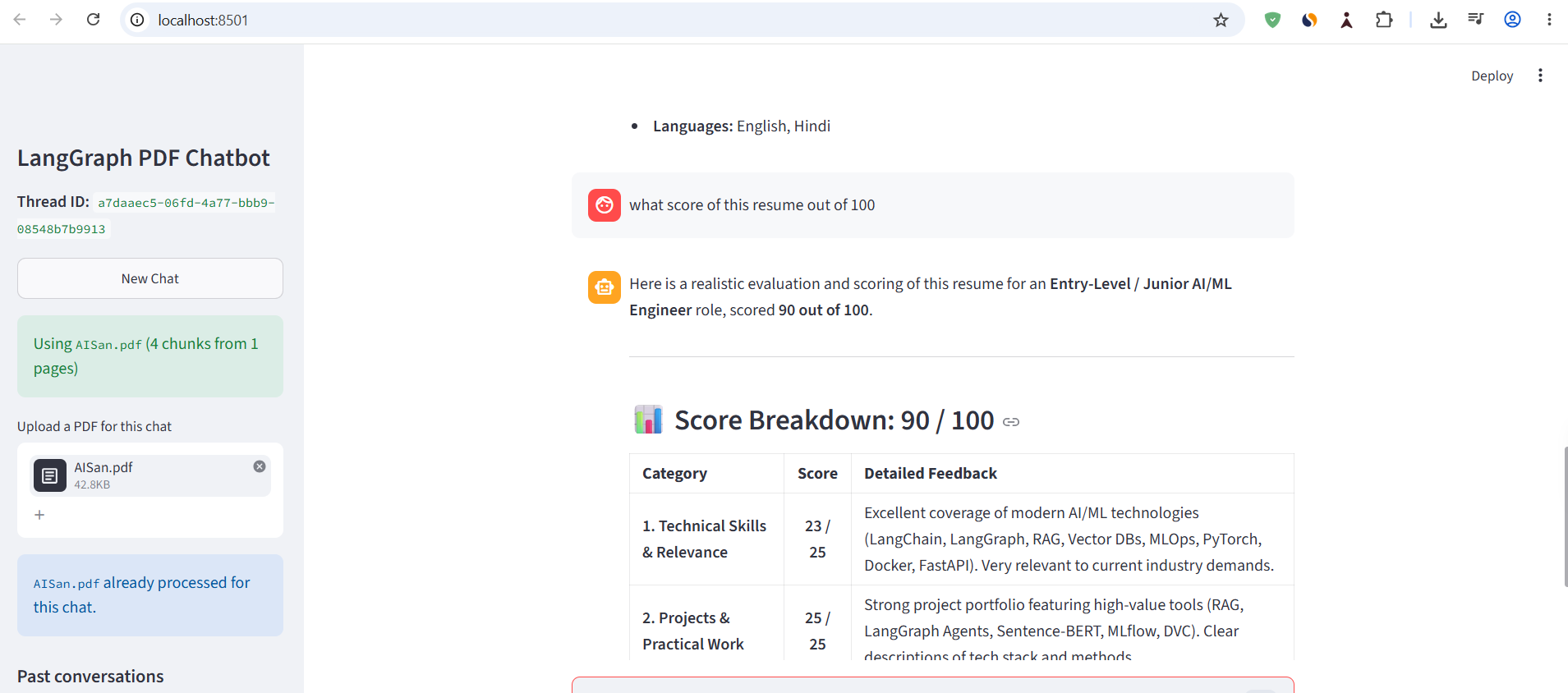
| GitHub Link with UI Code | Click Here |
| Follow Me LinkedIn | Click Here |
One of the most important tools in an AI agent is Retrieval-Augmented Generation (RAG).
Instead of depending entirely on the Large Language Model’s training data, a RAG system retrieves relevant information from external knowledge sources such as PDFs, databases, or company documents before generating a response.
In this tutorial, we’ll build a Multi-Utility RAG Chatbot using LangGraph that allows users to:
- Upload PDF documents
- Ask questions about those documents
- Retrieve the most relevant information automatically
- Generate accurate answers grounded in the uploaded files
- Use RAG as just another tool inside an Agentic AI workflow
By the end of this article, you’ll understand how LangGraph enables an AI agent to intelligently decide when it should search a document and when it should simply answer using its own knowledge.
Why Do We Need RAG? #
Although modern LLMs such as GPT-4o, Claude, and Gemini are extremely capable, they still suffer from several important limitations.
1. Knowledge Cutoff #
Every LLM is trained on data available only until a certain date.
This means the model has no knowledge of:
- today’s news
- recent research papers
- updated laws
- latest documentation
- newly released software
RAG solves this problem by retrieving information from external sources before generating the answer.
2. Private Documents #
Suppose you have:
- company financial reports
- internal documentation
- medical records
- research papers
- personal notes
- university lecture PDFs
These documents are not part of the LLM’s training data.
A normal chatbot cannot answer questions about them.
RAG securely connects your private documents to the language model without requiring model retraining.
3. Hallucination #
LLMs occasionally produce incorrect answers while sounding highly confident.
This phenomenon is called hallucination.
Instead of relying only on the model’s memory, RAG provides relevant context from trusted documents.
The model is therefore encouraged to answer using retrieved evidence rather than inventing facts.
What is Retrieval-Augmented Generation (RAG)? #
Retrieval-Augmented Generation combines two systems:
- Retriever → Finds relevant information
- Generator (LLM) → Produces the final response
Instead of asking:
“Answer this question.”
we ask:
“Here is the relevant context. Now answer using only this information.”
This dramatically improves factual accuracy.
The Core Principle: In-Context Learning #
RAG works because of In-Context Learning.
Rather than permanently changing the model, we temporarily provide additional information inside the prompt.
For example:
Question:
What is Gradient Descent?

Relevant Context:
Gradient Descent is an optimization algorithm...

Answer:
...
The model now answers using both:
- its pretrained knowledge
- the retrieved context
Why Can’t We Send the Entire PDF? #
Large Language Models have a limited context window.
Examples:
- 8K tokens
- 32K tokens
- 128K tokens
A 300-page PDF may contain hundreds of thousands of tokens.
Sending the complete document with every query would:
- increase cost
- increase latency
- exceed the model’s context limit
Instead, RAG retrieves only the most relevant sections.
RAG Architecture #
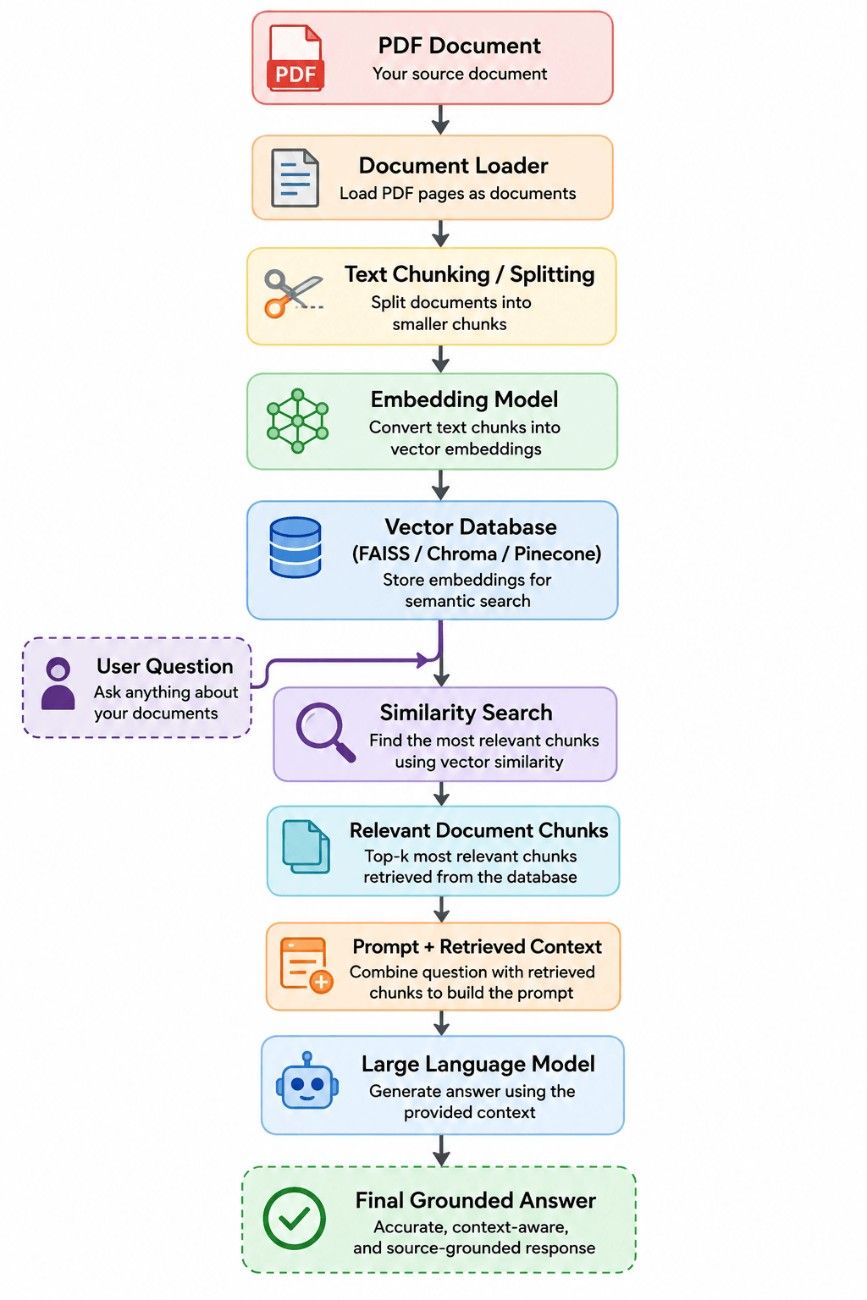
Step 1: Loading the PDF #
We first load the PDF using LangChain’s PyPDFLoader.
from langchain_community.document_loaders import PyPDFLoader

loader = PyPDFLoader("intro-to-ml.pdf")
docs = loader.load()

print(len(docs))
Each page becomes a Document object containing:
- page content
- page number
- metadata
Step 2: Splitting Large Documents #
Large pages are divided into smaller chunks.
from langchain.text_splitter import RecursiveCharacterTextSplitter

splitter = RecursiveCharacterTextSplitter(
    chunk_size=1000,
    chunk_overlap=200
)

chunks = splitter.split_documents(docs)
Why overlap?
Chunk 1
------------------------
Machine Learning is...

Chunk 2
            continues...
The overlap preserves context between neighboring chunks.
Step 3: Creating Embeddings #
Text cannot be searched efficiently.
Instead, every chunk is converted into a numerical vector.
from langchain_openai import OpenAIEmbeddings

embeddings = OpenAIEmbeddings(
    model="text-embedding-3-small"
)
Embeddings capture semantic meaning.
For example:
Dog
↓

[0.13, -0.25, 0.71, ...]

Cat
↓

[0.12, -0.24, 0.69, ...]
Similar meanings produce similar vectors.
Step 4: Storing Embeddings in FAISS #
Now we create a vector database.
from langchain_community.vectorstores import FAISS

vector_store = FAISS.from_documents(
    chunks,
    embeddings
)
FAISS stores vectors for efficient similarity search.
Step 5: Creating a Retriever #
The retriever searches the vector database.
retriever = vector_store.as_retriever(
    search_type="similarity",
    search_kwargs={"k":4}
)
Whenever a user asks a question:
Question

↓

Embedding

↓

Similarity Search

↓

Top 4 Relevant Chunks
Only those chunks are passed to the LLM.
Step 6: Turning RAG into a LangGraph Tool #
Instead of calling the retriever directly, we wrap it as a tool.
from langchain_core.tools import tool

@tool
def rag_tool(query):
    """
    Retrieve relevant information from the PDF document.
    """

    result = retriever.invoke(query)

    context = [doc.page_content for doc in result]
    metadata = [doc.metadata for doc in result]

    return {
        "query": query,
        "context": context,
        "metadata": metadata
    }
This makes retrieval available to the AI agent whenever needed.
Why Implement RAG as a Tool? #
Imagine your AI assistant also has:
- Calculator
- Weather API
- Web Search
- Stock Price API
- MCP Server
- SQL Database
- PDF Search
The agent should decide which tool is appropriate.
For example:
User: What is today’s Tesla stock price? Use: Stock Tool
User: Explain KNN from my uploaded notes. Use: RAG Tool
This is precisely what LangGraph enables.
Step 7: Binding Tools to the LLM #
tools = [rag_tool]

llm_with_tools = llm.bind_tools(tools)

Now the model knows that a retrieval tool exists and can call it when appropriate.
Step 8: Defining the Graph State #
class ChatState(TypedDict):
    messages: Annotated[
        list[BaseMessage],
        add_messages
    ]
The state stores the ongoing conversation history.
Step 9: Creating the Chat Node #
def chat_node(state):

    messages = state["messages"]

    response = llm_with_tools.invoke(messages)

    return {
        "messages":[response]
    }
This node is responsible for:
- understanding user intent
- deciding whether to call a tool
- generating responses
Step 10: Creating the Tool Node #
tool_node = ToolNode(tools)
Whenever the LLM requests a tool, this node executes it.
Step 11: Building the LangGraph Workflow #
graph = StateGraph(ChatState)

graph.add_node("chat_node", chat_node)
graph.add_node("tools", tool_node)

graph.add_edge(START, "chat_node")

graph.add_conditional_edges(
    "chat_node",
    tools_condition
)

graph.add_edge(
    "tools",
    "chat_node"
)

chatbot = graph.compile()
Workflow:
          START
             │
             ▼
       Chat Node
             │
   Tool Needed?
      /      \
    Yes      No
    │          │
    ▼          ▼
 Tool Node   Final Answer
    │
    ▼
 Chat Node
    │
    ▼
 Final Answer
Running the Chatbot #
result = chatbot.invoke(
    {
        "messages":[
            HumanMessage(
                content="""
Using the PDF notes,
explain how to find the ideal
value of K in KNN.
"""
            )
        ]
    }
)

print(result["messages"][-1].content)
The agent automatically decides that it needs the RAG tool, retrieves the relevant sections from the PDF, and generates a grounded explanation.
Visualizing Execution with LangSmith #
This transparency helps debug tool usage, verify retrieved context, and optimize agent performance.
Multi-Utility Agent Architecture #
Because RAG is implemented as a tool, it integrates seamlessly with other capabilities.
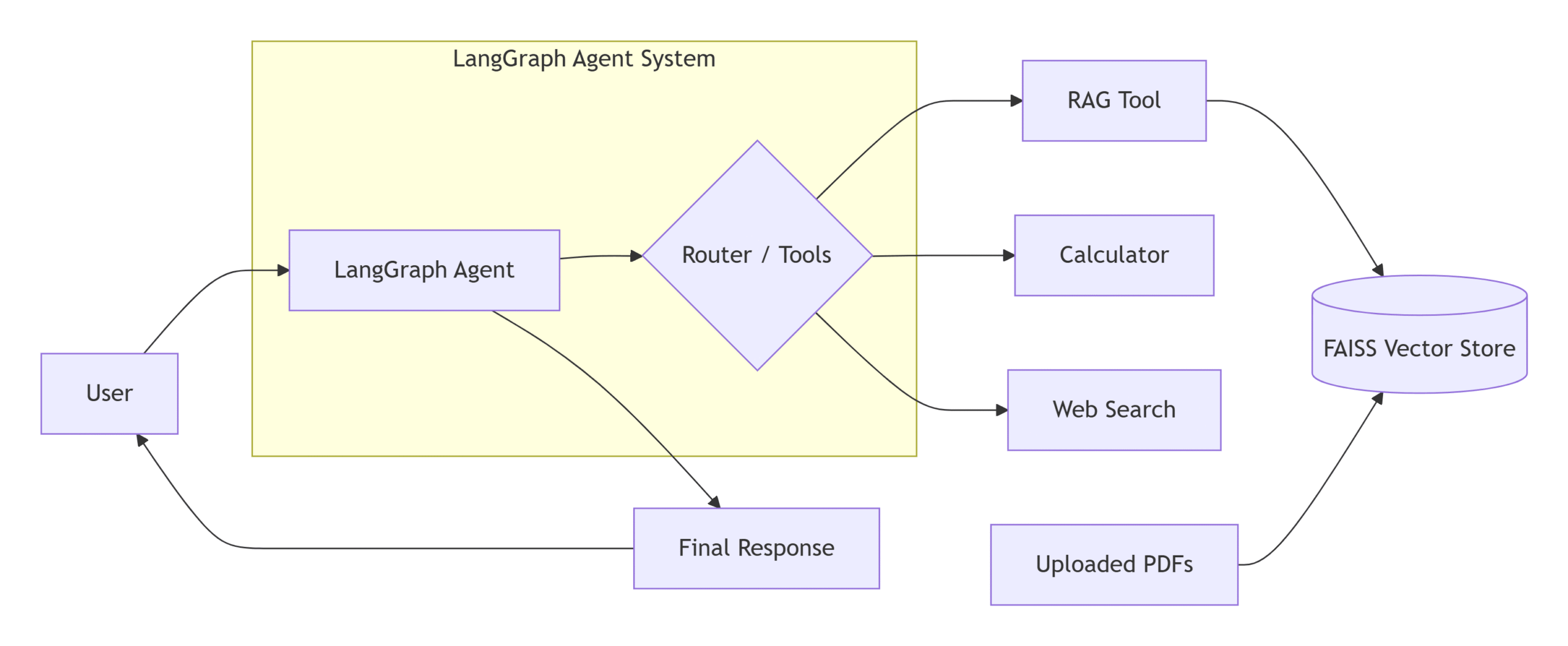
The same chatbot can:
- answer general knowledge questions
- search uploaded PDFs
- solve mathematical calculations
- query external APIs
- access MCP tools
- perform web searches
without changing the overall architecture.
Advantages of This Approach #
- Modular and extensible design
- Reduced hallucinations through grounded retrieval
- Secure access to private documents
- Efficient semantic search using embeddings
- Intelligent tool selection with LangGraph
- Easy integration with additional tools such as MCP servers, SQL databases, search engines, and calculators
- Transparent execution tracing with LangSmith
Conclusion #
Retrieval-Augmented Generation is one of the most practical techniques for building reliable AI applications. By combining semantic search with a Large Language Model, we can create assistants that answer questions using private, domain-specific knowledge instead of relying solely on pretrained data.
LangGraph takes this idea a step further by treating RAG as a tool within an agentic workflow. Rather than hard-coding retrieval into every request, the agent decides when document search is necessary and when another capability—such as a calculator, web search, or external API—is more appropriate.
This modular architecture makes the chatbot significantly more powerful, scalable, and maintainable. As your application grows, you can continue adding new tools without redesigning the core workflow, enabling a single AI assistant to handle general conversations, document analysis, real-time data retrieval, and specialized business tasks within the same interaction.
Quiz #
Q.1 What is the primary purpose of Retrieval-Augmented Generation (RAG) in the context of Large Language Models?
To increase the training speed of the base model.
To replace the LLM with a rule-based search engine.
To compress the model so it can run on mobile devices.
To provide the model with external, up-to-date, or private knowledge that was not included during training.
Explanation
RAG augments an LLM with external knowledge retrieved at inference time, allowing it to answer questions using recent, domain-specific, or private information without retraining the model.
Q.2 How does RAG help reduce hallucinations in LLM responses?
It deletes responses containing broken links.
It retrains the model for every user query.
It increases the model's temperature.
It grounds the response using retrieved evidence supplied in the prompt.
Explanation
RAG retrieves relevant information from trusted sources and provides it to the LLM, encouraging the model to generate answers based on factual evidence instead of relying only on its internal knowledge.
Q.3 Why is Retrieval-Augmented Generation often preferred over continually retraining an LLM?
Retraining is unnecessary because LLMs never become outdated.
RAG updates the model's neural network automatically.
Retraining large models is expensive and time-consuming, whereas RAG can access new knowledge instantly.
RAG completely replaces embeddings.
Explanation
Retraining foundation models requires significant computational resources and time. RAG allows models to use newly available information immediately by retrieving documents at inference time instead of retraining the model.
Q.4 Why is document chunking necessary before storing documents in a vector database?
To fit within the LLM's context window and retrieve only the most relevant sections.
To encrypt the documents.
Because vector databases only store files smaller than 1 MB.
To eliminate the need for embeddings.
Explanation
Documents are split into smaller chunks so they fit within context limits and allow similarity search to retrieve only the most relevant pieces instead of entire documents.
Q.5 What is the role of an Embedding Model in a RAG pipeline?
It provides the chatbot interface.
It summarizes documents.
It translates documents into another language.
It converts text into numerical vectors representing semantic meaning.
Explanation
Embedding models transform text into high-dimensional vectors so semantically similar documents and queries are positioned close together in vector space for efficient retrieval.
Q.6 How is RAG integrated into a LangGraph agentic workflow?
It always runs before every response.
It is implemented as a separate LLM.
It replaces conversation memory.
It is exposed as a tool that the agent can invoke whenever external document knowledge is required.
Explanation
In LangGraph, RAG is commonly implemented as a Tool. The agent decides whether document retrieval is necessary before generating its final answer.
Q.7 Why is a Vector Store such as FAISS or Chroma used in a RAG system?
To permanently store user conversations.
To efficiently retrieve document chunks that are semantically similar to a query.
To host the chatbot frontend.
To automatically fix grammar mistakes.
Explanation
Vector stores index embeddings and perform efficient similarity search, enabling rapid retrieval of the document chunks that best match the user’s question.
Q.8 Why is chunk overlap commonly used during document splitting?
To preserve context when information spans across chunk boundaries.
To make embeddings faster.
To increase vector database storage for better performance.
To encrypt document contents.
Explanation
Chunk overlap duplicates a small portion of neighboring text between adjacent chunks, helping preserve context when important information crosses chunk boundaries.
Q.9 After the Tool Node completes RAG retrieval in a LangGraph workflow, what happens next?
Control returns to the Chat Node so the LLM can generate the final answer using the retrieved context.
The retrieved text is sent directly to the user.
The vector database is cleared.
The workflow terminates immediately.
Explanation
The retrieved documents are returned to the Chat Node, where the LLM combines the retrieved evidence with the user’s question to produce a grounded final answer.
Q.10 What is Metadata in the context of retrieved document chunks?
Random text added to increase context length.
Additional information such as page numbers, filenames, authors, or document sources that helps provide traceable and informative responses.
The embedding model's source code.
An encrypted version of the document.
Explanation
Metadata contains descriptive information associated with document chunks, such as source filename, page number, title, author, or timestamp, enabling the LLM to generate more trustworthy and citeable responses.


