This tenth installment of our Agentic AI series focuses on a critical pillar of production-grade AI: Observability. As your LangGraph workflows move from simple chains to complex, autonomous agents, identifying why a system is slow, expensive, or hallucinating becomes a major challenge. LangSmith is the unified platform designed to solve these “black box” problems by providing deep insights into every step of your LLM application.
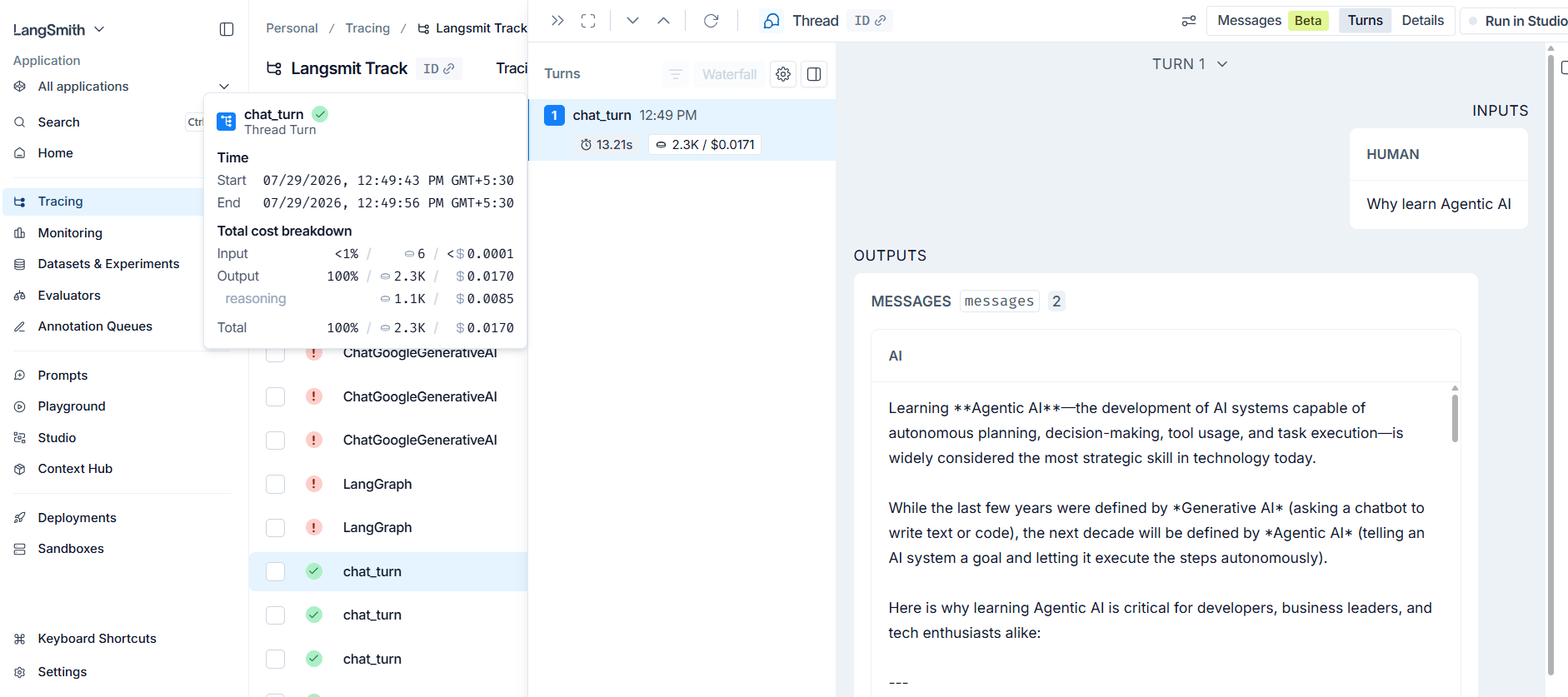
1. The Problem: The Non-Deterministic Black Box #
Traditional software is deterministic—given the same input, it always produces the same output. LLM-based systems are non-deterministic; the same prompt can yield different results each time. Furthermore, complex workflows (like RAG or Multi-Agent systems) involve multiple stages, making it nearly impossible to identify the “culprit” when something goes wrong.
Common Production Challenges: #
- Latency Spikes: A workflow that usually takes 2 seconds suddenly takes 10. Without observability, you cannot tell which node (e.g., PDF loading vs. LLM reasoning) is slow.
- Cost Spikes: An agent might enter an infinite loop or use a more expensive model than intended.
- Hallucinations: In RAG systems, it is difficult to know if a bad answer was caused by the Retriever (fetching the wrong data) or the Generator (the LLM ignoring context).
2. Core Concepts: Projects, Traces, and Runs #
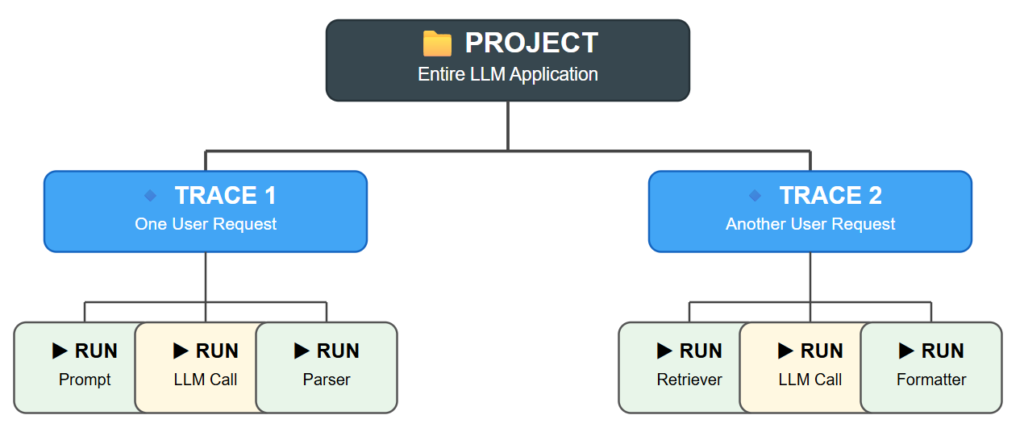
To use LangSmith effectively, you must understand its three foundational hierarchical layers:
- Project: This represents your entire LLM application. For example, if you build a research assistant or a hiring platform, that whole system is defined as a project in LangSmith.
- Trace: A trace is a single end-to-end execution of your project. Every time a user interacts with your application (e.g., asking one question and getting one final answer), that entire journey is recorded as one trace.
- Run: A trace is composed of multiple Runs. A run represents the execution of an individual component within your workflow. For instance, a single trace might contain separate runs for a prompt template, the LLM call itself, and an output parse
Summary Table
| Concept | Scope | Example |
|---|---|---|
| Project | The entire application. | “Customer Support Chatbot” |
| Trace | One full execution (Input to Output). | One user asking: “What is my leave balance?” |
| Run | A single step or component within an execution. | The specific step where the LLM processes the prompt. |
3. Integrating LangSmith with LangGraph #
Because LangGraph and LangSmith are developed by the same team, they are tightly coupled. In a LangGraph execution:
- The Entire Graph becomes one Trace.
- Each Node in your graph becomes a Run.
- Logic Visualization: LangSmith allows you to see exactly which path your agent took through conditional edges or loops.
4. Implementation Guide: Setting Up Observability #
Step 1: Environment Configuration #
You do not need to change your core logic to enable basic tracing. You simply set specific environment variables in your .env file.
LANGCHAIN_TRACING_V2=true
LANGCHAIN_ENDPOINT="https://api.smith.langchain.com"
LANGCHAIN_API_KEY="your_langsmith_api_key"
LANGCHAIN_PROJECT="My-LangGraph-Project"
Step 2: Tracing Custom Python Functions #
While LangGraph nodes are traced automatically, you may have standard Python functions (like PDF loaders) that are not part of a LangChain “runnable.” You can trace these using the @traceable decorator.
from langsmith import traceable

@traceable(name="Load_PDF_Component")
def load_pdf(path: str):
    # Your custom loading logic
    return documents
Step 3: Adding Metadata and Tags #
For better searching and auditing, you can attach custom tags or metadata to your traces during invocation.
config = {
    "configurable": {"thread_id": "user_123"},
    "tags": ["production", "v1.2"],
    "metadata": {"user_plan": "premium", "region": "us-east"}
}
app.invoke(inputs, config=config)
5. Beyond Tracing: Advanced LangSmith Features #
| Feature | Description |
|---|---|
| Monitoring | Aggregates data across thousands of traces to track average latency, error rates, and total cost. |
| Alerting | Automatically notifies your team if latency exceeds a threshold (e.g., > 5 seconds) or if the error rate spikes. |
| Evaluation | Allows you to benchmark your agent against “Gold Standard” datasets using LLM-as-a-judge to score quality and relevance. |
| Playground | A web interface to A/B test different prompts or models side-by-side to see which performs better on the same input. |
| Dataset Creation | You can “cherry-pick” a real-world trace and add it to a dataset for future testing or fine-tuning. |
Summary: The Impact of Observability
Implementing LangSmith transforms your AI development from “guessing” to “engineering”. By converting your system from a Black Box to a White Box, you gain the ability to debug at a granular level, optimize costs, and ensure your agents remain reliable as they scale.
Q.1 What is the primary function of a Trace in the LangSmith platform?
A single end-to-end execution of an LLM application.
A database for storing vector embeddings.
A specific component within a chain, such as an LLM call.
The set of all logs for a specific user over one month.
Explanation
A Trace represents the complete execution of an LLM application from start to finish, capturing every step involved in processing a single request.
Q.2 Why do LLM-based systems require observability more than traditional software?
LLMs are strictly deterministic.
LLM code is written in special programming languages.
LLMs are non-deterministic, meaning identical inputs can produce different outputs.
LLMs always consume more GPU memory.
Explanation
Unlike traditional deterministic programs, LLMs may generate different responses for the same input. Observability helps developers understand and debug these unpredictable behaviors.
Q.3 In LangSmith, what is a Run?
A collection of multiple traces.
The application's uptime.
The execution of an individual component or step within a trace.
A scheduled model-training job.
Explanation
A Run represents a single operation within a Trace, such as an LLM call, retriever execution, prompt formatting step, or tool invocation.
Q.4 Which decorator is used to trace ordinary Python functions that are not LangChain Runnables?
@traceable
@langchain_log
@observe
@api_monitor
Explanation
The @traceable decorator enables LangSmith to monitor and record executions of normal Python functions alongside LangChain components.
Q.5 When debugging a hallucinating RAG system, how does LangSmith help determine whether the Retriever is responsible?
It compares answers with an encyclopedia.
It increases the LLM temperature.
It lets developers inspect the exact retrieved documents.
It automatically rewrites the user's query.
Explanation
LangSmith displays the retrieved documents, allowing developers to verify whether the retriever supplied accurate and relevant context before the LLM generated its response.
Q.6 If a RAG application is slow because it rebuilds the vector index on every request, what solution is demonstrated?
Save the index to disk and reload it when the source file hasn't changed.
Convert PDFs into plain text.
Use a smaller embedding model.
Increase the number of retrieved documents.
Explanation
Persisting the vector index prevents unnecessary re-indexing, significantly reducing response time by reusing previously created embeddings.
Q.7 How does LangSmith represent a LangGraph workflow in its interface?
The graph is represented as a Trace, and each node execution appears as a Run.
Each node is stored as a separate Project.
The entire graph is shown as one Run.
Each edge becomes a Trace.
Explanation
A complete LangGraph execution is recorded as a Trace, while each node execution inside the graph appears as an individual Run within that trace.
Q.8 In an agentic workflow, what does the Scratchpad trace display?
The evolving history of the agent's reasoning, actions, and observations.
Unused tools available to the agent.
Developer notes.
A coding playground.
Explanation
The Scratchpad captures the agent’s intermediate reasoning, tool calls, observations, and decisions, making complex agent behavior easier to understand and debug.
Q.9 What is the difference between Observability and Monitoring in LangSmith?
Observability analyzes individual traces, while Monitoring examines trends across many traces.
Observability measures cost only.
They are identical concepts.
Monitoring is only for end users.
Explanation
Observability helps investigate individual executions in detail, whereas Monitoring aggregates metrics across many traces to identify trends, failures, latency, and production health.
Q.10 Which LangSmith feature supports A/B testing of prompts and models?
Prompt Experimentation.
Alerting System.
User Feedback Integration.
Traceable Decorator.
Explanation
Prompt Experimentation allows developers to compare prompts and models in the Playground, making it easy to identify which version performs best.
Q.11 What is the main benefit of using the 'LLM as a Judge' evaluation approach?
It replaces vector databases.
It guarantees perfect AI outputs.
It uses a powerful LLM to automatically evaluate outputs using predefined criteria.
It provides legal AI compliance.
Explanation
LLM as a Judge automates evaluation by scoring outputs based on factors such as correctness, relevance, helpfulness, and quality without requiring constant human review.
Q.12 How does LangSmith improve collaboration among development teams?
By allowing traces to be shared through URLs for collaborative debugging.
By enabling live collaborative coding.
By automatically creating GitHub issues.
By providing an internal chat application.
Explanation
Developers can generate shareable links to traces so teammates can inspect the exact execution, making debugging and collaboration much easier.
Q.13 Why can setting n=1 for retrieved documents be problematic in a RAG application?
It slows embedding generation.
It immediately exceeds the context window.
A single retrieved document may not provide enough context for accurate answers.
Vector databases require at least five documents.
Explanation
Retrieving only one document may omit important context, increasing the chances of incomplete or hallucinated answers from the LLM.
Q.14 What happens when you add a trace to a Dataset in LangSmith?
The trace becomes a reusable dataset example for testing and evaluation.
The trace is permanently deleted.
OpenAI automatically retrains the model.
An additional storage invoice is generated.
Explanation
Datasets allow traces to be reused for regression testing, evaluations, benchmarking, prompt experimentation, and future quality improvements.
Q.15 What metadata is automatically included in LangSmith traces when using LangChain?
The physical location of the server.
The application's complete source code.
Sensitive user payment information.
Information such as the LangChain version and related software dependencies.
Explanation
LangSmith automatically records useful metadata such as LangChain versions and environment information, making debugging and reproducibility easier.


