In the journey of building RAG (Retrieval-Augmented Generation) applications, after loading your documents, the next critical step is Text Splitters. This guide, based on the CampusX series, explores how to break down large documents into manageable “chunks” to ensure your LLM performs effectively and accurately.
1. What is Text Splitting? #
Text Splitting is the process of breaking large pieces of text—such as articles, PDFs, or books—into smaller, manageable pieces called chunks.
The code that performs this operation is called a Text Splitter. In a standard RAG workflow, you connect a Document Loader to a Text Splitter, which then outputs a list of smaller Document objects.
2. Why Do We Need Text Splitters? #
There are three major reasons why you should never feed an entire large document into an LLM at once:
- Context Length Limits: Every LLM has a maximum input size (e.g., 50,000 tokens). If your PDF has 100,000 words, you will breach the model’s threshold and fail to process the document.
- Output Quality: LLMs perform better with smaller, focused contexts. Large texts can cause the model to “drift” or even hallucinate information that isn’t in the document.
- Better Embeddings & Search: It is difficult to capture the semantic meaning of a huge document in a single vector. Breaking text into chunks (e.g., one chunk per IPL team) allows embedding models to capture specific meanings more precisely, leading to more accurate Semantic Search.
- Resource Optimization: Smaller chunks are more memory-efficient and allow for better parallelization during processing.
3. Key Concepts: Size and Overlap #
When configuring a splitter, you will interact with two main parameters:
- chunk_size: The maximum number of units (characters or tokens) in each chunk.
- chunk_overlap: The number of characters shared between two consecutive chunks. This is crucial for retaining context that might otherwise be lost if a sentence or word is cut off mid-way.
- Best Practice: For RAG applications, an overlap of 10% to 20% of the chunk size is generally recommended.
4. Types of Text Splitters #
A. Length-Based (CharacterTextSplitter)
The simplest method. It traverses the text and creates a split once the chunk_size is reached, regardless of the text’s structure.
- Pros: Very fast and simple.
- Cons: Often cuts off text in the middle of words or sentences, losing semantic meaning.
from langchain_text_splitters import CharacterTextSplitter

splitter = CharacterTextSplitter(
    chunk_size=100,
    chunk_overlap=20,
    separator=""
)
chunks = splitter.split_text(your_text)
print(chunks)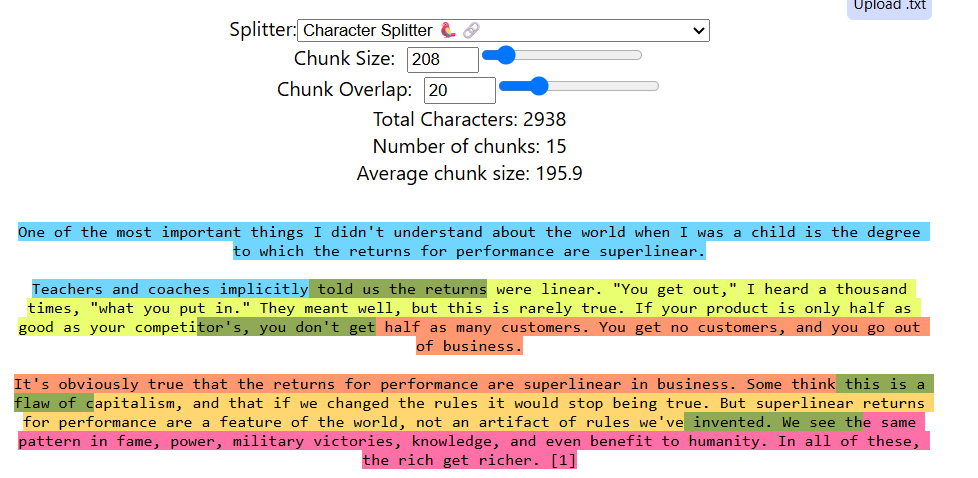
- More Experiments: chunkviz.up.railway.app
B. Text Structure-Based (RecursiveCharacterTextSplitter)
This is the most recommended and widely used splitter. It tries to keep related pieces of text together by splitting based on a hierarchy of separators:
- Double Newlines (Paragraphs)
- Single Newlines (Sentences)
- Spaces (Words)
- Characters
It only moves down the hierarchy if a chunk is still too large, ensuring your text is rarely cut mid-word or mid-sentence.
from langchain_community.document_loaders import PyPDFLoader
from langchain_text_splitters import RecursiveCharacterTextSplitter


# 1. Give the path of your PDF here
loader = PyPDFLoader("data/curriculum.pdf")

# 2. Load the PDF
docs = loader.load()


# 3. Create the text splitter
splitter = RecursiveCharacterTextSplitter(
    chunk_size=300,
    chunk_overlap=30
)


# 4. Split the loaded documents
chunks = splitter.split_documents(docs)


# 5. Print the chunks
for i, chunk in enumerate(chunks):
    print(f"\n--- Chunk {i + 1} ---")
    print(chunk.page_content)
    print("Metadata:", chunk.metadata)
C. Specialized Document Splitters (Code & Markdown)
For non-plain text documents like Python code or Markdown, standard paragraph splitting doesn’t work. These splitters use specific keywords (like class or def in Python) to split logic intelligently.
# Import the recursive text splitter and supported programming languages
from langchain_text_splitters import (
    RecursiveCharacterTextSplitter,
    Language
)

# Create a text splitter specifically designed for Python code
# It uses Python-specific separators to avoid breaking code unnecessarily
splitter = RecursiveCharacterTextSplitter.from_language(
    language=Language.PYTHON,

    # Maximum size of each chunk
    chunk_size=500,

    # Number of characters repeated between consecutive chunks
    # This helps preserve context between chunks
    chunk_overlap=50
)

# Python source code that we want to split
code = """
class Student:
    def __init__(self, name):
        self.name = name

    def get_name(self):
        return self.name

student = Student("Sanjit")
print(student.get_name())
"""

# Split the Python code into smaller chunks
chunks = splitter.split_text(code)

# Loop through all generated chunks
for i, chunk in enumerate(chunks):

    # Print the chunk number
    print(f"--- Chunk {i+1} ---")

    # Print the actual Python code inside the chunk
    print(chunk)
D. Semantic Meaning-Based (SemanticChunker)
This is an experimental approach that doesn’t use length or structure. Instead, it uses Embeddings to compare consecutive sentences.
# ============================================================
# Install the required packages before running this code
# ============================================================

# Using uv:
# uv add langchain_experimental
# uv add langchain_huggingface
# uv add sentence-transformers

# OR using pip:
# pip install langchain_experimental
# pip install langchain_huggingface
# pip install sentence-transformers

# These packages should be installed inside your virtual environment.
#
# This example uses the FREE Hugging Face embedding model:
# sentence-transformers/all-MiniLM-L6-v2
#
# You can also use other embedding providers/models such as
# OpenAI or Google, but those may require an API key and/or
# paid usage depending on the model/service.


# ============================================================
# Import required classes
# ============================================================

# SemanticChunker splits text based on semantic/meaning changes
from langchain_experimental.text_splitter import SemanticChunker

# HuggingFaceEmbeddings allows us to use a Hugging Face
# Sentence Transformer model to convert text into embeddings
from langchain_huggingface import HuggingFaceEmbeddings


# ============================================================
# Create the embedding model
# ============================================================

# The embedding model converts each sentence into a vector
# representation that captures its semantic meaning.
#
# all-MiniLM-L6-v2 is a relatively small and commonly used
# sentence-transformer model and can run locally.
embeddings = HuggingFaceEmbeddings(
    model_name="sentence-transformers/all-MiniLM-L6-v2"
)


# ============================================================
# Create the SemanticChunker
# ============================================================

# SemanticChunker compares the semantic similarity between
# sentences and tries to create a new chunk when there is
# a significant change in meaning/topic.
splitter = SemanticChunker(
    embeddings,

    # "percentile" determines semantic breakpoints based
    # on the distribution of similarity/distance values.
    breakpoint_threshold_type="percentile"
)


# ============================================================
# Create sample document
# ============================================================

text = """
Python is a popular programming language.
It is widely used in data science and machine learning.
Libraries such as NumPy and Pandas are commonly used.

The stock market changes every day.
Investors analyze economic conditions before making decisions.
"""


# ============================================================
# Split the document into semantic chunks
# ============================================================

# create_documents() converts the text into LangChain
# Document objects and performs semantic chunking.
chunks = splitter.create_documents([text])


# ============================================================
# Display the generated chunks
# ============================================================

# enumerate() gives us both the chunk number and the chunk itself.
for i, chunk in enumerate(chunks):

    # Display the chunk number
    print(f"Chunk {i+1}:")

    # page_content contains the actual text of the chunk
    print(chunk.page_content)

    # Print an empty line for better readability
    print()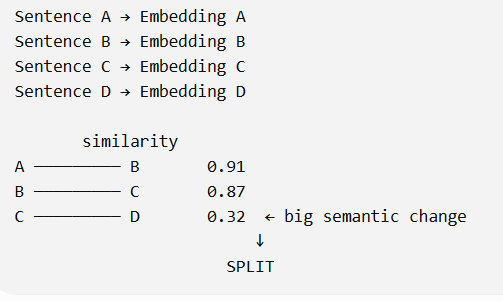

- How it works: It calculates the similarity between sentences. When the similarity drops significantly (using a threshold like percentile), it identifies a “topic change” and performs a split.
- Status: Currently experimental and may not always yield satisfying or accurate results compared to recursive splitting.
LLM-Based Text Splitter #
In RAG applications, large documents need to be divided into smaller chunks before they can be stored and retrieved efficiently. Instead of using a fixed-size text splitter, we can use an LLM-based text splitter to identify natural topic boundaries.
from langchain_openai.chat_models import ChatOpenAI
from pydantic import BaseModel
from langchain_core.documents import Document
from dotenv import load_dotenv
from langchain_core.prompts import ChatPromptTemplate

# Load environment variables
load_dotenv()

# Sample text
text = """Artificial intelligence is transforming technology and shaping the future.
Machine learning algorithms are becoming more sophisticated every day.
Deep learning models can now process vast amounts of data efficiently.
Neural networks are inspired by the human brain's structure.
The best pasta recipes include fresh ingredients and proper cooking techniques.
Italian cuisine emphasizes quality olive oil and regional cheeses.
Authentic carbonara uses guanciale, eggs, pecorino romano, and black pepper.
Cooking pasta al dente ensures the best texture and flavor.
Climate change is affecting ecosystems worldwide.
Rising temperatures are causing glaciers to melt at unprecedented rates.
Scientists warn that immediate action is needed to reduce carbon emissions.
Renewable energy sources offer hope for a sustainable future."""

# Structured output
class Chunk(BaseModel):
    chunk_text: str
    summary: str


class Chunker(BaseModel):
    chunks: list[Chunk]


# Define model
model = ChatOpenAI(model="gpt-5-mini")

llm_chunker = model.with_structured_output(
    schema=Chunker
)

# Chunking prompt
prompt = ChatPromptTemplate(messages=[
    (
        "system",
        """You are an expert Text Chunker that splits the given text
        and outputs them as a list of strings.

        You understand the natural topic boundaries of text
        and also do not change the existing text.

        You just split the text wherever applicable.

        Once you create the chunk, you also generate
        a 1-2 line summary of the chunk also"""
    ),
    (
        "human",
        "Split the given text into chunks\nText: {text}"
    )
], input_variables=["text"])

# Create chain
model_chain = prompt | llm_chunker

# Generate chunks
response = model_chain.invoke({
    "text": text
})

# Extract chunks
chunks = response.chunks

# Convert to LangChain Documents
docs = [
    Document(
        page_content=chunk.chunk_text,
        metadata={
            "summary": chunk.summary
        }
    )
    for chunk in chunks
]
5. Summary Table #
| Splitter Type | Best For | Logic |
|---|---|---|
| Character | Simple, fast tasks | Splits text using a strict character count. |
| Recursive | Standard RAG | Hierarchical splitting: Paragraph → Sentence → Word. |
| Code / Markdown | Programming files & documentation | Uses language- or format-specific separators and structure. |
| Semantic | Topic-based splitting | Uses embedding similarity to identify changes in meaning or topic. |
| LLM-Based | Context-aware RAG | Uses an LLM to understand natural topic boundaries and create meaningful chunks. |
| LLM-Based + Summary | Advanced RAG | LLM creates topic-based chunks and generates a summary for each chunk as metadata. |
Text Splitters Quiz #
Q.1 What is the primary objective of using a 'Text Splitter' in the context of Large Language Model (LLM) applications?
To remove stop words and perform lemmatization on raw text data.
To break down large documents into smaller, manageable chunks that an LLM can process effectively.
To compress text data to reduce the storage space required in a vector database.
To translate large documents into multiple languages simultaneously.
Explanation
Text Splitters divide large documents into smaller chunks so they fit within an LLM’s context window and can be processed efficiently while preserving important information.
Q.2 Why is text splitting considered crucial for improving the quality of text embeddings?
Large documents automatically crash embedding models regardless of their content.
It is easier to capture the precise semantic meaning of a small chunk than a very large, multi-topic document.
It eliminates the need for using an embedding model entirely.
It allows the embedding model to generate higher-dimensional vectors.
Explanation
Embedding models create one vector for the entire input. Smaller, focused chunks produce embeddings that better represent a specific topic or concept, improving retrieval quality.
Q.3 An LLM has a context length limit of 50,000 tokens. If you attempt to summarize a PDF containing 100,000 tokens without splitting, what is the most likely outcome?
The LLM will automatically compress the 100,000 tokens into 50,000.
The LLM will process the entire document but take twice as long.
The input will exceed the threshold, likely resulting in an error or truncated information.
The LLM will ignore the limit if the hardware has enough RAM.
Explanation
Every LLM has a fixed context window. If the input exceeds this limit, the request will either fail or the excess text will be truncated, causing information loss.
Q.4 What is the primary purpose of the 'chunk overlap' parameter in text splitting?
To create duplicate data to ensure the LLM doesn't forget the text.
To encrypt the boundaries between chunks for security purposes.
To maintain semantic context between adjacent chunks and prevent abrupt cuts in the middle of sentences.
To reduce the total number of chunks generated from a document.
Explanation
Chunk overlap repeats a small portion of text between neighbouring chunks, helping preserve context and reducing the chance of splitting important ideas across chunk boundaries.
Q.5 Which of the following best describes the logic used by the 'Recursive Character Text Splitter'?
It splits text only based on a fixed character count regardless of punctuation.
It uses a hierarchy of separators like paragraphs (\n\n), lines (\n), and spaces to keep related text together.
It only works for programming languages and cannot process plain English.
It randomly selects split points to ensure a diverse distribution of data.
Explanation
Recursive Character Text Splitter attempts to split using larger separators such as paragraphs first, then lines, spaces, and finally characters if necessary, preserving as much semantic structure as possible.
Q.6 In LangChain, if you are working with a Python source file, how should you initialize a recursive splitter for the best results?
Use the standard splitter with the separator set to 'Python'.
Use the from_language method with Language.PYTHON to use code-specific separators like class and def.
Code cannot be split and must be fed to the LLM as a single chunk.
Manually insert split markers in the code before processing.
Explanation
LangChain provides RecursiveCharacterTextSplitter.from_language(Language.PYTHON), which uses Python-aware separators such as class and def to create more meaningful code chunks.
Q.7 How does 'Semantic Meaning-based' text splitting differ from 'Length-based' splitting?
It uses embeddings to detect when the topic of the text changes and splits at those context shifts.
It only works on documents that have been translated into multiple languages.
It is the fastest and most simple method available in LangChain.
It uses character counts but only for specific fonts.
Explanation
Semantic text splitting analyses the meaning of neighbouring sentences using embeddings and creates chunk boundaries where significant topic changes occur instead of relying only on character or token counts.
Q.8 What role does the 'Standard Deviation' play in the experimental Semantic Chunker?
It serves as a threshold to determine if the 'distance' between two sentences is large enough to warrant a split.
It calculates the average length of all words in the document.
It determines the speed at which the LLM generates tokens.
It is used to count the number of grammatical errors in a chunk.
Explanation
The Semantic Chunker compares embedding distances between neighbouring sentences and uses a standard deviation threshold to decide when a semantic change is significant enough to split the text.
Q.9 According to the source, what is a recommended chunk overlap percentage for RAG-based applications?
50% to 75%
10% to 20%
Exactly 100%
0% to 5%
Explanation
A chunk overlap of approximately 10% to 20% is commonly recommended for RAG applications because it preserves context while avoiding excessive duplication of information.
Q.10 True or False: The 'Character Text Splitter' always ensures that sentences are never cut in the middle.
False
True
Explanation
Character Text Splitter uses character counts rather than sentence boundaries, so it may split text in the middle of a sentence. Recursive or semantic splitters are better choices when preserving sentence structure is important.


